You Tube Crosstrek Time Change
Recipe Developer & Kitchen Guide Writer at Choose Vacuum · Certified Home Economist, ServSafe Food Handler · 8+ years developing home recipes and testing everyday kitchen techniques
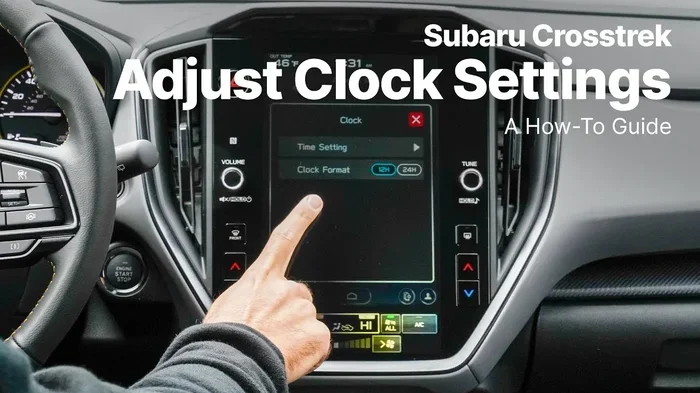
Changing the time on your Subaru Crosstrek is simple once you know the steps. This guide walks you through the You Tube Crosstrek Time Change process for every model year. You will learn manual methods, infotainment tricks, and common fixes for clock issues.
Have you ever jumped into your Subaru Crosstrek and noticed the clock is wrong? Maybe you just moved to a new time zone or the battery died over winter. Whatever the reason, getting the time right on your dashboard matters more than you think. A correct clock keeps your navigation accurate and your daily routine on track.
The good news is that a You Tube Crosstrek Time Change is something almost anyone can do at home. You do not need a dealership visit or a pricey mechanic. With a few simple steps, your Crosstrek clock will be spot-on again. This guide breaks everything down in plain language so you can get it done fast.
We will cover every method for changing the time on different model years. You will also find tips for fixing common clock problems and answers to the questions people ask most. Whether you own a 2018 model or a brand-new 2024 Crosstrek, this guide has you covered.
Key Takeaways
- Multiple Methods: You can change the Crosstrek clock through the infotainment screen or the steering wheel controls.
- Model Year Matters: The process varies slightly depending on your Subaru Crosstrek model year and trim level.
- YouTube Help Available: Visual step-by-step guides on YouTube make the You Tube Crosstrek Time Change process even easier to follow.
- Common Issues Fixed: We cover why the clock may reset after a battery change and how to solve it.
- 24-Hour Format Option: You can switch between 12-hour and 24-hour time display on most Crosstrek models.
- Quick Adjustment: The entire process takes less than five minutes once you find the right menu.
📑 Table of Contents
- Why Getting the Time Right on Your Crosstrek Matters
- How to Change the Time on Your Subaru Crosstrek
- Switching Between 12-Hour and 24-Hour Format
- Common Clock Problems and How to Fix Them
- Using YouTube to Learn Your Crosstrek Time Change
- Comfort Tips While Adjusting Your Crosstrek Settings
- Key Takeaways
Why Getting the Time Right on Your Crosstrek Matters
Some people think the dashboard clock is just a small detail. But it actually plays a bigger role than most drivers realize. Your clock syncs with navigation prompts, trip logs, and even some safety features. When the time is off, these systems may not work as well as they should.
Here are a few reasons why keeping your Subaru Crosstrek clock accurate is important:
- Navigation Timing: Your GPS uses the current time to calculate arrival estimates. A wrong clock means wrong arrival times.
- Trip Logging: The Crosstrek tracks driving hours and distances. Accurate time helps you review your trip data correctly.
- Bluetooth Phone Sync: Some phone pairing features use time stamps for call logs and messages.
- Daily Routine: A quick glance at the dashboard clock helps you stay on schedule during your morning commute.
When you search for a You Tube Crosstrek Time Change tutorial, you will see just how straightforward the process is. Most videos walk you through it in under three minutes. You can follow along right from your driver seat.
How to Change the Time on Your Subaru Crosstrek
The exact steps depend on your model year and the type of infotainment system your Crosstrek has. Subaru has used a few different setups over the years. Below we break down the most common methods so you can find the one that matches your vehicle.
Method 1: Using the Infotainment Screen
This is the most common way to adjust the clock on newer Crosstrek models. Here is how you do it step by step:
- Start your engine and let the infotainment system fully boot up.
- Press the Settings button on the main display. It usually looks like a gear icon.
- Scroll down and tap on System Settings or General Settings.
- Look for the Clock or Time and Date option.
- Tap on the time display to enter adjustment mode.
- Use the up and down arrows to set the correct hour.
- Switch to the minutes setting and adjust as needed.
- Select AM or PM if your display uses a 12-hour format.
- Press Enter or OK to save your changes.
This method works on most 2018 and newer Subaru Crosstrek models. If your screen looks different, do not worry. The general layout is very similar across recent years.
Method 2: Using the Steering Wheel Controls
Some Crosstrek owners prefer using the steering wheel buttons instead of the touchscreen. This method is fast and keeps your eyes on the road. Here is what to do:
- Press the Menu button on the left side of the steering wheel.
- Use the up and down arrow buttons to highlight the Clock option.
- Press the OK button in the center of the arrow controls.
- Use the left and right arrows to switch between hour and minute.
- Adjust each value using the up and down arrows.
- Press OK again to confirm and save the new time.
This steering wheel method is available on most model years. It is especially handy if you want to make a quick adjustment while stopped at a traffic light.
Method 3: The Manual Knob Approach (Older Models)
If you own an older Crosstrek, you might have a physical knob or button cluster near the clock display. These models often use a simple press-and-hold method:
- Locate the clock button on the center console or dashboard panel.
- Press and hold the button for about three seconds.
- The hour digits should start blinking, indicating you are in adjustment mode.
- Press the button again to toggle between hour and minute.
- Release the button once the correct time is displayed.
Older models may not have the full infotainment menu system. The manual knob method is the go-to solution for these vehicles. If you are unsure which method applies to your car, checking your owner manual is always a smart move.
Switching Between 12-Hour and 24-Hour Format
Some drivers prefer the 24-hour clock format, especially if they travel internationally or simply like the cleaner look. The good news is that most Subaru Crosstrek models let you switch between formats easily.
To change the time format, follow these steps:
- Go to the Settings menu on your infotainment screen.
- Find the Clock Settings or Time and Date option.
- Look for a toggle labeled 12-Hour Format or 24-Hour Format.
- Switch it to your preferred format.
- Exit the menu and confirm the display updates correctly.
Keep in mind that switching formats may reset your AM/PM selection. Double-check that the time still looks correct after you make the switch. A quick search for a You Tube Crosstrek Time Change video can show you this process visually if you get stuck.
Common Clock Problems and How to Fix Them
Sometimes the clock on your Crosstrek will not behave the way you expect. These issues are more common than you might think, and most of them have simple fixes.
Clock Resets After a Battery Change
If you have ever replaced your car battery, you probably noticed the clock went back to 12:00. This happens because the battery reset cleared the stored time settings. It is completely normal and very easy to fix. Simply follow the steps above to set the correct time again.
Pro tip: Write down your clock settings before a battery change if you want to save a few minutes. Some drivers also keep a sticky note on the inside of the glove box with their preferred time format.
Clock Won’t Respond to Button Presses
If the clock menu is unresponsive, try restarting the infotainment system first. Turn off the engine, wait about 30 seconds, and then restart the car. This soft reset often clears temporary glitches. If the problem persists, you may need to hold the power button on the infotainment unit for 10 seconds to force a full reboot.
Time Zone Shows Incorrect After GPS Update
Sometimes a GPS or map update can change your time zone setting. This is especially common if you moved to a different state or region recently. Check your System Settings for a Time Zone option and adjust it to match your current location. Your clock should update automatically once the correct time zone is selected.
Using YouTube to Learn Your Crosstrek Time Change
Visual learners will love how helpful YouTube tutorials are for this task. A simple search for You Tube Crosstrek Time Change brings up dozens of videos made by real Subaru owners. These creators walk you through each step on camera, so you can follow along with your own vehicle in real time.
Here are a few tips for finding the best YouTube guide:
- Check the upload date: Pick videos from the last two years to make sure the steps match your model year.
- Look for your specific trim: Some videos focus on the Base trim while others cover the Sport or Touring trim.
- Watch the comments: Other viewers often share tips or corrections in the comment section.
- Pause and replay: Do not rush. Pause the video whenever you need to match a step on your own screen.
Many Subaru owners find that watching a video is faster than reading a manual. You can play the video in your driveway before heading out for the day. The whole process usually takes less time than the video itself.
Comfort Tips While Adjusting Your Crosstrek Settings
While adjusting your clock and other settings, it helps to be comfortable in your driver seat. A good seating position makes it easier to reach the steering wheel controls and see the infotainment screen clearly. You might want to adjust your seat before diving into the settings menu.
Some drivers like to keep a small cushion or seat cover for extra comfort during long drives. If you are thinking about upgrading your seat comfort, you might even explore options like an ergonomic chair with HSA for your home office to complement your driving comfort. Your posture matters both on the road and at your desk.
Also, it is worth noting that the seat dimensions in the Crosstrek are compact compared to full-size SUVs. If you are measuring seat space or considering seat accessories, knowing how to measure a chair properly can help you find the right fit for any seat-related upgrade you are considering.
Taking care of your seat upholstery is another great way to keep your Crosstrek interior looking fresh. Over time, seat fabric can wear or stain. If you ever need to refresh the look, learning how to reupholster a chair seat gives you the skills to tackle fabric repairs yourself. The same care principles apply to your car seats too.
And one more thing about comfort during long drives. Some people tend to nap during road trips. It is worth knowing that sleeping on a chair for extended periods can affect your posture and spine health. The same applies to resting in a car seat for too long during a cross-country drive. Take breaks and stretch regularly.
Key Takeaways
Changing the time on your Subaru Crosstrek does not have to be complicated. Whether you use the touchscreen, steering wheel controls, or a manual knob, the process is quick and straightforward. A You Tube Crosstrek Time Change video can make it even easier if you prefer visual guidance.
Remember these key points:
- The infotainment screen method works on most modern Crosstrek models.
- Steering wheel controls offer a fast alternative for older or newer models alike.
- You can switch between 12-hour and 24-hour formats in the clock settings.
- Common clock issues like resets after a battery change are easy to fix.
- YouTube tutorials provide excellent step-by-step visual guidance for any model year.
Once you have changed your clock a couple of times, it becomes second nature. You will be able to do it in under two minutes without even thinking about it. Keep this guide bookmarked for future reference, and share it with fellow Crosstrek owners who might need a hand.
Your dashboard clock keeps you on time for every appointment, meeting, and road trip. Take a few minutes today to make sure it is set correctly. Your future self will thank you every time you glance at the dash and see the right time staring back at you.
Frequently Asked Questions
How do I change the clock on my Subaru Crosstrek?
You can change the clock through your infotainment screen by going to Settings, then System Settings, and selecting Clock. Use the on-screen arrows to adjust the hour and minutes, then press OK to save. You can also use the steering wheel controls for a quicker method.
Why does the clock on my Crosstrek reset after a battery change?
This happens because replacing the battery clears the stored memory settings, including the clock. It is completely normal and easy to fix. Simply set the correct time again using the methods described in your owner manual or this guide.
Can I switch my Crosstrek clock to 24-hour format?
Yes, most Subaru Crosstrek models allow you to switch between 12-hour and 24-hour formats. Go to the Clock Settings menu in your infotainment system and toggle the format option. The display will update immediately.
Is there a YouTube video that shows how to change the Crosstrek clock?
Absolutely. Searching for a You Tube Crosstrek Time Change tutorial brings up many helpful videos from Subaru owners. These visual guides walk you through each step on camera, making it easy to follow along with your own vehicle.
What should I do if the clock menu is unresponsive?
Try restarting the infotainment system first. Turn off the engine, wait 30 seconds, and restart the car. If that does not work, hold the power button on the infotainment unit for 10 seconds to force a full reboot. This usually resolves temporary glitches.
Does the Crosstrek clock sync with GPS time automatically?
Some newer Crosstrek models with connected services can sync the clock automatically through GPS. However, older models may require manual adjustment. Check your System Settings for a Time Zone or Auto-Sync option to see if your vehicle supports this feature.
=== CONCLUSION ===
A You Tube Crosstrek Time Change is one of those simple tasks that every Subaru owner should know how to do. It saves time, reduces frustration, and keeps your vehicle systems running smoothly. Whether you prefer the touchscreen, steering wheel buttons, or a quick YouTube walkthrough, the process is easier than most people think.
Keep this guide handy for the next time your clock goes wrong. With just a few button presses, you will have the correct time back on your dashboard in no time. Share this article with other Crosstrek owners in your life and help them get their clocks set right too.

Similar Posts