Resetting Maintenance Trip Meters: Flushing Oil Change Warning Indicators Post-service Completion.
Recipe Developer & Kitchen Guide Writer at Choose Vacuum · Certified Home Economist, ServSafe Food Handler · 8+ years developing home recipes and testing everyday kitchen techniques
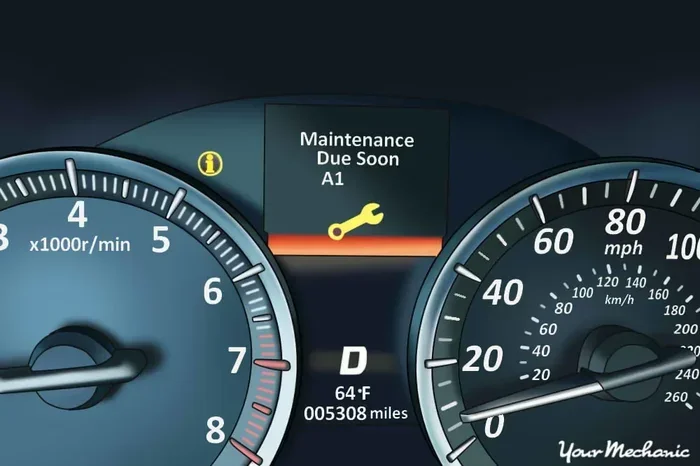
Resetting maintenance trip meters is a simple but essential step after every oil change. Flushing oil change warning indicators keeps your dashboard clean and your service records accurate. This guide walks you through the exact process for most car models so you can handle it yourself in minutes.
Key Takeaways
- Know your system: Different cars use different methods to track oil changes and maintenance intervals.
- Reset after every service: Flushing the indicator right after an oil change prevents false warnings.
- Check your owner manual: Each vehicle brand has slightly different reset steps.
- Trip meters track distance: The trip meter measures kilometers or miles since the last reset, helping you stay on schedule.
- No special tools needed: Most resets take just a few button presses on the dashboard or steering wheel controls.
- Avoid common mistakes: Skipping the reset or resetting too early can throw off your maintenance schedule.
📑 Table of Contents
- Why Resetting Maintenance Trip Meters Matters
- How to Reset Your Maintenance Trip Meter
- Common Oil Change Warning Indicators
- Why Flushing Oil Change Warnings After Service Is Important
- Quick Tips for a Smooth Reset
- Common Mistakes to Avoid
- Expert Insights on Maintenance Tracking
- Final Thoughts on Flushing Oil Change Indicators
Why Resetting Maintenance Trip Meters Matters
Your car talks to you. It uses lights, symbols, and messages on the dashboard to tell you when something needs attention. One of the most important alerts is the oil change warning. When that light comes on, it means your vehicle is due for an oil change.
But here is the thing most people miss. After you get the oil changed, the warning light does not turn off by itself. You have to reset the maintenance trip meter manually. If you skip this step, the light stays on and nags you every time you start the car. It is annoying and confusing.
Resetting the trip meter also keeps your service records accurate. You want to know exactly when your last oil change happened. This matters for resale value, warranty claims, and keeping your engine healthy. Let us walk through everything you need to know about flushing oil change warning indicators after service completion.
What Is a Maintenance Trip Meter?
A trip meter is a small odometer on your dashboard. It tracks the distance your car has traveled since you last set it to zero. Many vehicles use this reading to figure out when you are due for an oil change or other routine service.
The trip meter is different from your main odometer. The main odometer counts the total miles or kilometers your car has ever driven. The trip meter starts fresh each time you reset it. This makes it perfect for tracking service intervals and oil change cycles.
Some cars call this the “oil life system.” Others use a simple mileage counter. Either way, the idea is the same. The car monitors how far you have driven and tells you when it is time for an oil change. After the service, you reset the counter so it can start tracking the next interval.
How to Reset Your Maintenance Trip Meter
Every vehicle is a little different. But the basic process is similar across most makes and models. Here is a general guide that works for the majority of cars on the road today.
Step-by-Step Reset Process
Follow these steps to reset your maintenance trip meter after an oil change:
- Turn the ignition to the “on” position. Do not start the engine. Just turn the key or press the start button so the dashboard lights up.
- Locate the trip meter button. This is usually on the steering wheel or the dashboard panel near the speedometer. Some cars use a scroll wheel on the left side of the instrument cluster.
- Press and hold the button. Hold it for about 5 to 10 seconds. You should see the trip reading start to flash.
- Release the button. Then press it again quickly. The reading should reset to zero.
- Turn the ignition off and then back on. Check that the warning light has disappeared from the dashboard.
If the light is still on, try the process again. Some vehicles require you to hold the button for a longer time. Others need you to use the steering wheel controls to scroll to a “service reset” menu. Always refer to your vehicle manual for the exact steps.
Resetting by Vehicle Brand
Different car brands use different methods. Here is a quick look at how some popular brands handle the trip meter reset:
- Toyota: Turn the ignition on. Press and hold the trip meter reset button until the maintenance light flashes. Release and press again to confirm.
- Honda: Turn the key to position two. Scroll through the dashboard display using the steering wheel controls. Select “reset” for the oil life indicator.
- Ford: Use the steering wheel controls to navigate to the vehicle information menu. Find the “maintenance required” option and select reset.
- Chevrolet: Press and hold the trip meter reset stalk on the steering column until the light clears.
These steps are general guides. Always double-check with your specific model. If you are unsure, a quick search online for your car model plus “reset maintenance light” will give you the exact steps.
Common Oil Change Warning Indicators
Cars use different symbols and messages to tell you it is time for an oil change. Knowing what each one means helps you respond quickly.
The Oil Change Reminder Light
This is the most common warning. It usually looks like an oil can with a drop coming out of it. When this light comes on steady, it means your oil life system has determined that the oil needs to be replaced.
The system does not measure oil quality directly. Instead, it tracks your driving habits, engine temperature, and distance driven. Based on this data, it estimates when the oil is no longer effective. This is called the “maintenance interval” system.
The Maintenance Required Light
Some cars use a simple “maintenance required” message. This light is less urgent than the oil change light but still needs attention. It often comes on based on mileage alone. For example, it might trigger every 5,000 miles or 7,500 miles depending on your vehicle settings.
The Oil Pressure Warning Light
Do not confuse the oil change reminder with the oil pressure warning. The oil pressure light is usually red and looks like an oil can with a wavy line underneath. This is a serious warning. It means your oil pressure is too low right now. Stop driving immediately if you see this light. Check your oil level and get help if needed.
| Warning Type | Color | Urgency | What It Means |
|---|---|---|---|
| Oil Change Reminder | Yellow or Orange | Low | Oil change is due soon |
| Maintenance Required | Yellow or Orange | Low | Routine service is due |
| Oil Pressure Warning | Red | Critical | Low oil pressure — stop driving |
Why Flushing Oil Change Warnings After Service Is Important
After your mechanic finishes the oil change, the first thing you should do is flush the warning indicator. This is not just about turning off an annoying light. There are real reasons why this step matters.
First, a persistent warning light can mask other real problems. If the oil change light stays on, you might ignore a different warning that comes on later. You do not want to miss something important because you are used to seeing a light that should not be there.
Second, resetting the maintenance trip meter helps you track your service history. When the next oil change comes due, the light will come on at the right time. This keeps your car running smoothly and helps you avoid engine damage from old oil.
Third, if you ever sell your car, a clean dashboard with properly tracked service intervals makes a great impression. Buyers trust a vehicle that has clear, up-to-date maintenance records.
What Happens If You Do Not Reset?
If you skip the reset, the warning light stays on. This can cause several problems:
- Constant distraction: The light bothers you every time you drive.
- Confusion: You may forget when the last oil change was.
- Missed service: The next time the light comes on, you might ignore it because you think you just had the oil changed.
- Warranty issues: Some warranties require proof of regular oil changes. A reset record helps with this.
Quick Tips for a Smooth Reset
Here are some practical tips to make the trip meter reset process easy and error-free:
- Reset right after the oil change. Do it before you drive away from the shop or garage.
- Have your owner manual handy. Keep it in the glove box for quick reference.
- Note the date and mileage. Write down when you reset the meter so you remember when the next service is due.
- Use the correct button sequence. Pressing the wrong button can sometimes reset other settings. Follow the steps carefully.
- Check for multiple indicators. Some cars have separate lights for oil change, tire rotation, and other services. Make sure you reset all of them if needed.
- Do not reset while driving. Always do this with the car stationary and the ignition on.
These simple habits save time and prevent frustration. Once you do it a couple of times, the process becomes second nature.
Common Mistakes to Avoid
Even with the best intentions, people make mistakes when resetting maintenance trip meters. Here are the most common ones and how to avoid them:
Resetting Too Early
Some people reset the light before the oil change is actually done. This clears the warning but does not change the oil. The engine still runs on old, dirty oil. Always complete the oil change first, then reset the indicator.
Forgetting to Check the Oil Level
Resetting the trip meter is not the same as checking the oil level. After an oil change, always use the dipstick or electronic gauge to confirm the oil is at the right level. A low oil level can still cause engine damage even if the warning light is off.
Using the Wrong Reset Method
Not all cars use the same reset process. Do not guess. If you are not sure, look up the specific steps for your vehicle online or ask your mechanic to show you.
Ignoring Other Maintenance Lights
Some vehicles track multiple service items. Tire rotation, brake inspection, and fluid checks all have their own indicators. Resetting the oil change light does not reset these others. Check the full dashboard and address each one.
Expert Insights on Maintenance Tracking
Automotive experts agree that regular oil changes are the single most important thing you can do for your engine. Clean oil reduces friction, prevents overheating, and removes contaminants. But the benefits only work if you stay on top of the schedule.
Modern cars with oil life monitoring systems are smart. They adjust the oil change interval based on how you drive. If you drive in stop-and-go traffic or extreme temperatures, the system may recommend an earlier change. This is more accurate than the old rule of changing oil every 3,000 miles regardless of driving conditions.
However, these systems still need human input. You must reset the maintenance trip meter after each service. Think of it as a partnership between you and your car. The car monitors and alerts. You respond and maintain.
If your car has a digital dashboard with a full menu, take a few minutes to explore the maintenance settings. Learn where the trip meter is and how to reset it. This knowledge will serve you well over the life of your vehicle. Many drivers find that understanding their dashboard controls gives them more confidence and independence when it comes to basic car care.
Also, keep in mind that some newer vehicles automatically reset the maintenance light after a certain number of ignition cycles. But do not count on this. Always confirm the light is off after you complete the reset yourself. It takes just a few seconds and gives you peace of mind.
Final Thoughts on Flushing Oil Change Indicators
Resetting maintenance trip meters is a small task with big benefits. It keeps your dashboard clear, your service records accurate, and your engine running well. After every oil change, take the extra two minutes to flush the warning indicator and reset the trip meter.
Do not let a simple step become a habit you skip. The few seconds it takes to reset the light can save you from confusion, missed services, and potential engine problems down the road. Your car works hard for you. A little attention to maintenance tracking goes a long way.
Now that you know the process, you are ready to handle it yourself. The next time you get an oil change, step out of the shop, complete the reset, and drive away with confidence. Your car and your wallet will thank you.
Remember, if you ever feel unsure about any dashboard light or indicator, consult your vehicle manual or reach out to a trusted mechanic. Staying informed is the best way to keep your car in top shape for years to come.
Frequently Asked Questions
How do I know if my trip meter needs to be reset?
Your trip meter needs a reset when the oil change or maintenance warning light stays on after you have completed the service. If the light is still visible on your dashboard after an oil change, the trip meter has not been reset yet. Check your mileage and service records to confirm.
Can I reset the maintenance light myself?
Yes, most vehicles allow you to reset the maintenance light yourself. The process usually involves a few button presses on the dashboard or steering wheel controls. Refer to your owner manual for the exact steps for your specific car model.
What happens if I never reset the trip meter?
If you never reset the trip meter, the warning light will stay on continuously. This can be distracting and may cause you to ignore other important dashboard alerts. It also makes it harder to track when your next oil change is due.
Do all cars use the same reset method?
No, different car brands and models use different reset methods. Toyota, Honda, Ford, and Chevrolet all have their own procedures. Always check your vehicle manual or look up the specific steps for your car online before attempting a reset.
Is it safe to drive with the oil change light on after service?
It is safe to drive, but the light will continue to remind you that the reset was not completed. The oil itself is fresh and fine. However, it is best to reset the indicator as soon as possible after the oil change to keep your dashboard clear and your records accurate.
How often should I check and reset my maintenance trip meter?
You should check and reset the trip meter every time you get an oil change or routine service. This is typically every 5,000 to 7,500 miles for most vehicles, but check your owner manual for the recommended service interval for your specific car.
=== CONCLUSION ===
Resetting maintenance trip meters is one of those small car care tasks that makes a big difference. It takes just a few minutes and keeps your dashboard accurate and your service schedule on track. After every oil change, make it a habit to flush the oil change warning indicators and reset the trip meter to zero.
Understanding your maintenance trip meter gives you more control over your vehicle’s health. You stay informed, you stay proactive, and you avoid the confusion of lingering dashboard lights. Keep this guide handy for your next service, and you will never have to wonder how to clear that annoying warning light again.
Take a moment right now to locate the trip meter reset button in your vehicle. Practice the steps while the car is parked. This way, when your next oil change is complete, you will know exactly what to do. A little preparation today saves time and hassle tomorrow.

Similar Posts