Touch Screen on Toyota Stopped Working After a Valet
Recipe Developer & Kitchen Guide Writer at Choose Vacuum · Certified Home Economist, ServSafe Food Handler · 8+ years developing home recipes and testing everyday kitchen techniques
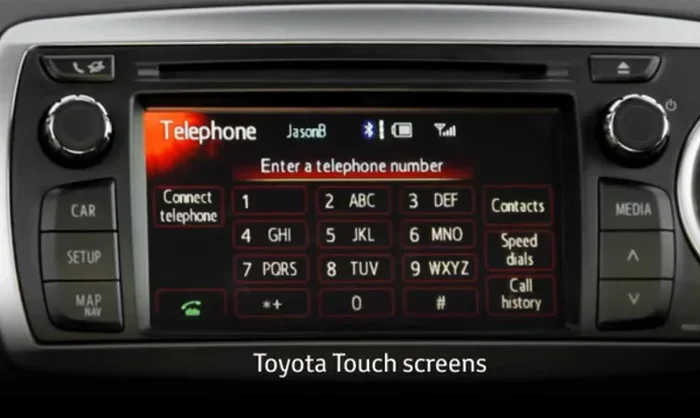
A Toyota touch screen that stops working after valet parking is a frustrating but common issue. The problem often stems from a system glitch, a tripped fuse, or accidentally activated settings. Most Toyota touch screen problems after valet can be resolved with a simple reset or reboot. Understanding what triggers the malfunction helps you prevent it in the future and save money on unnecessary repairs.
You hand your Toyota keys to a valet at a restaurant. You come back, get in, and tap the screen. Nothing happens. Your Toyota touch screen is completely dead. This is a frustrating experience, but you are not alone. Many Toyota owners face this exact problem after valet parking. The good news is that it is usually fixable without a trip to the dealer.
The Toyota infotainment system is a complex piece of technology. It handles navigation, audio, climate control, and phone connections. When it suddenly stops responding, it can feel like your whole dashboard has gone blind. But most of the time, the cause is simple. A software glitch, a tripped fuse, or an accidentally activated setting is usually behind the problem. Let us walk through exactly what causes this and how you can fix it yourself.
Key Takeaways
- System Glitch: A software freeze is the most common reason a Toyota touch screen stops working after valet parking.
- Simple Reset: A hard reset or reboot often fixes the issue in minutes without professional help.
- Fuse Problems: A tripped fuse related to the infotainment system can cause a complete screen blackout.
- Valet Mode: Some Toyota models have a valet mode that restricts or disables certain features, including the touch screen.
- Preventable: Simple steps before handing over your keys can protect your Toyota screen from future issues.
- Professional Help: If basic fixes don’t work, a certified Toyota technician can diagnose deeper electrical problems.
📑 Table of Contents
Why Your Toyota Touch Screen Stops Working After Valet
When you hand your car keys to a valet, you are giving someone else control of your vehicle. Even if you trust them, things can go wrong with your electronics. The Toyota touch screen may stop working for several reasons. Understanding these causes is the first step toward a solution.
Valet attendants are not trained Toyota technicians. They do not know about your specific system settings. They might press the wrong button, pull a wrong fuse, or simply jostle a wire while moving your car. The result is a frozen Toyota display or a completely black screen.
Software Freezes and System Glitches
The most common reason for a dead touch screen is a simple software freeze. The Toyota infotainment system runs on a computer processor. Like any computer, it can crash or freeze unexpectedly. This happens more often when the system is interrupted while updating or processing a command.
A valet might have pressed the power button, tried to change the radio station, or bumped the screen while parking. Any of these actions can cause a system glitch that locks up the display. The screen goes black or becomes unresponsive to any touch input.
Think of it like your phone freezing. You know that feeling when you tap the screen and nothing happens? Your Toyota screen works the same way. A simple restart usually fixes it right up.
Tripped Fuses and Electrical Issues
Your Toyota has a fuse box that protects different electrical systems. The infotainment system has its own dedicated fuse. If that fuse blows, your touch screen will go completely dark.
Valets sometimes move your car in a hurry. A sudden jolt or bump can cause a minor electrical disturbance. In rare cases, this can trip the fuse that powers your Toyota display screen. This is less common than a software freeze, but it does happen.
You can check your fuse box yourself. Look for the fuse labeled “Audio” or “Infotainment.” If the metal strip inside is broken, that is your problem. Replacing a fuse is cheap and easy. Just make sure you use the correct amp rating.
Valet Mode or Restricted Settings
Some Toyota models have a valet mode or a restricted user profile. When activated, this mode limits certain functions. It might disable the touch screen or lock out navigation and media features.
A valet might accidentally activate this mode while adjusting something in your car. Or the previous driver might have left it on without telling you. Either way, your Toyota touchscreen reset might need to be done in a specific way to exit this restricted mode.
Check your owner manual for instructions on how to exit valet mode. It is usually a simple button combination or a quick settings toggle.
How to Reset Your Toyota Touch Screen
Before you panic or call a mechanic, try a reset first. Most Toyota touch screen problems after valet are solved with a simple reboot. Here are the methods that work best.
Method 1: The Soft Reset
A soft reset is the gentlest way to restart your system. It does not erase any of your settings or saved data.
- Press and hold the power button on the screen for 10 to 15 seconds.
- Wait for the screen to go completely dark.
- Wait another 30 seconds.
- Press the power button again to turn it back on.
This works about 70% of the time. The system refreshes itself and clears any temporary glitches. If your screen was just frozen, this should bring it right back to life.
Method 2: The Hard Reset
If the soft reset does not work, try a hard reset. This is like pulling the plug on a computer. It forces the system to shut down completely and restart fresh.
- Turn off your Toyota ignition and remove the key.
- Open the fuse box and locate the infotainment fuse.
- Pull the fuse out and wait 2 to 3 minutes.
- Push the fuse back in firmly.
- Start your car and wait for the system to boot up.
A hard reset takes a few more minutes but is very effective. Your system will restart as if it was brand new. All your settings should still be saved.
Method 3: The Battery Disconnect
For stubborn cases, you can disconnect the car battery for a few minutes. This drains any residual power from the system and forces a full reset.
Just remember to have your radio code ready. Some Toyotas require a code after a battery disconnect. And make sure you know how to reset your clock and radio presets afterward.
When to Seek Professional Help
Most touch screen issues resolve with a reset. But some problems need a professional touch. If you have tried all the reset methods and your Toyota display screen is still black, it is time to see a Toyota technician.
Here are signs that the problem is more than a simple glitch:
- The screen stays black even after a full battery disconnect.
- You hear the audio playing but cannot see the display.
- The screen flickers or shows lines and distortion.
- The touch screen works in some areas but not others.
- Other electronic features in your car are also malfunctioning.
These symptoms suggest a deeper electrical or hardware problem. A certified Toyota technician can run diagnostic tests and find the root cause. They have access to specialized tools that can read error codes from your infotainment system.
Do not ignore persistent screen problems. A small issue today can become a bigger, more expensive repair tomorrow. Early diagnosis saves money and keeps your Toyota running smoothly.
Preventing Touch Screen Problems After Valet Parking
The best fix is prevention. You cannot control what a valet does with your car, but you can take steps to protect your electronics. A few simple precautions can save you from a dead Toyota touch screen on your next outing.
Before You Hand Over the Keys
- Write down or memorize your radio and Bluetooth codes.
- Turn off the touch screen manually before leaving the car.
- Set the system to the simplest mode available.
- Remove any accessories or devices plugged into the screen.
- Lock the center console if your car has that feature.
After You Get Your Car Back
- Test the touch screen immediately before driving away.
- Check that navigation, audio, and Bluetooth are all working.
- Look for any unfamiliar settings or changed preferences.
- Reboot the system as a precaution if anything seems off.
A quick check takes only 30 seconds. It can save you from a surprise malfunction on the highway. Think of it as a quick inspection, just like checking your mirrors before you drive.
Consider a Steering Wheel Lock
If you frequently use valet services, consider investing in a steering wheel lock. This physical deterrent makes it harder for anyone to drive your car without your permission. It also protects your electronics from unauthorized access. Many Toyota owners find that this simple device gives them peace of mind every time they hand over their keys.
Common Mistakes People Make With a Dead Touch Screen
When your Toyota screen not working after valet, it is easy to make mistakes out of frustration. Here are some common errors to avoid.
Panicking and Assuming the Worst
The screen is black. Your mind jumps to expensive repairs. But in most cases, it is just a frozen system. Take a deep breath and try a reset before you worry about the worst-case scenario.
Trying to Force the Screen to Respond
Do not press hard on the screen or hit the dashboard. You could damage the delicate touch sensors. Gentle, standard resets are always the better approach. If the screen is unresponsive, it is not going to respond to force.
Ignoring the Problem
Some people just leave the screen off and keep driving without it. This works short term but ignores a potential underlying issue. A fuse that tripped once can trip again. A software glitch that happens once can become a recurring problem. Address it now while it is simple.
Taking Your Car to an Expensive Repair Shop First
Many people rush to the dealer or an expensive electronics shop. They pay big money for a diagnosis that a simple reset would have fixed. Always try the basic fixes first. You will save time and money.
Understanding Your Toyota Infotainment System
Your Toyota touch screen is part of a larger infotainment system. This system connects your audio, navigation, phone, and climate controls into one interface. Knowing how it works helps you troubleshoot better.
The system runs on a dedicated processor with its own memory and storage. It connects to your car’s network through a CAN bus or similar data network. When something disrupts this connection, the screen can go dark or become unresponsive.
Toyota has improved their infotainment systems over the years. Newer models have more robust processors and better error recovery. But even the latest systems can experience glitches after an unexpected interruption like valet parking.
Regular software updates from Toyota can help prevent these issues. Keep your system updated whenever a new firmware is available. This ensures your Toyota multimedia system runs smoothly and handles interruptions better.
For more information about Toyota car features and how to maintain your vehicle, you might find this article on what a valet chair is helpful for understanding valet-related terminology and services.
Key Takeaways
- Software Glitch Is Most Common: A simple system freeze is the top reason a Toyota touch screen stops working after valet parking.
- Reset Before You Repair: A soft reset or hard reset solves most touch screen problems in minutes.
- Check the Fuse: A tripped infotainment fuse can cause a completely black screen and is easy to replace.
- Valet Mode Matters: Some Toyotas have restricted modes that disable the touch screen accidentally.
- Prevention Works: Simple steps before valet parking can protect your screen from future issues.
- Know When to Call a Pro: Persistent problems need a certified Toyota technician for proper diagnosis.
Frequently Asked Questions
Why did my Toyota touch screen go black after I used a valet?
The most common reason is a software glitch or system freeze caused by an interruption while the valet was handling your car. The infotainment system may have been processing a command when the screen was bumped or the power was briefly interrupted. A simple reset usually fixes this quickly and gets your display working again.
How do I reset my Toyota touch screen after valet parking?
Start with a soft reset by holding the power button for 10 to 15 seconds until the screen goes dark. Wait 30 seconds and press the power button again. If that does not work, try a hard reset by pulling the infotainment fuse for a few minutes. Most Toyota touch screen issues resolve with one of these two methods.
Can a valet damage my Toyota infotainment system?
It is rare but possible. A valet could accidentally trip a fuse, press the wrong combination of buttons, or activate a restricted mode like valet mode. Physical damage to the screen itself is uncommon unless the car was handled roughly. Most issues are software-related and easily fixed with a reset.
Is it safe to disconnect my Toyota battery to reset the touch screen?
Yes, it is safe and is a common troubleshooting step. Disconnecting the battery for 2 to 3 minutes drains residual power and forces a full system reboot. Just make sure you have your radio code handy and be aware that you may need to reset your clock and some preferences after reconnecting the battery.
How can I prevent my Toyota touch screen from malfunctioning after valet parking?
Turn off the touch screen manually before handing over your keys, remove any plugged-in devices, and write down your radio and Bluetooth codes. After getting your car back, immediately test the screen and reboot it as a precaution. These simple steps take less than a minute and can save you from unexpected screen problems.
When should I take my Toyota to a dealer for a touch screen issue?
If you have tried both soft and hard resets without success, and the screen remains black or unresponsive, it is time to see a Toyota technician. Also seek professional help if you notice flickering, lines on the display, or if other electronic systems in your car are also malfunctioning. These signs point to a deeper electrical issue that needs expert diagnosis.
=== CONCLUSION ===
A Toyota touch screen stopped working after a valet is a frustrating but usually fixable problem. The most common causes are software glitches, tripped fuses, or accidentally activated valet modes. A simple reset, either soft or hard, solves the majority of these issues in just a few minutes.
Understanding your Toyota infotainment system helps you troubleshoot with confidence. You do not need to be a mechanic to handle these common problems. With the right knowledge, you can save time and money while keeping your car’s technology running smoothly.
Take preventive steps before every valet experience. Protect your settings, write down your codes, and test your screen immediately after getting your car back. These small habits make a big difference. Your Toyota touch screen is a valuable feature. Treat it well and it will serve you reliably for years to come.

Similar Posts