Not a Tesla App
Recipe Developer & Kitchen Guide Writer at Choose Vacuum · Certified Home Economist, ServSafe Food Handler · 8+ years developing home recipes and testing everyday kitchen techniques
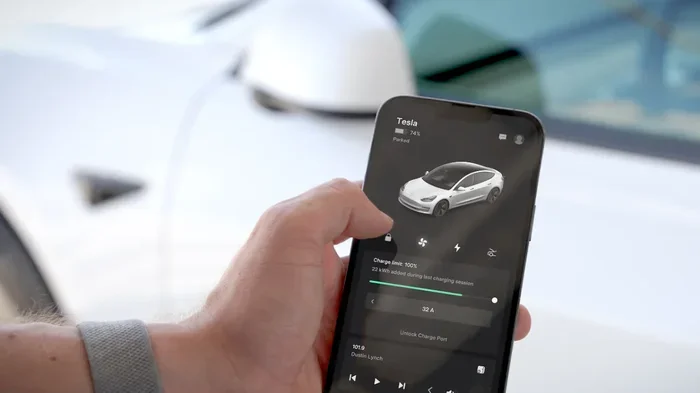
Not a Tesla app refers to any app that pretends to be the official Tesla mobile app but isn’t. Fake Tesla apps can steal your login details, damage your vehicle settings, and put your personal data at risk. This guide shows you exactly how to tell the real Tesla app from a fake one, what steps to take if you’ve downloaded a scam app, and how to keep your Tesla account safe and secure.
This is a comprehensive guide about not a tesla app.
Key Takeaways
- Fake Tesla apps are a real threat: Scammers create clone apps that look almost identical to the official Tesla mobile app to steal your credentials.
- Always download from official sources: The real Tesla app is only available on the Apple App Store and Google Play Store through Tesla’s verified developer account.
- Check for verification signs: Look for the developer name, app reviews, download count, and official badges before trusting any app.
- Act fast if you downloaded a fake: Change your Tesla password immediately, enable two-factor authentication, and contact Tesla support.
- Regular app hygiene matters: Just like learning how to wash a chair keeps your furniture in good shape, regularly reviewing your apps keeps your digital life secure.
- Knowledge is your best defense: Understanding what not a Tesla app looks like helps you avoid scams before they cause any harm.
[FEATURED_IMAGE_PLACEHOLDER]
What Does “Not a Tesla App” Actually Mean?
You may have heard someone say “not a Tesla app” and wondered what it really means. Simply put, it refers to any application that pretends to be connected to Tesla but is not made or approved by Tesla Inc. These apps can be found lurking on app stores, websites, and even social media links. They look real. They feel real. But they are not real.
The official Tesla mobile app lets you control your vehicle, check charging status, pre-condition the cabin, and more. When an app claims to do these things but isn’t made by Tesla, it falls into the “not a Tesla app” category. Some are harmless knockoffs. Others are dangerous scams designed to steal your personal information.
Think of it this way. If you were picking out a great chaos Pfp for your online profile, you’d want something that truly represents you. The same care should go into choosing apps that connect to your Tesla account. You need to know what’s real and what’s not.
Understanding the difference between the real Tesla app and a fake one is the first step toward protecting yourself. Let’s dive into exactly what makes an app fake and how scammers operate.
How Fake Tesla Apps Trick You
The Anatomy of a Clone App
Scammers are clever. They study the official Tesla app and copy its look and feel. The icons are nearly identical. The color schemes match. The menu layout feels familiar. But underneath the surface, everything is different. These fake apps are designed to harvest your Tesla login credentials, payment details, and personal data.
Here is how a typical Tesla app scam works:
- You search for “Tesla app” in an app store or click a link online.
- A fake app appears with a name and logo that looks almost correct.
- You download the app and enter your Tesla account credentials.
- The fake app sends your login information to the scammer.
- The scammer now has access to your Tesla account and vehicle.
This process happens fast, and many people don’t realize they’ve been tricked until it’s too late. That is why knowing what not a Tesla app looks like matters so much.
Why Fake Apps Are Hard to Spot
The reason fake Tesla apps succeed is because they look incredibly convincing. Scam artists invest time in making their apps appear legitimate. They use similar app descriptions, fake reviews, and stolen images. Some even mimic the Tesla app’s user interface down to the smallest detail.
Here are common tactics used by scammers:
- Slightly altered app names: Adding a word like “Pro,” “Plus,” or “Official” to the name.
- Fake developer profiles: Using a name that sounds close to “Tesla Inc.”
- Stolen branding: Copying Tesla’s logo and color palette exactly.
- Too-good-to-be-true promises: Offering features the real Tesla app doesn’t have.
- Unofficial download links: Pushing downloads through websites instead of official stores.
Being aware of these tricks helps you stay one step ahead. The more you know about what not a Tesla app looks like, the safer your account will be.
How to Identify a Real Tesla App
Spotting the real Tesla app among dozens of fakes requires a sharp eye and a few simple checks. You don’t need to be a tech expert. Anyone can learn to verify whether an app is legitimate.
Think of this process like measuring a chair before you buy it. You check every detail to make sure it’s the right fit. The same precision applies here.
Check the Developer Name
The official Tesla app is developed and published by “Tesla Inc.” If the developer name is anything different, that is a major red flag. Fake apps often use names like “Tesla Apps Team,” “Tesla Mobile,” or “Tesla Official.” None of these are real.
Always tap on the developer name to see their other apps. Tesla Inc. only publishes a few official apps. If the developer has dozens of unrelated apps, be suspicious.
Verify the App Store Listing
Both Apple and Google have verification systems in place. The real Tesla app will have an official badge or verification mark. Look at the number of downloads, user reviews, and the app’s rating. The genuine Tesla app has millions of downloads and thousands of reviews. A fake app with only a few hundred downloads should raise your suspicion.
Compare the App Icon and Design
The Tesla app icon features a distinctive “T” logo with a specific shade of red and white. Fake apps often get the colors slightly wrong or use a lower-quality version of the logo. Zoom in on the icon. Check for pixelation or blurry edges. The real Tesla app looks crisp and polished.
Review the App Permissions
The real Tesla app requests permissions that make sense for a vehicle control app. These include location access, Bluetooth, and notifications. If an app labeled as a Tesla app asks for unusual permissions like access to your contacts or camera, that is a clear warning sign.
What to Do If You Downloaded a Fake App
If you suspect you’ve downloaded an app that is not a Tesla app, don’t panic. There are clear steps you can take right away to protect your account and your vehicle.
Step 1: Change Your Tesla Password Immediately
Go to your Tesla account settings and create a strong, new password. Use a mix of uppercase letters, lowercase letters, numbers, and special characters. Avoid using the same password you used before.
Step 2: Enable Two-Factor Authentication
Two-factor authentication adds an extra layer of security. Even if a scammer has your password, they still can’t access your account without the second verification step. Turn this on in your Tesla account settings right away.
Step 3: Remove the Fake App
Delete the fake app from your device completely. Don’t just ignore it. Make sure it’s removed from both your app drawer and any connected accounts.
Step 4: Contact Tesla Support
Reach out to Tesla’s official customer support team. Let them know what happened. They can help you secure your account, check for unauthorized access, and guide you through any additional safety steps.
Step 5: Monitor Your Account Activity
After securing your account, keep an eye on your Tesla account activity. Check your login history, vehicle settings, and any connected payment methods. If you notice anything unusual, report it to Tesla immediately.
Just like maintaining your car requires regular care, keeping your digital accounts safe requires the same attention. Think of it the same way you’d learn how to wash a chair to keep it in great shape – regular maintenance prevents bigger problems down the road.
Protecting Your Tesla Account from Fake Apps
Prevention is always better than cure. Taking a few proactive steps can save you from the headache of dealing with a fake Tesla app.
Only Download from Official Sources
Never download the Tesla app from a third-party website, email link, or social media post. Only use the Apple App Store or Google Play Store. Both platforms have security measures in place, though they are not perfect. Always double-check the developer name before tapping download.
Keep Your App Updated
Tesla regularly releases updates to its mobile app. These updates fix security vulnerabilities and improve functionality. Keeping your app updated ensures you have the latest protections in place.
Be Wary of Unsolicited Links
If you receive a text message or email claiming to be from Tesla and asking you to download an app, be very cautious. Tesla does not send unsolicited download links. When in doubt, go directly to the official app store and search for the Tesla app yourself.
Use a Password Manager
A password manager helps you create and store strong, unique passwords for every account. This means even if a fake app captures one of your passwords, it won’t work on other accounts. It is one of the simplest and most effective security tools available.
Educate Yourself and Others
Share what you’ve learned about fake Tesla apps with friends and family. The more people know about what not a Tesla app looks like, the harder it is for scammers to succeed. Knowledge is the best defense against any kind of online scam.
Common Signs of a Tesla App Scam
Here is a quick checklist to help you spot a fake Tesla app at a glance. If you notice any of these signs, do not download or use the app.
- The developer name is not “Tesla Inc.”
- The app has fewer than 1,000 downloads.
- The app description contains spelling or grammar errors.
- The app asks for unnecessary permissions like access to your contacts.
- The app promises features that the real Tesla app doesn’t offer.
- The download link comes from an email, text message, or social media post.
- The app icon looks blurry, pixelated, or slightly different from the official Tesla app.
- The user reviews seem generic or copied from other apps.
- The app asks for payment information just to “activate” features.
- The app’s rating is unusually high but the reviews are short and vague.
Print this list or save it to your phone. Having it handy makes it much easier to make quick, safe decisions when downloading any app related to your Tesla vehicle.
Final Thoughts
The world of mobile apps is full of both helpful tools and hidden dangers. When it comes to apps connected to your Tesla vehicle, being cautious is not paranoia. It is smart. Knowing what not a Tesla app means and how to spot one puts you in a much stronger position to protect your account and your vehicle.
Always verify the developer, check the app store listing, review permissions, and download only from official sources. If something feels off, trust your instincts. It is better to be safe than sorry.
Your Tesla is a significant investment. Treating its digital security with the same care you give its physical maintenance is the smartest thing you can do. Stay informed, stay vigilant, and enjoy a safe and seamless Tesla experience.
Frequently Asked Questions
How do I know if a Tesla app is real?
Check the developer name to confirm it says “Tesla Inc.” Verify that the app is available on the official Apple App Store or Google Play Store. Look at the download count, user reviews, and the app icon for any signs of low quality or inconsistency.
What happens if I enter my Tesla login into a fake app?
The scammer can gain access to your Tesla account, vehicle controls, and personal data. Change your password immediately, enable two-factor authentication, and contact Tesla support to secure your account.
Can a fake Tesla app damage my vehicle?
While a fake app cannot physically damage your vehicle, it can give a scammer remote access to your Tesla account. This could allow them to change settings, unlock doors, or access your stored payment information.
Are there any third-party Tesla apps that are safe?
Some third-party apps offer additional features, but they are not affiliated with Tesla. Always research any third-party app thoroughly, read reviews, and never share your Tesla login credentials with an unofficial app.
Why do fake Tesla apps exist?
Scammers create fake apps to steal personal data, login credentials, and payment information. Some fake apps also display aggressive ads or install malware on your device.
What should I do if I accidentally downloaded a fake Tesla app?
Delete the app immediately, change your Tesla password, enable two-factor authentication, and contact Tesla support. Monitor your account for any unauthorized activity in the days following the incident.

Similar Posts