Senior Pages in Yearbook Ideas to Make Them Stand Out
Recipe Developer & Kitchen Guide Writer at Choose Vacuum · Certified Home Economist, ServSafe Food Handler · 8+ years developing home recipes and testing everyday kitchen techniques
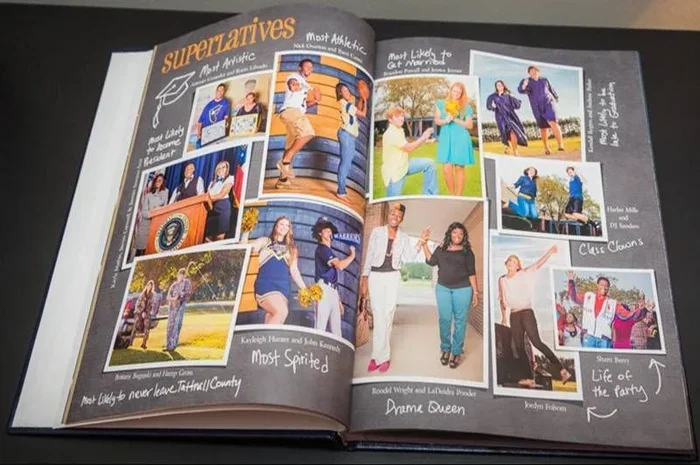
Senior pages in yearbook design are one of the most exciting parts of high school. Your senior spread is your moment to shine and showcase your personality, friendships, and memories. This guide shares creative yearbook ideas, layout tips, and practical advice to help your senior page stand out from the rest. Whether you prefer a classic look or something bold and unique, you will find inspiration here.
Senior year is one of the most memorable times in your life. And what better way to preserve those memories than through a stunning senior page in your yearbook? Your yearbook page is more than just a collection of photos. It is a snapshot of your personality, your friendships, and your journey through high school. Whether you are part of the yearbook committee or just picking out your senior spread, the choices you make matter. A great senior page can turn a simple book into a keepsake you will treasure forever.
Key Takeaways
- Your senior yearbook page reflects your personality: Choose themes and colors that represent who you are.
- Layout matters just as much as photos: A well-structured spread draws the eye and tells a story.
- Collaborate with your yearbook committee early: Planning ahead gives you more creative freedom and better results.
- Choose photos and captions carefully: They should capture real moments and genuine emotions.
- Avoid common mistakes: Overcrowding, poor photo quality, and generic themes can weaken your spread.
- Think beyond the standard layout: Unique ideas like timelines, collages, and themed spreads make your page memorable.
📑 Table of Contents
- Why Senior Yearbook Pages Matter
- Popular Senior Page Themes to Try
- Creative Layout Ideas for Senior Pages
- Tips for Choosing Photos and Captions
- How to Collaborate with Your Yearbook Committee
- Common Mistakes to Avoid on Senior Pages
- Quick Tips for a Winning Senior Yearbook Page
- Final Thoughts on Senior Yearbook Pages
Why Senior Yearbook Pages Matter
Your senior page is often the centerpiece of the entire yearbook. It is where you get to show off your style, your achievements, and the people who matter most to you. Unlike other pages, the senior spread gets the most attention. Teachers flip through it. Friends compare pages. Parents keep it as a memento. That is why putting thought into your senior pages in yearbook design is so important.
A well-designed yearbook page tells a story. It captures the energy of your final school year. It highlights milestones like prom, sports, clubs, and graduation. When you look back years later, you want to feel the excitement all over again. A boring or generic page just will not do that. So let your creativity flow and make every element count.
What Makes a Senior Page Stand Out
Several factors go into creating a standout senior spread. First, think about color schemes that match your personality. Do you love bold reds and blacks? Or soft pastels? Your color choice sets the tone for the entire page. Second, consider the balance between photos and text. Too many photos can feel cluttered. Too much text can feel overwhelming. Finding the sweet spot is key.
Third, think about your layout flow. The eye should move naturally from one element to the next. A strong focal point, like a large portrait, draws the reader in. Supporting elements like quotes, stats, and smaller photos fill in the story around it. Every piece should connect to the next.
Popular Senior Page Themes to Try
Themes give your yearbook page a unified look and feel. They help tie all the elements together. Here are some popular senior page themes that work beautifully:
- Classic Elegance: Clean lines, neutral tones, and a polished look. This theme never goes out of style.
- Retro Nostalgia: Think vintage yearbook styles from the 1950s or 1980s. Add retro fonts and muted colors for a throwback feel.
- Travel Adventure: If you love exploring, use maps, passport stamps, and travel-themed graphics. This theme works great for students who spent their senior year traveling.
- Minimalist Modern: Lots of white space, simple fonts, and a few striking photos. Less is more with this approach.
- Pop Culture Inspired: Use references from your favorite movies, music, or TV shows. This theme is fun and personal.
- Nature and Outdoor: Earthy tones, floral borders, and scenic elements. Perfect for students who love the outdoors.
When picking a theme, ask yourself what represents you best. Your senior page should feel like you, not like a copy of someone else’s page.
Creative Layout Ideas for Senior Pages
The layout is the skeleton of your yearbook page. Without a strong structure, even the best photos and captions will fall flat. Here are some creative layout ideas to consider:
The Split-Page Design
This design splits your content across two facing pages. One page might feature your main portrait and key stats. The other page could highlight your friends, favorite memories, and fun facts. The split-page design gives you room to breathe. It also allows for a bigger visual impact.
The Collage Approach
A collage layout uses overlapping photos to create a dynamic, artistic look. This approach works well when you have a lot of great photos to choose from. You can layer images of different sizes and shapes. Add a few text overlays for quotes or captions. The result feels energetic and personal.
The Timeline Format
A timeline layout takes the reader on a journey through your senior year. Start with the beginning of the year and end with graduation. Place photos and captions along a visual timeline. This format tells a clear story and keeps the reader engaged from start to finish.
When Posing for Your Senior Photos
Your senior photos are the anchor of the entire page. When you are working on how you present yourself, think about how a person sitting in a chair can change the entire feel of a portrait. Your posture, angle, and expression all contribute to the final image. For more ideas on natural posing, check out how a person sitting in a chair can create different moods and styles.
Tips for Choosing Photos and Captions
Photos and captions are the heart of your senior yearbook page. Here are some tips to make them shine:
- Choose photos with genuine emotion: Candid shots often feel more real than posed ones. Pick photos that capture laughter, surprise, or joy.
- Use a mix of close-ups and wide shots: Close-ups show detail and expression. Wide shots show context and setting. Together, they create depth.
- Keep captions short and meaningful: A caption should add value, not repeat what the photo already shows. A clever one-liner often works better than a long paragraph.
- Include photos with friends and groups: Your senior page should reflect your relationships. Include shots with your closest friends, teammates, and classmates.
- When sitting in a chair for portraits, remember that posture matters: When sitting in a chair, your body language speaks volumes. Sit up straight, relax your shoulders, and look confident. Good posture can transform an ordinary photo into a striking portrait.
Caption Ideas That Work
Coming up with the right caption can be tricky. Here are some ideas to get you started:
- A favorite quote that inspires you
- A funny inside joke with your friends
- A short reflection on your senior year
- A goal or dream for the future
- A simple and honest statement about who you are
Your captions should feel authentic. Avoid clichés that everyone else is using. The best captions are the ones that only you would write.
How to Collaborate with Your Yearbook Committee
If your school has a yearbook committee, you are in luck. Working with a team can bring your senior page to life in ways you never imagined. Here is how to make the collaboration successful:
Start Early
Do not wait until the last minute. Reach out to your yearbook committee at the beginning of the school year. The earlier you start planning, the more creative freedom you will have. Early planning also means you can gather photos, ideas, and input from classmates over time.
Share Your Vision
Bring your ideas to the committee. Show them examples of layouts you like. Explain your theme and color choices. The more clearly you communicate your vision, the better the committee can support you.
Be Open to Feedback
Collaboration means compromise. Your committee members may have suggestions that improve your page. Listen with an open mind. Sometimes the best ideas come from unexpected places.
Learn Proper Seating and Posture for Portraits
If you are coordinating photo sessions, proper seating can make a big difference. For formal portraits, learning how to sit in an office chair with good back support helps you maintain a polished look throughout the session. This small detail can improve the quality of your final senior photos.
Common Mistakes to Avoid on Senior Pages
Even the best intentions can lead to mistakes. Here are common pitfalls to watch out for:
- Overcrowding the page: Too many photos, too much text, and too many colors can make your page feel chaotic. Give your design room to breathe.
- Using low-quality photos: Blurry or pixelated images ruin an otherwise great page. Always use high-resolution photos.
- Ignoring the theme: Mixing too many styles and colors can make your page feel disjointed. Stick to your chosen theme for a cohesive look.
- Forgetting to proofread: Spelling errors and awkward captions distract from your page. Always double-check your text before submitting.
- Copying someone else’s page: Your senior page should be unique to you. Borrowing ideas is fine, but make sure the final product reflects your own story.
Avoiding these mistakes will help your senior page look professional and polished. It also ensures that your page truly represents who you are.
Quick Tips for a Winning Senior Yearbook Page
Here is a quick checklist to keep handy as you design your senior spread:
- Pick a theme that matches your personality
- Choose a color palette with no more than three to four colors
- Use high-quality photos in both landscape and portrait orientation
- Write captions that are short, clear, and meaningful
- Leave enough white space so the page does not feel crowded
- Proofread everything before submitting to the yearbook committee
- Start early and give yourself time to revise
Final Thoughts on Senior Yearbook Pages
Your senior page in the yearbook is more than just a page. It is a celebration of your hard work, your friendships, and your growth. The time you invest in designing this page will pay off when you flip through your yearbook years from now. Take the time to plan, collaborate, and create something that truly represents you. Your senior year deserves a page that stands out.
Remember, there is no single right way to design a senior yearbook page. The best pages are the ones that feel honest and personal. Whether you go bold with a collage layout or keep it simple with a minimalist design, the most important thing is that it feels like you. So gather your favorite photos, pick a theme you love, and start creating. Your unforgettable senior yearbook page is waiting to happen.
Frequently Asked Questions
What should I include on my senior yearbook page?
Your senior yearbook page should include a mix of personal and group photos, a meaningful caption or quote, your favorite stats or facts, and a layout that reflects your personality. Include photos that capture real moments from your senior year, and make sure the design tells your unique story.
How do I choose the right theme for my senior spread?
Think about what represents you best. Consider your hobbies, favorite colors, and the overall vibe of your senior year. Popular themes include classic elegance, retro nostalgia, travel adventure, and minimalist modern. Pick a theme that feels authentic and personal to you.
How early should I start planning my senior yearbook page?
Start planning as early as possible, ideally at the beginning of your senior year. Early planning gives you time to gather photos, brainstorm ideas, and collaborate with your yearbook committee. It also reduces stress and allows for revisions before the final deadline.
Can I design my senior page myself, or do I need help?
You can absolutely design your own senior page, especially if your school allows personal submissions. However, working with your yearbook committee can bring fresh ideas and technical expertise. Collaboration often leads to a stronger final product that represents you well.
What makes a senior yearbook page stand out from others?
A standout senior page combines a clear theme, high-quality photos, creative layout, and meaningful captions. The page should feel personal and unique. Avoid overcrowding, use white space effectively, and make sure every element connects to your overall story.
How do I write a great caption for my senior page?
A great caption is short, clear, and meaningful. It should add something the photo does not already show. Use a favorite quote, a funny inside joke, or a simple reflection on your senior year. Avoid clichés and focus on what truly matters to you.
=== CONCLUSION ===
Designing your senior pages in yearbook is one of the most rewarding creative projects you will tackle in high school. Your senior spread captures a pivotal moment in your life, and it deserves careful thought and effort. From choosing the right theme to selecting the perfect photos and captions, every detail contributes to the final result. Use the ideas and tips in this guide to create a senior yearbook page that you and your classmates will remember for years to come. Your senior year is fleeting, but a beautiful yearbook page makes those memories last forever.

Similar Posts































