Kia Picanto 2022 Infotainment Software Update
Recipe Developer & Kitchen Guide Writer at Choose Vacuum · Certified Home Economist, ServSafe Food Handler · 8+ years developing home recipes and testing everyday kitchen techniques
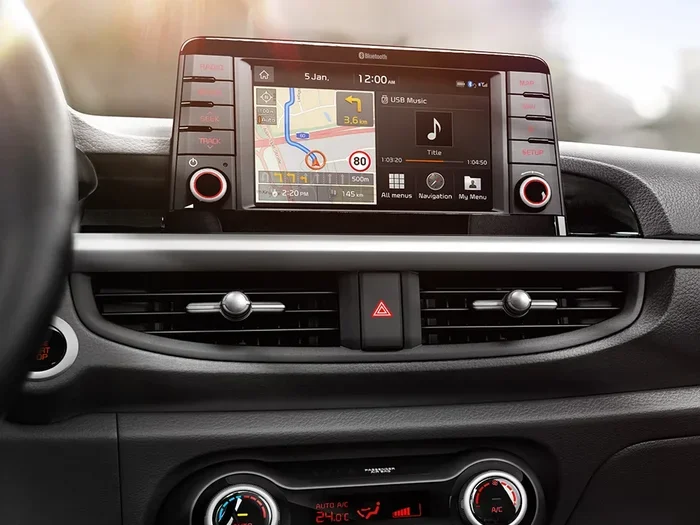
The Kia Picanto 2022 infotainment software update keeps your car’s entertainment and navigation systems running smoothly. This guide walks you through every step, from checking your current firmware version to completing the software update safely. You will learn how to update via USB, at the dealer, and through wireless methods. Kia Picanto 2022 owners can fix bugs, improve Bluetooth connectivity, and unlock new features with the right infotainment update.
The Kia Picanto 2022 is a fun, compact city car that packs a lot of value into a small package. One part that makes or breaks the driving experience is the infotainment system. This is the screen and software that handles your music, navigation, phone calls, and more. Like any software, it needs regular updates to stay fast and bug-free.
If you own a Kia Picanto 2022, you might have noticed your system feels slow or shows outdated maps. That is where the infotainment software update comes in. This guide will show you exactly how to update your system, what to expect, and how to avoid common pitfalls. Whether you are tech-savvy or not, you will find clear steps that work.
Keeping your car’s software current is just as important as oil changes or tire rotations. A software update can improve Bluetooth connectivity, add new features, and fix annoying glitches. Let us dive into everything you need to know about updating your Kia Picanto 2022 entertainment system.
Key Takeaways
- Regular updates matter: Keeping your Kia Picanto 2022 infotainment system current improves performance and fixes bugs.
- Multiple update methods exist: You can update via USB, at a Kia dealer, or through wireless connections depending on your model year.
- Preparation is key: Back up your settings, ensure a full battery, and use the correct firmware file before starting.
- Common issues are fixable: Freezing screens, Bluetooth drops, and GPS errors often resolve with a simple software update.
- Expert tips save time: Following best practices avoids common mistakes and ensures a smooth infotainment upgrade.
📑 Table of Contents
- What Is the Kia Picanto 2022 Infotainment System?
- Why You Should Update Your Infotainment Software
- How to Update Your Kia Picanto 2022 Infotainment Software
- Common Infotainment Issues Fixed by Updates
- Quick Tips for a Smooth Update
- Common Mistakes to Avoid
- What to Expect After the Update
- Expert Insights on Car Software Updates
- Frequently Asked Questions
- Conclusion
What Is the Kia Picanto 2022 Infotainment System?
The Kia Picanto 2022 infotainment system is the built-in computer in your car’s dashboard. It controls the touchscreen display, audio system, navigation, and smartphone connections. Think of it as the brain behind your car’s entertainment and communication features.
Most Kia Picanto 2022 models come with a touchscreen display that supports Apple CarPlay and Android Auto. These features let you mirror your phone’s apps on the car screen safely. The system also handles radio streaming, GPS navigation, and Bluetooth audio for hands-free calling.
Key Features of the Infotainment System
- Touchscreen interface: Easy-to-use display for controlling all functions.
- Smartphone integration: Works with Apple CarPlay and Android Auto.
- Navigation maps: Built-in GPS with route guidance.
- Audio controls: Radio, USB playback, and Bluetooth streaming.
- Kia Connect: Remote services through the Kia Connect app.
Like any computer, this system runs on firmware — the permanent software programmed into the hardware. Over time, Kia releases firmware updates to improve performance, add features, and patch security issues. That is why staying current with your software update matters so much.
Why You Should Update Your Infotainment Software
Some car owners skip software updates because they do not see an immediate need. But keeping your Kia Picanto 2022 infotainment current offers real benefits. Think of it like updating the apps on your phone — each update brings improvements.
Benefits of Regular Updates
- Bug fixes: Updates resolve freezing screens, audio glitches, and connection drops.
- Improved Bluetooth: Newer firmware often fixes pairing issues with phones.
- Map updates: Fresh navigation data means better route guidance and new points of interest.
- New features: Sometimes updates add useful functions your car did not have before.
- Better security: Updates patch vulnerabilities that could affect your Kia Connect app.
- Smoother performance: Updated software runs faster and more responsively.
Ignoring updates can lead to a frustrating experience. A slow or buggy infotainment system takes away from the joy of driving your Kia Picanto 2022. A simple update can bring your car back to life.
How to Update Your Kia Picanto 2022 Infotainment Software
There are a few ways to perform a Kia Picanto 2022 infotainment software update. The method you choose depends on your comfort level and what tools you have access to. Let us look at each option in detail.
Method 1: USB Update (Most Common)
The USB method is the most popular way to update your infotainment system. You download the update file from Kia’s website, put it on a USB drive, and let the car install it. Here is how to do it step by step.
- Visit the official Kia website and go to the software downloads section.
- Find your exact Kia Picanto 2022 model and year.
- Download the latest infotainment firmware file.
- Format a USB drive to FAT32.
- Copy the downloaded file to the USB drive.
- Plug the USB drive into the car’s USB port.
- Turn on the ignition (do not start the engine).
- Go to Settings > System > Software Update on the touchscreen.
- Select the USB drive and follow the on-screen prompts.
- Wait for the installation to complete. Do not turn off the car.
This process usually takes 15 to 30 minutes. Make sure your car battery is fully charged before starting. A power loss during the update can cause serious problems with your infotainment system.
Method 2: Dealer Installation
If you prefer not to handle the update yourself, visit your local Kia dealer. They have professional tools and firmware files ready to go. The dealer can install the software update quickly and check for any other issues at the same time.
This method is ideal if you are not comfortable with USB drives or if your car is still under warranty. Many Kia dealers offer free or low-cost infotainment updates as part of routine service. Call ahead to confirm availability and schedule an appointment.
Method 3: Over-the-Air (OTA) Updates
Some newer Kia Picanto 2022 models support over-the-air updates. This means the car downloads the update wirelessly through your Wi-Fi or cellular connection. OTA updates are the most convenient option because you do not need a USB drive or a trip to the dealer.
Check your infotainment settings for a “Software Update” section. If OTA is supported, you will see a notification when a new firmware version is available. Simply tap “Download” and “Install” when prompted. Your car will guide you through the rest.
Comparison of Update Methods
| Method | Difficulty | Time Required | Cost | Best For |
|---|---|---|---|---|
| USB Update | Moderate | 20-30 min | Free | DIY enthusiasts |
| Dealer Installation | Easy | 30-60 min | Free or low cost | Warranty-covered vehicles |
| OTA Update | Very Easy | 10-20 min | Free | Connected models |
Common Infotainment Issues Fixed by Updates
Before you update, it helps to know what problems a software update can solve. Many Kia Picanto 2022 owners experience these annoying issues, and a simple firmware update often fixes them.
Freezing or Lagging Screen
If your touchscreen display freezes or responds slowly, outdated software is often the cause. A software update refreshes the system and improves responsiveness. This is one of the most common reasons owners seek an infotainment upgrade.
Bluetooth Pairing Problems
Struggling to connect your phone via Bluetooth connectivity? Updates often include fixes for pairing failures and audio dropouts. After a software update, many owners report much more stable Bluetooth connections with their phones.
Outdated Navigation Maps
Old map data can send you to wrong addresses or miss new roads. A navigation update through the infotainment software update process ensures your maps are current. This is especially important if you use your car’s GPS for daily commuting.
Audio and Media Playback Issues
Glitches with media playback — like songs skipping or USB devices not being recognized — can also be resolved through updates. The multimedia system benefits from optimized code in newer firmware versions.
Quick Tips for a Smooth Update
Updating your Kia Picanto 2022 infotainment system is straightforward, but a few tips can make the process even smoother. Follow these quick tips to avoid headaches.
- Check your battery first: Ensure your car battery is at least 75% charged before starting.
- Use a reliable USB drive: A slow or faulty USB drive can interrupt the process.
- Do not interrupt the update: Once the installation starts, let it finish completely.
- Back up your settings: Note your preferred radio stations and Bluetooth pairings before updating.
- Download from official sources only: Always get firmware files from Kia’s official website.
- Update in a safe location: Park in a shaded, secure spot where you will not be tempted to leave early.
- Restart after updating: A full system reboot after the update ensures everything loads correctly.
Common Mistakes to Avoid
Even with clear instructions, mistakes can happen during a Kia Picanto 2022 infotainment software update. Knowing what to avoid saves you time and potential repair costs.
Using the Wrong USB Format
One of the most common errors is using a USB drive formatted to NTFS or exFAT instead of FAT32. The infotainment system may not recognize the drive, and the update will fail. Always format your USB to FAT32 before copying the firmware file.
Turning Off the Car Mid-Update
Never turn off the ignition or remove the USB drive while the software update is in progress. This can corrupt the infotainment software and require a full system reset or dealer visit. Be patient and wait for the process to complete.
Skipping the Current Version
If you are several versions behind, do not jump to the latest firmware directly. Install updates sequentially. Skipping versions can cause compatibility issues with your multimedia system and Kia Connect features.
Ignoring Error Messages
If the update shows an error, do not just try again blindly. Note the error code, check Kia’s support page, or contact a dealer. Ignoring errors can lead to a partially installed software update that causes more problems than it solves.
What to Expect After the Update
Once your Kia Picanto 2022 infotainment software update is complete, your car will restart the infotainment system. Here is what you should notice.
- Faster response times: Menus and apps should open more quickly.
- Improved Bluetooth stability: Phone connections should be more reliable.
- Updated maps: New roads and points of interest should appear in navigation.
- New features: Any added capabilities will be visible on the home screen.
- Updated firmware version: Check Settings > System > About to confirm the new software version.
If something does not look right after the update, do not panic. Try restarting the system by holding the power button for 10 seconds. Most minor issues resolve with a simple reboot. If problems persist, contact your Kia dealer for assistance.
Expert Insights on Car Software Updates
Automotive experts recommend treating your car’s infotainment system like any other connected device. Just as you update your phone and laptop regularly, your Kia Picanto 2022 benefits from the same care. Industry professionals note that software updates are one of the most overlooked aspects of car ownership.
“Many owners do not realize how much their driving experience improves with a simple infotainment upgrade,” says automotive technology specialist Mark Reynolds. “A software update can transform a sluggish system into a responsive, feature-rich dashboard.”
Experts also stress the importance of staying informed about Kia Connect services and firmware versions. Subscribing to Kia’s owner newsletter or checking their website monthly can alert you to new software updates before they become urgent.
Frequently Asked Questions
How often should I update my Kia Picanto 2022 infotainment software?
Kia typically releases infotainment updates a few times a year. Check for updates every 3 to 6 months to keep your system running smoothly. If you notice any bugs or connectivity issues, check for an update right away.
Can I update the infotainment system myself, or do I need a dealer?
You can absolutely update your Kia Picanto 2022 yourself using a USB drive. The process is straightforward and takes about 20 to 30 minutes. However, if you prefer not to DIY, your local Kia dealer can handle the software update for you.
Will the update erase my saved data and settings?
Most infotainment software updates do not erase your personal data. Your Bluetooth pairings, radio presets, and saved navigation addresses should remain intact. However, it is always wise to back up important settings before starting any update.
What should I do if the update fails?
If the software update fails, try using a different USB drive formatted to FAT32. Make sure the firmware file is complete and downloaded from Kia’s official website. If the problem persists, visit your Kia dealer for professional assistance.
Is the Kia Picanto 2022 infotainment update free?
Yes, Kia infotainment updates are typically free. You only need to download the firmware file from Kia’s website and use a USB drive. Dealer installations may be free or low-cost depending on your warranty status.
Can I use my phone to update the infotainment system?
Some Kia Picanto 2022 models support over-the-air updates through Wi-Fi. Check your infotainment settings for an OTA option. If your model does not support wireless updates, the USB method is your best alternative.
Conclusion
Updating your Kia Picanto 2022 infotainment software update is one of the simplest things you can do to improve your daily driving experience. A current infotainment system means smoother navigation, better Bluetooth connectivity, fewer glitches, and access to the latest features. Whether you choose the USB method, a dealer visit, or an over-the-air update, the process is manageable for any owner.
Do not let a sluggish multimedia system hold you back. Follow the steps in this guide, avoid the common mistakes, and enjoy a faster, more reliable Kia Picanto 2022 experience. Your car is a significant investment, and keeping its software current is a small effort with big rewards.
Take a few minutes today to check your current firmware version and see if an update is available. Your infotainment system — and your daily commute — will thank you for it.

Similar Posts