How to Turn Off Oil Change Required Message
Recipe Developer & Kitchen Guide Writer at Choose Vacuum · Certified Home Economist, ServSafe Food Handler · 8+ years developing home recipes and testing everyday kitchen techniques
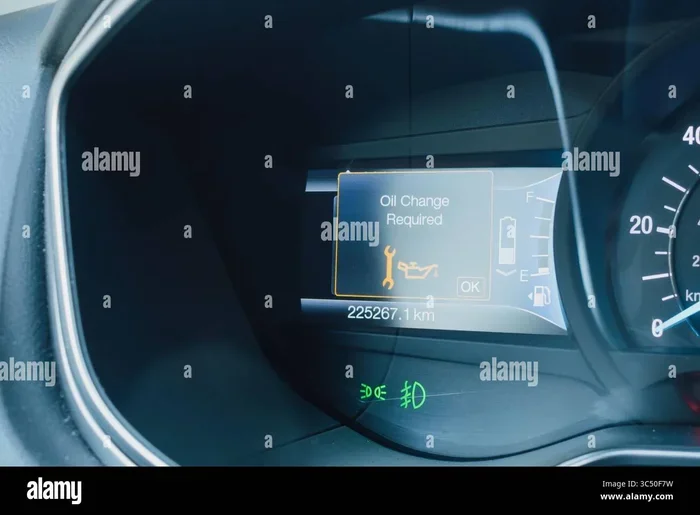
An oil change required message can be annoying, but turning it off is simple once you know the right steps. This guide walks you through resetting the oil change light on most vehicles. You will learn the common methods, what to do if the message won’t go away, and when to see a mechanic.
That little message on your dashboard saying “Oil Change Required” can really get on your nerves. You have already changed the oil, but the message just keeps staring at you every time you start the car. It is frustrating, right? The good news is that learning how to turn off oil change required message is something you can do at home in most cases. You do not need to be a mechanic or have fancy tools. In this guide, we will walk you through the exact steps for different vehicle brands, explain why the message appears in the first place, and share tips to keep your car running smoothly.
Your car has a smart system that tracks your driving habits and engine use. When the system thinks your oil life is used up, it triggers the warning. But here is the thing. The system does not know exactly when your oil gets dirty. It just guesses based on mileage and driving conditions. That is why it is so important to actually change the oil and then reset the message. Let us dive into everything you need to know about handling this annoying but important dashboard alert.
Key Takeaways
- Resetting the oil change message is usually a quick process that takes just a few minutes on most vehicles.
- Different car brands use different methods to reset the oil change reminder, so check your owner’s manual first.
- The message comes back if you skip the actual oil change, so always change your oil before resetting the light.
- Common dashboard symbols like the oil can icon or “CHANGE OIL” text are standard across many makes and models.
- Some vehicles need a diagnostic tool to fully reset the maintenance message after service.
- Ignoring the oil change message can lead to engine damage, so never delay your oil change too long.
📑 Table of Contents
- Why Does the Oil Change Message Appear?
- How to Turn Off Oil Change Required Message: Step-by-Step Methods
- What to Do If the Message Won’t Go Away
- Common Mistakes People Make When Resetting the Oil Change Message
- How Often Should You Change Your Oil?
- Expert Tips for Keeping Your Oil Change System Accurate
- When to See a Professional
- Conclusion
Why Does the Oil Change Message Appear?
Every modern vehicle has an oil life monitoring system. This system tracks how much you drive and in what conditions. It then calculates when your oil needs to be replaced. The system is designed to remind you to take care of your engine before any damage happens. But sometimes the message shows up even when you have recently changed your oil. That is when you need to reset it.
The oil change reminder is part of your car’s maintenance schedule. It is not just a random alert. The system uses algorithms to estimate oil degradation based on factors like engine temperature, driving distance, and idle time. When the system determines the oil life has reached zero, it triggers the message. Understanding this helps you know when to trust the system and when to ignore it. For example, if you just got an oil change, the message is simply leftover from the old calculation and needs a manual reset.
How to Turn Off Oil Change Required Message: Step-by-Step Methods
The exact steps to reset the oil change message depend on your vehicle’s make and model. Below are the most common methods used across popular car brands. Always refer to your owner’s manual for brand-specific instructions.
Method 1: Using the Steering Wheel Controls
Many newer vehicles let you reset the maintenance message through the steering wheel buttons. Here is how it usually works:
- Turn the ignition to the “on” position without starting the engine.
- Use the steering wheel arrows to scroll to the maintenance menu.
- Press and hold the reset button for about 10 seconds.
- The message should disappear and the oil life indicator will reset to 100%.
This method works on many Ford, Chevrolet, and Toyota models. The steering wheel controls make it easy to navigate the dashboard menu without touching anything on the center console. If you are not sure which button is the reset button, look for a small icon that looks like a wrench or the word “RESET” printed on it.
Method 2: Using the Trip Meter Reset
Older vehicles often use the trip meter to reset the oil change light. Here is the process:
- Turn the ignition off.
- Press and hold the trip meter reset button.
- While holding the button, turn the ignition to the “on” position.
- Continue holding the button for about 10 to 15 seconds.
- The oil change light should blink and then turn off.
This method is common on Honda, Nissan, and older model vehicles. The trip meter reset button is usually located on the dashboard cluster or on the steering wheel. Some vehicles may require you to hold the button for up to 30 seconds, so be patient. If the light does not turn off the first time, try again and hold the button a bit longer.
Method 3: Using the Infotainment System
Many modern vehicles with touchscreens allow you to reset the oil change message through the infotainment system:
- Go to the main menu on your touchscreen.
- Navigate to “Settings” or “Vehicle Maintenance.”
- Look for “Oil Life System” or “Maintenance Reset.”
- Select “Reset” and confirm your choice.
BMW, Audi, and Mercedes-Benz vehicles often use this method. The infotainment system gives you a more detailed view of your vehicle’s maintenance status. You can also check your maintenance schedule and see when the next service is due right from the screen. If you have trouble finding the reset option, try searching the settings menu for “service” or “oil.”
Method 4: Using a Diagnostic Tool
If the above methods do not work, you may need an OBD2 diagnostic tool. These tools plug into your car’s diagnostic port and allow you to reset the maintenance message:
- Find your car’s OBD2 port (usually under the dashboard on the driver’s side).
- Plug in the diagnostic tool.
- Turn the ignition to the “on” position.
- Follow the tool’s on-screen instructions to reset the oil change message.
You can buy a basic OBD2 scanner for under $30 at most auto parts stores. These tools are great for more than just resetting the oil change light. They can also read error codes, check engine health, and help you troubleshoot other dashboard warnings. If you do not want to buy one, many auto parts stores offer free diagnostic scans.
What to Do If the Message Won’t Go Away
Sometimes the oil change message keeps coming back even after you reset it. This can be frustrating, but there are a few things you can try:
First, make sure you actually changed the oil. If the oil level is low or the old oil was not fully drained, the system may keep triggering the message. Check your oil level using the dipstick and top it off if needed. Also, make sure you used the right type of oil for your vehicle as specified in the owner’s manual.
Second, try resetting the message again. Sometimes the system does not register the reset the first time. Turn the car off, wait a minute, and try the reset process again. For some vehicles, you need to start and stop the engine a couple of times before the reset takes effect.
Third, check for other issues. The oil change message sometimes appears alongside other warnings. If you see a check engine light or an oil pressure warning, those could be separate problems that need attention. In this case, it is best to visit a mechanic. They can run a full diagnostic and make sure everything is working properly.
Fourth, disconnect the battery. This is a last resort method. Disconnecting the battery for about 15 minutes can sometimes reset the entire dashboard system. However, this method also resets other settings like your radio presets and clock, so use it carefully.
Common Mistakes People Make When Resetting the Oil Change Message
Resetting the oil change message seems simple, but people make mistakes all the time. Here are some common errors to avoid:
- Resetting without actually changing the oil. This is the biggest mistake you can make. The message exists to protect your engine. Skipping the oil change and just resetting the light can lead to serious engine damage over time.
- Not holding the button long enough. Many people let go of the reset button too early. Hold it for at least 10 to 15 seconds to make sure the system registers the command.
- Using the wrong reset method for your vehicle. Not all cars use the same reset process. Always check your owner’s manual or look up your specific model online before trying.
- Ignoring the message entirely. Even if you plan to change the oil soon, do not ignore the warning for too long. The message is there for a reason. Prolonged driving with old oil reduces engine performance and can cause costly repairs.
- Forgetting to check the oil level after the reset. A reset does not replace the need to monitor your oil. Make it a habit to check your oil level every few weeks, especially between oil changes.
Similar to how you would wash a chair to keep it in good shape, regular oil changes keep your engine clean and running well. Maintenance is maintenance, whether it is for your car or your furniture.
How Often Should You Change Your Oil?
The old rule of changing oil every 3,000 miles is outdated for most modern vehicles. Today, many cars can go between 5,000 and 7,500 miles between oil changes. Some synthetic oils can even last up to 10,000 miles. However, your driving habits play a big role in determining the right interval.
If you drive in severe conditions, you may need to change your oil more often. Severe conditions include:
- Frequent short trips under 5 miles
- Driving in extreme heat or cold
- Towing heavy loads
- Driving in stop-and-go traffic
- Dusty or off-road driving conditions
Check your vehicle’s owner manual for the recommended oil change interval. The manual will also tell you what type of oil to use. Using the wrong oil can reduce engine efficiency and trigger the oil change message sooner than necessary. If you are unsure, ask your mechanic during your next service interval appointment.
Expert Tips for Keeping Your Oil Change System Accurate
Keeping your oil life monitoring system accurate is easier than you might think. Here are some expert tips to help you stay on top of your car’s maintenance needs:
- Reset the system every time you change the oil. This keeps the system calibrated and ensures the next reminder is accurate.
- Use the oil type recommended by your manufacturer. Using the wrong oil can affect how the system calculates oil life.
- Keep track of your mileage manually. Even with a monitoring system, it helps to log your oil changes in a notebook or phone app.
- Do not ignore other dashboard warnings. The oil change message is just one of many alerts your car uses to communicate its health.
- Visit a trusted mechanic regularly. Even if you change your own oil, a professional inspection can catch issues you might miss.
Just like you might reupholster a chair to extend its life, regular oil changes and proper maintenance extend the life of your vehicle. Taking small steps today saves you big headaches tomorrow.
When to See a Professional
Most of the time, resetting the oil change message is a DIY task. But there are situations where professional help is the right call. If the message keeps coming back after multiple reset attempts, there may be a deeper issue with your car’s oil life monitoring system. A mechanic can diagnose whether the sensor needs replacement or if there is a software issue that needs updating.
You should also see a professional if you notice other symptoms alongside the oil change message. These symptoms include strange engine noises, decreased fuel efficiency, dark or gritty oil, or a burning smell from the engine bay. These could be signs of more serious problems that go beyond a simple oil change reminder. Do not wait until small issues become expensive repairs.
Finally, if you are not comfortable working under the hood or navigating your car’s dashboard menus, there is no shame in asking for help. Many local auto shops and quick-lube services will reset the oil change message for free or a small fee when you get your oil changed. It is a quick and easy service that saves you time and effort.
Conclusion
Learning how to turn off oil change required message is a useful skill every car owner should have. Whether you use the steering wheel controls, the trip meter, the infotainment system, or a diagnostic tool, the process is straightforward once you know the right method for your vehicle. The key is to always change the oil first, then reset the message. This keeps your engine healthy and your dashboard clear of annoying alerts.
Remember, the oil change message is there to protect your car. Do not ignore it or reset it without actually servicing the vehicle. Stay on top of your maintenance schedule, keep track of your oil levels, and your car will reward you with reliable performance for years to come. Now you have all the information you need to handle that oil change message like a pro. Go ahead and give it a try, and enjoy the satisfaction of a clean, reset dashboard.
Frequently Asked Questions
How do I reset the oil change message on a Toyota?
On most Toyota models, you can reset the message by turning the ignition to “on,” pressing the odometer button until the maintenance light appears, then holding the button until the light resets. The exact steps can vary by model year, so check your owner’s manual for confirmation.
Can I drive with the oil change message on?
Yes, you can drive a short distance with the message on, but you should not delay the oil change for too long. The message is a reminder that your oil life has reached its limit, and driving with old oil can reduce engine performance and cause long-term damage.
What happens if I never reset the oil change message?
The message will stay on your dashboard until you reset it. It does not affect how your car runs, but it can be distracting and annoying. More importantly, if you forget to actually change the oil because you keep ignoring the message, it can lead to engine problems over time.
Do I need special tools to reset the oil change message?
For most vehicles, you do not need any special tools. The reset process uses buttons on the steering wheel, dashboard, or infotainment system. However, some newer or luxury vehicles may require an OBD2 diagnostic tool or a visit to a dealership or mechanic.
Why does the oil change message come back after I reset it?
The message usually comes back if you have not actually changed the oil, if the oil level is low, or if the reset process was not completed correctly. Try resetting again following the proper steps for your vehicle, and make sure the oil change was done with the correct type and amount of oil.
How can I tell if my oil actually needs changing or if it is just the reminder?
The best way is to check your oil using the dipstick. Fresh oil should be amber or golden in color. If the oil looks dark brown or black, or feels gritty between your fingers, it is time for a change. You can also check your mileage since the last oil change to see if you have reached the recommended interval.

Similar Posts































