How to Reset the Maintenance Light on Toyota
Recipe Developer & Kitchen Guide Writer at Choose Vacuum · Certified Home Economist, ServSafe Food Handler · 8+ years developing home recipes and testing everyday kitchen techniques
Resetting the maintenance light on your Toyota is a quick and easy process you can do at home. Whether you own a Corolla, Camry, or RAV4, this guide walks you through every method with clear instructions. Keep your Toyota running smoothly and your dashboard clean with our proven techniques.
That little little light on your Toyota dashboard can be annoying. It blinks or stays solid, reminding you that your car needs service. Whether it is time for an oil change or a routine check, the maintenance light serves an important purpose. But once you have taken care of the service, you need to know how to turn it off. This guide shows you exactly how to reset the maintenance light on Toyota vehicles. We cover every method, every model, and every common mistake you should avoid.
Many Toyota owners feel confused when the maintenance light comes on. You might wonder if something is seriously wrong with your car. The truth is, this light is part of the Toyota maintenance reminder system. It tracks your mileage and tells you when it is time for scheduled service. After you complete the service, the light stays on until you manually reset it. This article gives you all the information you need to handle this simple task yourself. No mechanic required. No expensive dealership visits needed. Just clear, easy steps you can follow right now.
Key Takeaways
- Simple Process: Resetting the Toyota maintenance light takes just a few minutes using the odometer or steering wheel controls.
- Model-Specific Steps: Different Toyota models may require slightly different reset methods, which we cover in detail.
- Common Mistakes Matter: Avoiding errors like holding buttons too long or resetting before service ensures accuracy.
- Interior Care Counts: Keeping your Toyota’s interior clean, including upholstery cleaning, complements your maintenance routine.
- Professional Help When Needed: Some issues require a mechanic, especially if the light persists after resetting.
- Regular Maintenance Is Key: Following the Toyota maintenance schedule prevents costly repairs down the road.
📑 Table of Contents
- Understanding the Toyota Maintenance Light
- How to Reset the Maintenance Light on Toyota
- Toyota Maintenance Light Reset by Model
- Common Mistakes When Resetting the Maintenance Light
- Keeping Your Toyota Interior Clean and Maintained
- When to See a Professional
- Final Thoughts on Resetting Your Toyota Maintenance Light
Understanding the Toyota Maintenance Light
The maintenance light on a Toyota is different from the check engine light. The check engine light signals a problem with your vehicle’s systems. The maintenance light, sometimes called the service light, simply reminds you that a scheduled service interval has been reached. Toyota uses this light to keep track of your vehicle maintenance schedule. It is a helpful feature designed to keep your car running at its best.
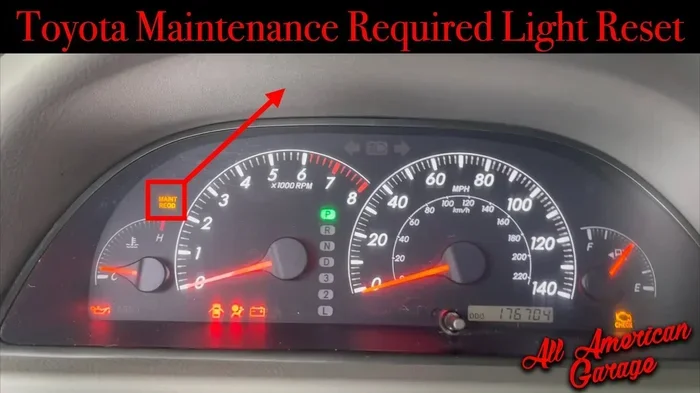
Most Toyota models use the same basic system. A small wrench icon appears on the dashboard. This symbol means it is time for routine maintenance. The light typically activates every 5,000 miles or based on the mileage interval set by the manufacturer. Understanding this difference helps you respond appropriately. You do not need to panic when the maintenance light comes on. You simply need to service your vehicle and then reset the light.
Why the Maintenance Light Matters
Ignoring the maintenance light can lead to bigger problems over time. Regular oil changes, tire rotations, and fluid checks keep your Toyota in top shape. The maintenance light acts as your personal reminder system. It ensures you do not skip important service intervals. Staying on top of your maintenance schedule also helps preserve your vehicle’s resale value. A well-documented service history makes your Toyota more attractive to buyers.
Additionally, following the recommended maintenance schedule can prevent unexpected breakdowns. A small investment in regular service saves you from costly repairs later. The maintenance light is your first line of defense in vehicle care. Treat it as a helpful friend, not an annoyance.
How to Reset the Maintenance Light on Toyota
Resetting the maintenance light on Toyota is straightforward once you know the steps. The process varies slightly depending on your Toyota model and year. Below, we cover the most common methods used across Toyota’s lineup. Pick the method that matches your vehicle and follow along carefully.
Method 1: Using the Odometer Button
This is the most common method for older Toyota models. You will need to access your trip meter display on the dashboard. Follow these steps to reset the maintenance light:
- Turn the ignition key to the “ON” position without starting the engine.
- Press the trip meter reset button until the odometer display shows the total mileage.
- Turn the ignition key to the “OFF” position.
- Press and hold the trip meter reset button.
- While still holding the button, turn the ignition key back to the “ON” position.
- Continue holding the button for about 10 seconds until the light flashes or resets.
- Release the button and turn the ignition off. Then start the engine to confirm the light is off.
This method works on many Toyota models including the Corolla, Camry, and RAV4 from the early 2000s through mid-2010s. If the light does not reset the first time, try repeating the steps. Sometimes it takes a second attempt for the maintenance reminder to clear completely.
Method 2: Using Steering Wheel Controls
Newer Toyota models come with digital displays and steering wheel controls. The process is slightly different but just as simple. Here is how to reset the maintenance light using steering wheel buttons:
- Press the “Menu” or “Setup” button on the steering wheel.
- Use the arrow buttons to navigate to the vehicle settings or maintenance menu.
- Select the “Maintenance Reset” or “Service Reset” option.
- Press “OK” or “Enter” to confirm your selection.
- Hold the reset button for several seconds until the display shows the light has been cleared.
- Turn the vehicle off and back on to verify the maintenance light is no longer active.
This method works on Toyota models from 2014 onward, including the Camry, RAV4, and Highlander. If you are unsure which menu option to select, consult your Toyota owner’s manual. The manual provides model-specific guidance that can save you time and frustration.
Method 3: Using the Dashboard Pedal Method
Some Toyota owners prefer using the pedal method for resetting the maintenance light. This technique works well on certain Toyota models and is quick to perform:
- Make sure the vehicle is completely off and the key is out of the ignition.
- Press and hold the odometer trip button on the dashboard.
- While holding the button, insert the key and turn the ignition to “ON.”
- Continue holding the trip button for about 10 to 15 seconds.
- The maintenance light should start to flash, indicating it is resetting.
- Release the button and turn the ignition off, then back on to confirm the reset.
This method is especially useful for Toyota owners who do not have access to steering wheel controls. It is a reliable backup option that works on a wide range of Toyota models.
Toyota Maintenance Light Reset by Model
Different Toyota models have slight variations in the reset process. Below is a quick reference guide to help you find the right method for your specific vehicle.
Toyota Corolla Maintenance Light Reset
The Toyota Corolla is one of the most popular sedans on the road. For older Corolla models, use the odometer button method described above. Newer Corolla models from 2014 and beyond use the steering wheel control method. The digital display makes navigation easy, and the reset process typically takes less than 30 seconds.
Toyota Camry Maintenance Light Reset
The Camry is Toyota’s flagship sedan. Most Camry models respond well to the steering wheel control method. Simply navigate to the vehicle settings menu, select maintenance reset, and confirm. For older Camry models from the 2000s, the odometer button method works perfectly. The Camry’s dashboard layout is straightforward, making the reset process simple even for first-time users.
Toyota RAV4 Maintenance Light Reset
The RAV4 is Toyota’s best-selling SUV. Whether you drive a older model or a newer one, the reset process is similar to the Camry. Use the steering wheel controls on newer RAV4s and the odometer method on older ones. The RAV4’s larger dashboard display makes it easy to read the maintenance reset confirmation on screen.
Common Mistakes When Resetting the Maintenance Light
Even though resetting the maintenance light is simple, mistakes can happen. Here are the most common errors Toyota owners make and how to avoid them:
- Resetting Before Service: Never reset the light before actually completing the service. The maintenance reminder exists for a reason. Resetting it prematurely means you might forget to get your oil changed or tires rotated.
- Not Holding the Button Long Enough: Many owners release the reset button too early. Hold it for at least 10 seconds to ensure the system registers the reset command.
- Using the Wrong Button: Some Toyota dashboards have multiple buttons near the odometer. Make sure you are pressing the trip reset button, not the display button or any other control.
- Ignoring Persistent Lights: If the maintenance light does not turn off after resetting, there may be an underlying issue. Do not keep trying to reset it repeatedly. Instead, check for other dashboard warnings or consult a professional mechanic.
- Skipping the Owner’s Manual: Every Toyota model has slight differences. Your owner’s manual contains the exact reset procedure for your specific vehicle. Taking two minutes to check it can save you a lot of trial and error.
Avoiding these mistakes ensures a smooth reset every time. Take your time and follow each step carefully. Rushing through the process is the number one reason people fail to reset the light successfully.
Keeping Your Toyota Interior Clean and Maintained
Resetting the maintenance light is just one part of keeping your Toyota in great shape. Your vehicle’s interior also deserves regular attention. The seats, dashboard, and carpeting all benefit from routine cleaning. A clean interior not only looks better but also helps maintain the value of your Toyota over time.
When it comes to cleaning your Toyota’s seats and upholstery, using the right products makes a big difference. Regular vacuuming removes dirt and debris. A gentle upholstery cleaner keeps fabric seats looking fresh. For leather seats, a quality leather conditioner prevents cracking and fading. Taking care of your interior is part of the broader maintenance routine that keeps your Toyota running strong for years.
Many Toyota owners also appreciate adding personal touches to their vehicle’s interior. A stylish throw blanket on your passenger seat can add comfort and color during colder months. Similarly, keeping your seats protected with seat covers or stylishly placed blankets helps preserve the original upholstery. These small touches complement your maintenance routine and keep your Toyota’s interior looking its best.
Do not forget about the regular washing of removable seat covers or accessories that may be in your vehicle. Clean accessories contribute to a healthier cabin environment. A clean Toyota interior also makes every drive more enjoyable, whether you are commuting to work or taking a road trip with family.
When to See a Professional
Most Toyota maintenance light resets can be done at home without any special tools. However, there are situations where professional help is the right choice. If the maintenance light keeps coming back after you reset it, this could indicate an unresolved service issue. A mechanic can run diagnostic tests to identify any hidden problems with your vehicle.
Additionally, if you notice other warning lights alongside the maintenance light, do not ignore them. A combination of dashboard warnings may signal a more serious issue that requires immediate attention. Trust your instincts as a vehicle owner. If something feels wrong, have a professional inspect your Toyota. It is always better to be safe than sorry when it comes to your car’s health.
Regular visits to a certified Toyota service center also help maintain your vehicle’s warranty. Many Toyota warranties require documented maintenance at approved service intervals. Keeping up with these visits ensures your warranty remains valid and your Toyota performs at its best for years to come.
Final Thoughts on Resetting Your Toyota Maintenance Light
Resetting the maintenance light on your Toyota is a simple task that anyone can do. Whether you use the odometer button method, the steering wheel controls, or the pedal method, the process is quick and straightforward. The key is to follow the steps carefully for your specific Toyota model and year. Avoid common mistakes like resetting before service or releasing buttons too early.
Remember, the maintenance light is your friend. It keeps you on track with your vehicle maintenance schedule and helps prevent costly repairs. After you complete your service and reset the light, your Toyota dashboard stays clean and your vehicle stays in top condition. Take pride in maintaining your Toyota. It is an investment that pays off in reliability, performance, and long-term value.
With the knowledge you now have, you can handle the maintenance light reset confidently the next time it comes on. No stress, no guesswork. Just simple steps that get the job done right. Keep this guide bookmarked for future reference and share it with fellow Toyota owners who might need a helping hand.
Frequently Asked Questions
How do I reset the maintenance light on a Toyota Camry?
For Toyota Camry models, use the steering wheel controls on newer models or the odometer button method on older models. Navigate to the maintenance reset option in the vehicle settings menu, hold the reset button for 10 seconds, and confirm when the light clears. Always refer to your Camry’s owner manual for model-specific guidance.
Why won’t my Toyota maintenance light turn off after resetting?
If the maintenance light stays on after resetting, you may not have held the reset button long enough. Try repeating the reset process and hold the button for at least 10 to 15 seconds. If the light still persists, there may be an unresolved service issue or a faulty sensor that requires professional diagnosis.
How often does the Toyota maintenance light come on?
The Toyota maintenance light typically activates every 5,000 miles or based on the maintenance interval programmed by the manufacturer. Some newer Toyota models use a condition-based maintenance system that adjusts the reminder based on driving habits and conditions rather than a fixed mileage interval.
Can I drive my Toyota with the maintenance light on?
Yes, you can safely drive your Toyota with the maintenance light on. The light is a reminder for scheduled service, not an urgent warning like the check engine light. However, you should schedule your service soon to keep your vehicle running properly and avoid potential issues from overdue maintenance.
Do I need special tools to reset the Toyota maintenance light?
No special tools are needed. You only need access to your Toyota’s dashboard controls, such as the trip meter button or steering wheel buttons. The reset process is designed to be simple enough for any Toyota owner to complete at home without any additional equipment.
Will resetting the maintenance light affect my Toyota’s warranty?
Resetting the maintenance light itself does not affect your warranty. However, skipping or delaying actual service appointments can void your warranty. Always complete the recommended maintenance at the proper intervals and then reset the light to keep your Toyota warranty intact and your vehicle running smoothly.
=== CONCLUSION ===
Resetting the maintenance light on Toyota is one of the easiest and most useful skills every Toyota owner should know. It saves time, money, and trips to the dealership. With the step-by-step methods covered in this guide, you can confidently handle the reset process for any Toyota model. Remember to service your vehicle first, reset the light correctly, and avoid the common mistakes we highlighted. Your Toyota will reward you with reliable performance and a clean dashboard. Keep this guide handy, share it with friends, and make maintenance light resets a breeze every single time.

Similar Posts