How Do I Setup My Garage Door with a 2023 Gmc Denali
Recipe Developer & Kitchen Guide Writer at Choose Vacuum · Certified Home Economist, ServSafe Food Handler · 8+ years developing home recipes and testing everyday kitchen techniques
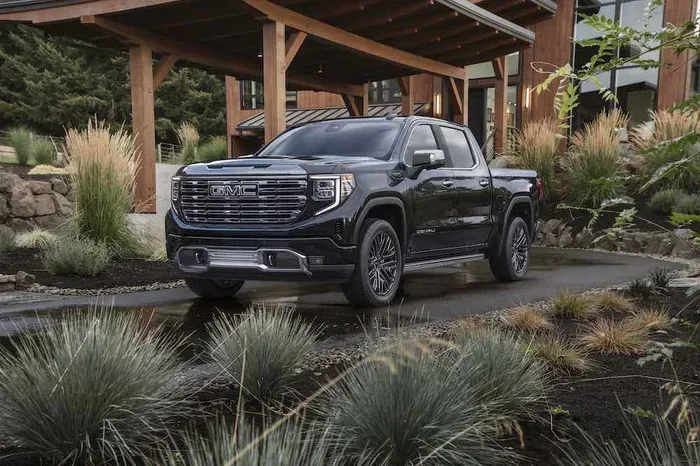
Setting up your garage door with a 2023 GMC Denali is easier than you think. This guide walks you through programming your HomeLink system, syncing your remote, and fixing common issues. Whether you are a first-time owner or upgrading your setup, you will find clear steps and practical tips here.
Owning a 2023 GMC Denali comes with a lot of great tech features. One of the most useful is the built-in garage door integration. If you have been wondering how do I setup my garage door with a 2023 GMC Denali, you are in the right place. This guide breaks everything down into simple, easy-to-follow steps. You will learn how to program your HomeLink system, sync your remote, and troubleshoot common issues. By the end, your garage door will work seamlessly with your truck.
The 2023 GMC Denali is packed with premium features that make daily life more convenient. The garage door setup is one of those features that feels like a luxury once you have it working. Whether you drive home late at night or carry groceries in both hands, being able to open your garage from the vehicle is a game changer. Let us walk through the entire process together.
Key Takeaways
- HomeLink Programming: You can program your garage door opener directly into your 2023 GMC Denali in minutes.
- Three Methods Available: Use the HomeLink system, a universal remote, or the manual learning button on your garage door motor.
- Safety First: Always test sensors and auto-reverse features after setup to ensure safe operation.
- Common Issues Are Fixable: Most problems like unresponsive buttons or signal interference have simple solutions.
- Professional Help Is Optional: With the right guidance, most owners can complete the setup without a technician.
- Regular Maintenance Helps: Keeping your garage door and remote in good shape prevents future problems.
📑 Table of Contents
Understanding Your 2023 GMC Denali Garage Door System
The Denali comes equipped with General Motors’ HomeLink system. This is a built-in wireless control system that lets you operate your garage door directly from your truck. You do not need a separate remote for most garage door openers. The system uses radio frequency to communicate with your garage door motor. It works with nearly all major brands including Chamberlain, LiftMaster, Craftsman, and Genie.
Before you start programming, make sure you have the right tools ready. You will need your garage door remote, your truck ignition key, and a stable position in your driveway. Park your 2023 GMC Denali facing the garage door with all doors closed. This ensures the sensors can read the door position correctly during setup.
Locating the HomeLink Buttons
In the 2023 GMC Denali, the HomeLink buttons are located on the driver’s side visor. There are usually three buttons labeled 1, 2, and 3. These buttons control up to three different garage doors or gates. Press and hold one of the buttons for a few seconds. The indicator light will start to flash. This means the system is ready to learn your garage door signal.
If you are also working on other parts of your truck’s interior, you might want to check out how to reupholster a chair seat for DIY seat projects in your garage workspace. Having a clean, comfortable workspace makes any project more enjoyable.
Programming Your Garage Door with HomeLink
Programming your garage door to the 2023 GMC Denali is a straightforward process. Follow these steps carefully and you will be done in about five minutes.
- Step 1: Clear the HomeLink System. Press and hold buttons 1 and 3 together for about 10 seconds. The indicator light will flash rapidly. This clears any previous programming.
- Step 2: Position Your Remote. Hold your garage door remote close to the HomeLink buttons on the visor. The distance should be about one to two inches.
- Step 3: Train the System. Press and hold the HomeLink button you want to use. At the same time, press and hold the button on your garage door remote. Keep holding both buttons until the HomeLink indicator light changes from slow to fast blinking.
- Step 4: Complete the Training. Release both buttons. Press the HomeLink button once to test. The garage door should respond immediately.
If the garage door does not respond on the first try, do not worry. Repeat the training process. Sometimes it takes two or three attempts for the signal to sync properly.
Using the Universal Garage Door Opener Feature
The 2023 GMC Denali also supports universal garage door opener programming. This method works when the standard HomeLink training does not recognize your remote. Here is how it works:
- Press and hold the HomeLink button you want to program.
- After 20 seconds, the indicator light will start flashing quickly.
- Release the button and immediately press the button on your garage door remote.
- Repeat this cycle up to three times until the garage door responds.
This universal programming method is especially helpful for older garage door openers that use rolling code technology. Most modern openers from 2011 onward use rolling codes for added security. The Denali HomeLink system is designed to handle these codes automatically.
Setting Up a Universal Remote
If your garage door opener brand is not compatible with HomeLink, you can use a universal remote. These remotes are available at most hardware stores and online. Popular brands include Genie, Chamberlain, and LiftMaster universal remotes. The setup process is similar to the HomeLink method but uses a different learning button on your garage door motor unit.
To set up a universal remote:
- Locate the learn button on your garage door motor. It is usually near the antenna wire on the motor unit.
- Press and release the learn button. The indicator light will stay on for about 30 seconds.
- Within that 30-second window, press the button on your universal remote.
- The motor unit light will blink or go out, confirming the remote is programmed.
Once the universal remote is programmed, you can pair it with your Denali’s HomeLink system using the steps above. This gives you the flexibility of using both your truck and a handheld remote.
Adjusting and Maintaining Your Setup
Once your garage door is programmed, you want to make sure everything works smoothly over time. Regular maintenance keeps the system reliable and safe.
Testing the Auto-Reverse Feature
The auto-reverse safety feature is one of the most important parts of your garage door system. Place a roll of paper towels on the ground under the door. Close the door using your HomeLink button. The door should automatically reverse when it hits the paper towels. If it does not, you need to adjust the force settings on your garage door motor.
Checking the Safety Sensors
The safety sensors are located near the bottom of each garage door track. They send an invisible beam across the door opening. If anything breaks the beam, the door will not close. Make sure the sensors are clean and aligned. A simple wipe with a soft cloth can fix many sensor issues. If the sensors are misaligned, adjust them until the indicator light on both units shows a solid glow.
Just as you would adjust the lever on a chair height lever to get the perfect position, you may need to fine-tune your garage door force settings for optimal performance. Small adjustments make a big difference in how smoothly everything operates.
Battery Maintenance for Your Remote
Keep spare batteries for both your garage door remote and your HomeLink system. A weak battery can cause intermittent signal problems. Replace batteries every six to twelve months for best results. If your remote stops working suddenly, a fresh battery is the first thing to try.
Troubleshooting Common Issues
Even with a proper setup, you might run into occasional issues. Here are the most common problems and how to fix them.
HomeLink Button Does Not Respond
If the HomeLink button on your Denali does not respond, try these steps:
- Make sure the vehicle engine is running or in accessory mode.
- Check that the HomeLink indicator light is flashing during programming.
- Clear the system and start the programming process again.
- Move your vehicle closer to the garage door motor and try again.
Garage Door Opens but Does Not Close
This issue is usually caused by misaligned safety sensors or a low battery in the remote. Clean the sensor lenses and check the alignment. Replace the remote battery if needed. If the problem persists, check the garage door motor force settings.
Signal Interference
Sometimes other electronic devices can interfere with the HomeLink signal. This is rare but can happen if you have multiple garage door openers in the same area. Try changing the HomeLink button you are using to a different channel. You can also check with your neighbors to see if their system is on the same frequency.
For those who enjoy hands-on projects, you might also want to explore how to build a chair as a fun garage DIY project. Both tasks require patience, the right tools, and a bit of problem-solving.
Advanced Tips for 2023 GMC Denali Garage Door Owners
Once you have your garage door set up, there are a few extra tips that can enhance your experience with the Denali.
- Use the MyLink Display: Your 2023 GMC Denali infotainment screen can sometimes display garage door status. Check your vehicle settings under the vehicle connectivity menu.
- Set Up Multiple Doors: Use the three HomeLink buttons to control different garage doors, gates, or even smart home devices.
- Keep a Manual Backup: Always keep your handheld remote as a backup. If the HomeLink system ever needs to be reset, you will be glad you have it.
- Update Your Garage Door Opener: If your garage door motor is more than 10 years old, consider upgrading to a newer model with better compatibility.
- Use the Denali App: Check if your GMC app supports garage door integration. Some newer models allow remote monitoring and control through your smartphone.
The 2023 GMC Denali garage door system is designed to be intuitive and reliable. With proper setup and regular maintenance, it will serve you well for years to come. The convenience of opening your garage from the truck is something you will appreciate every single day.
Final Thoughts
Setting up your garage door with your 2023 GMC Denali does not have to be complicated. The HomeLink system makes the process simple and fast. Whether you use the standard programming method, the universal programming method, or a separate universal remote, the steps are clear and manageable. Take your time, follow each step carefully, and test your setup thoroughly before relying on it daily.
Remember to maintain your system with regular checks. Test the auto-reverse feature monthly. Keep the sensors clean. Replace remote batteries when needed. These small habits will keep your garage door running smoothly and safely. With your Denali and your garage door working together, every trip home feels a little more convenient and a lot more modern.
Now that you know how to setup your garage door with your 2023 GMC Denali, you can enjoy the full benefit of this premium feature. Get in your truck, press the button, and let the garage door do the work for you.
Frequently Asked Questions
Can I program more than one garage door to my 2023 GMC Denali?
Yes, the 2023 GMC Denali has three HomeLink buttons, which means you can program up to three different garage doors, gates, or smart home devices. Each button stores a separate signal, so you can control multiple entry points from one vehicle.
Why is my HomeLink button not working after programming?
This is usually caused by a weak battery in your garage door remote, misaligned safety sensors, or an incomplete programming sequence. Try clearing the HomeLink system and reprogramming from scratch. Also check that your vehicle is in accessory mode during the process.
Do I need a special remote for the 2023 GMC Denali garage door system?
No, the HomeLink system works with most standard garage door openers without a special remote. However, if your opener uses older technology or a different frequency, a universal remote can bridge the gap and ensure compatibility.
How long does it take to program a garage door to a 2023 GMC Denali?
The entire process typically takes about five to ten minutes. Clearing the system takes a few seconds, and the programming itself usually requires just two to three attempts. Having your garage door remote and vehicle positioned correctly speeds things up.
Is the HomeLink system in the 2023 GMC Denali safe and secure?
Yes, HomeLink uses rolling code technology in most modern setups, which means the access code changes every time you use it. This prevents unauthorized access. Always make sure your garage door motor firmware is up to date for the best security.
What should I do if my garage door opens but will not close using HomeLink?
This is often a sensor issue. Check that the safety sensors at the bottom of each track are clean and properly aligned. A weak remote battery or incorrect force settings on the motor can also prevent the door from closing. Try replacing the battery first, then check the sensors.

Similar Posts