Disconnecting Auto Start Stop at the Battery on Ford F150
Recipe Developer & Kitchen Guide Writer at Choose Vacuum · Certified Home Economist, ServSafe Food Handler · 8+ years developing home recipes and testing everyday kitchen techniques
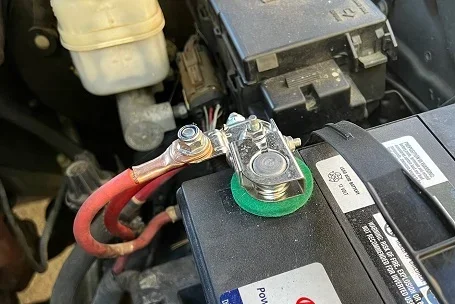
Disconnecting the auto start-stop system at the battery on your Ford F150 is a simple process that can save your battery and reduce engine wear. This guide walks you through the exact steps to safely disable the feature at the battery terminal, including which cable to disconnect and what tools you need. You will also learn the pros and cons of disabling start-stop and how to re-enable it when needed.
Owning a Ford F150 comes with a lot of great features. But sometimes, those features can cause more trouble than they are worth. The auto start-stop system is one of those things that divides opinion. Some drivers love the fuel savings. Others hate the constant engine shutting off and restarting. If you are tired of the start-stop system draining your battery or annoying you on your daily commute, you are in the right place. This guide shows you exactly how to disconnect auto start stop at the battery on Ford F150 models.
We will walk you through every step. You will learn what tools you need, what to watch out for, and how to get the job done safely. Whether you have a 2015 F150 or a brand-new 2024 model, the process is similar. Let us get started and take back control of your truck.
Key Takeaways
- Easy Process: Disconnecting auto start stop at the battery on Ford F150 requires basic tools and about 15 minutes of your time.
- Battery Protection: Disabling start-stop can significantly extend your battery life, especially in stop-and-go traffic.
- Simple Steps: You only need to disconnect the negative battery cable to disable the system effectively.
- Reversible: The process is fully reversible, and you can reconnect the cable to restore the start-stop function anytime.
- Safety First: Always follow proper safety precautions when working with your vehicle battery to avoid damage or injury.
- Fuel Impact: Disabling start-stop may slightly reduce fuel efficiency in heavy traffic but can improve battery longevity.
- Model Variations: The exact process may vary slightly depending on your Ford F150 model year and engine type.
📑 Table of Contents
- Understanding the Auto Start-Stop System on Ford F150
- Why Disconnect Auto Start Stop at the Battery?
- Tools and Materials You Will Need
- Step-by-Step Guide to Disconnecting Auto Start Stop
- Common Mistakes to Avoid
- Re-Enabling the Auto Start-Stop System
- Maintenance Tips After Disabling Start-Stop
- Expert Insights on Ford F150 Battery Health
- Final Thoughts
Understanding the Auto Start-Stop System on Ford F150
The auto start-stop system is designed to save fuel. When you come to a stop at a red light or in heavy traffic, the system shuts off the engine automatically. When you release the brake or press the accelerator, the engine restarts. This reduces idling time and can improve fuel economy slightly. But it also puts extra strain on your battery and starter motor.
Here is the thing. The system relies on a signal from the battery sensor. If the battery voltage drops too low, the system disables itself to protect the battery. But even when it is working correctly, the constant cycling can wear out your battery faster than normal. For drivers who spend a lot of time in city traffic or towing, this can become a real problem.
Ford designed the start-stop system to work with a specific type of battery. Most Ford F150 models use an absorbed glass mat or AGM battery. These batteries handle the extra cycling better than standard batteries. But even AGM batteries have a lifespan. If you live in a hot climate or do a lot of short trips, your battery may not last as long as it should.
How the Start-Stop System Works
The system uses several sensors to decide when to shut off the engine. It checks your battery voltage, cabin temperature, and whether the air conditioning is on. If all conditions are met, the engine shuts off when you stop. A warning light on the dashboard lets you know the system is active. You can usually press a button on the dashboard to turn it off temporarily. But this only lasts until you restart the engine. For a permanent solution, you need to disconnect it at the battery.
Why Disconnect Auto Start Stop at the Battery?
There are several good reasons to disconnect the auto start-stop system at the battery. The most common reason is battery health. The start-stop system cycles your engine on and off dozens of times during a single drive. This puts a lot of wear on your battery. Over time, this can reduce your battery life significantly.
Another reason is comfort. Some drivers find the constant engine restarts annoying. The vibration and noise can be distracting, especially on cold mornings. If you have a cold start, the system might not shut off at all. But in warm weather, it shuts off every single time you stop, which can get old fast.
Some truck owners also disconnect start-stop when they install aftermarket accessories. Winches, lights, and audio systems all draw power from the battery. Adding these to a vehicle with an active start-stop system can create a mismatch. The battery may not have enough reserve power to handle both the accessories and the constant engine cycling.
Pros and Cons of Disabling Start-Stop
- Pro: Extended battery life and reduced wear on the starter motor.
- Pro: A quieter and smoother driving experience in traffic.
- Pro: Better compatibility with aftermarket accessories.
- Con: Slightly reduced fuel economy in stop-and-go traffic.
- Con: You lose the factory fuel-saving feature.
- Con: Some buyers may notice the missing feature if you sell the truck later.
When you compare the pros and cons, most F150 owners find the benefits outweigh the drawbacks. Especially if you use your truck for towing or off-roading. The fuel savings from start-stop are often minimal in real-world driving. But the battery protection is very real.
Tools and Materials You Will Need
Before you start, gather everything you need. You do not want to be halfway through the job and realize you are missing a tool. Here is what you need:
- Wrench set: A 10mm wrench works for most Ford F150 battery terminals.
- Battery terminal cleaner: This helps remove corrosion from the cable ends.
- Safety gloves: Protect your hands from battery acid and corrosion.
- Safety glasses: Protect your eyes from any sparks or acid splashes.
- Memory saver device (optional): This preserves your radio settings and computer memory when you disconnect the battery.
- Pen and paper: You may want to note your radio code before disconnecting.
You do not need anything fancy for this job. A basic set of tools from any garage will do the trick. The most important thing is to be safe and take your time.
Step-by-Step Guide to Disconnecting Auto Start Stop
Now let us get into the actual steps. This process is straightforward and takes about 15 minutes. You do not need any advanced mechanical skills. Just follow along carefully and you will be done in no time.
Step 1: Park Your Ford F150 Safely
First, park your truck on a flat surface. Turn off the engine and remove the key from the ignition. Engage the parking brake. This ensures your truck does not roll while you are working. Open the hood and locate the battery. On most Ford F150 models, the battery is on the driver side of the engine bay. It is a large rectangular box with two cables attached to the top.
Step 2: Identify the Negative Terminal
Look at the battery terminals. One will be marked with a plus sign (+). This is the positive terminal. The other will be marked with a minus sign (-). This is the negative terminal. The negative terminal usually has a black cable attached to it. You will be disconnecting this cable to disable the start-stop system.
It is very important that you disconnect the negative terminal first. If you disconnect the positive terminal first, you risk creating a short circuit. Always work on the negative side first. This is a fundamental safety rule when working with any vehicle battery.
Step 3: Disconnect the Negative Cable
Use your 10mm wrench to loosen the nut on the negative terminal. Once the nut is loose, carefully lift the cable off the terminal. You may need to wiggle it a bit to get it free. Set the cable aside so it does not touch the battery terminal or any metal part of the truck.
Once the negative cable is disconnected, the start-stop system will be disabled. Your truck will no longer automatically shut off the engine when you stop. The battery light may come on on your dashboard. This is normal and nothing to worry about. It just means the battery is not connected to the vehicle systems.
Step 4: Wait and Reconnect
Leave the negative cable disconnected for at least 15 minutes. This allows the vehicle computer to reset. When you reconnect the cable, the truck will relearn your driving habits and the start-stop system will remain disabled. After 15 minutes, reconnect the negative cable to the terminal. Tighten the nut securely with your wrench.
Start your truck and let it idle for a few minutes. Check that all your electronics are working properly. Your radio, power windows, and dashboard lights should all function normally. If everything looks good, you are all set. The auto start-stop system is now disconnected.
Step 5: Verify the System is Disabled
To confirm the system is disabled, start your truck and let it idle. Then come to a full stop and release the brake pedal. The engine should stay running. If the engine shuts off, the system is still active. In this case, try disconnecting the negative cable again and waiting a full 30 minutes before reconnecting. Sometimes the computer needs more time to reset.
Common Mistakes to Avoid
Disconnecting your battery to disable start-stop is simple, but there are a few mistakes you should avoid. First, never disconnect the positive terminal first. This can cause sparks and potentially damage your electrical system. Always work on the negative side first, every time.
Second, do not let the wrench touch both terminals at the same time. This creates a short circuit that can fry your electrical components. Keep the wrench insulated and work carefully. Third, do not forget to wait the full 15 minutes before reconnecting. If you reconnect too quickly, the computer may not reset properly and the start-stop system could still be active.
Another common mistake is not cleaning the battery terminals before reconnecting. Corrosion on the terminals can cause a poor connection, which leads to electrical problems down the road. Use your battery terminal cleaner to scrub away any buildup before you reconnect the cable. A clean connection ensures your truck runs smoothly.
What Not to Do
- Do not disconnect the battery while the engine is running.
- Do not let metal tools touch both battery posts at once.
- Do not skip the waiting period before reconnecting.
- Do not ignore corrosion on the battery terminals.
- Do not reconnect the cable if it shows signs of wear or damage.
Re-Enabling the Auto Start-Stop System
If you ever want to turn the start-stop system back on, simply reverse the process. Disconnect the negative terminal, wait 15 minutes, and reconnect it. When you restart your truck, the system should be active again. You can also re-enable it by pressing the start-stop button on the dashboard each time you start the engine. But this is only temporary and will reset when you turn the truck off and on again.
Some Ford F150 owners prefer to keep the system disabled permanently. Others only disable it when they are towing or using aftermarket accessories. The choice is yours. Having the knowledge to do both gives you full control over your truck.
Remember that disconnecting the battery may also reset other settings. Your radio presets, power window auto-up/down, and clock may need to be reprogrammed. This is why using a memory saver device is a good idea if you have one available.
Maintenance Tips After Disabling Start-Stop
Once you have disabled the auto start-stop system, your battery will last longer. But you should still maintain it properly. Check your battery terminals every few months for corrosion. Clean them with a baking soda and water solution if you see any buildup. Keep your battery terminals tight and secure.
You should also monitor your battery voltage regularly. A healthy Ford F150 battery should read around 12.6 volts when the engine is off. When the engine is running, it should read between 13.7 and 14.7 volts. If your battery voltage drops below 12.4 volts, it may be time to replace the battery. This is especially important if you have aftermarket accessories drawing power.
Finally, keep your battery clean and dry. Moisture can cause corrosion and reduce battery performance. If you notice any swelling or leaking from the battery case, replace it immediately. A failing battery can leave you stranded and cause all sorts of electrical problems in your truck.
Expert Insights on Ford F150 Battery Health
According to Ford service advisors, the start-stop system can reduce battery life by up to 30 percent in certain driving conditions. This is especially true for drivers who frequently drive in stop-and-go traffic or live in hot climates. The constant engine cycling heats up the battery, which accelerates chemical breakdown inside the cells. By disabling the system, you can potentially double the life of your battery.
Many Ford F150 owners who tow trailers or haul heavy loads find that disabling start-stop is essential. The extra electrical load from towing accessories combined with the start-stop cycling can be too much for the battery to handle. Disabling the system takes the pressure off and helps ensure your truck starts reliably every time.
When it comes to vehicle maintenance, small decisions like this can make a big difference over time. Taking care of your battery means taking care of your truck. And a well-maintained truck will serve you reliably for years to come.
Final Thoughts
Disconnecting auto start stop at the battery on Ford F150 is a simple and effective way to protect your battery and improve your driving experience. The process takes just a few minutes and requires only basic tools. Whether you are dealing with a weak battery, annoying engine cycling, or aftermarket accessories, disabling the start-stop system gives you control back.
Follow the steps in this guide carefully. Take your time and stay safe. Your Ford F150 will thank you with reliable starts and a longer-lasting battery. And if you ever want to turn the system back on, you know exactly how to do it. Now go out there and take care of your truck.
Frequently Asked Questions
Can I disconnect just the positive terminal instead of the negative?
No, you should always disconnect the negative terminal first. Disconnecting the positive terminal first can create a short circuit if the wrench touches any metal part of the truck. The negative terminal is grounded to the frame, making it the safer option to work with first.
Will disconnecting start-stop void my Ford F150 warranty?
Disabling the start-stop system by disconnecting the battery does not typically void your warranty. However, if a battery or electrical issue arises that is directly linked to the disconnection, Ford may not cover it. Always check with your dealer if you are unsure about warranty implications.
How long does it take to disconnect auto start stop at the battery?
The entire process takes about 15 to 20 minutes. This includes parking safely, locating the battery, disconnecting the negative terminal, waiting 15 minutes, and reconnecting. It is a quick and straightforward job that most truck owners can do themselves.
Will my Ford F150 battery last longer after disabling start-stop?
Yes, in most cases. The start-stop system cycles your battery frequently, which can reduce its overall lifespan. By disabling it, you reduce the strain on the battery and can expect it to last longer, especially if you drive in heavy traffic or hot climates.
Do I need a special tool to disconnect the battery terminal?
A standard 10mm wrench is all you need for most Ford F150 models. Some models may require a slightly different size, but 10mm is the most common. A battery terminal cleaner is also helpful for removing corrosion before reconnecting.
Can I use a memory saver device during the process?
Yes, using a memory saver device is highly recommended. It preserves your radio presets, power window settings, and other computer memory while the battery is disconnected. This saves you time and frustration when you reconnect everything.

Similar Posts