Disabling on Call on Volve Xc 90
Recipe Developer & Kitchen Guide Writer at Choose Vacuum · Certified Home Economist, ServSafe Food Handler · 8+ years developing home recipes and testing everyday kitchen techniques
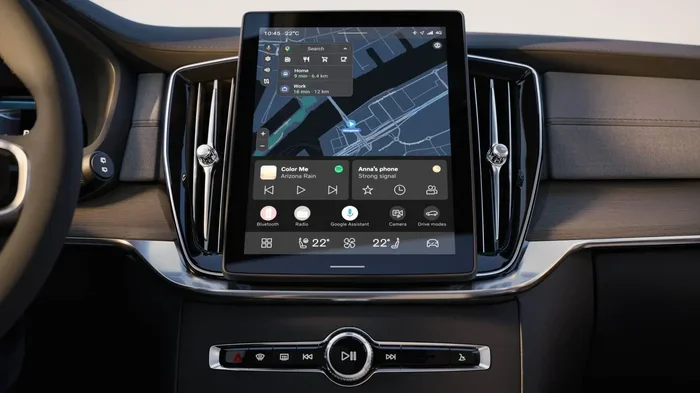
Disabling On Call on Volvo XC 90 is simple and gives you more control over your vehicle’s connected features. Whether you want to turn off remote services, stop notifications, or protect your privacy, this guide walks you through every method. You will learn the step-by-step process, what changes after disabling, and how to re-enable it later if needed.
Owning a Volvo XC 90 comes with a lot of smart features. One of those features is Volvo On Call. It lets you control your car from your phone. But not everyone wants that level of connection. Some drivers prefer more privacy. Others simply do not use the feature. If you are reading this, you probably want to know how to disable on call on Volvo XC 90. This guide will show you exactly how to do it. We will cover every method, what changes after you turn it off, and how to turn it back on later.
The Volvo On Call app connects your phone to your car. It lets you lock doors, start the engine, and check fuel levels from anywhere. For many Volvo owners, this is very convenient. But there are valid reasons to turn it off. Maybe you are concerned about data privacy. Perhaps the app drains your phone battery. Or you might just prefer to use your car the old-fashioned way. Whatever your reason is, disabling On Call is straightforward. Let us walk you through it.
Key Takeaways
- Multiple Methods: You can disable On Call through the car’s Sensus touchscreen, the Volvo On Call app, or by contacting your dealer.
- Privacy Control: Turning off On Call stops data sharing and remote tracking features on your Volvo XC 90.
- No Permanent Changes: You can re-enable On Call at any time through the same settings menu.
- Feature Changes: Disabling removes remote start, lock/unlock, and vehicle status alerts from your phone.
- Dealer Assistance: If you cannot find the settings, your local Volvo dealer can disable On Call for you.
- Warranty Safe: Disabling On Call does not affect your Volvo warranty or vehicle performance.
📑 Table of Contents
What Is Volvo On Call on the XC 90?
Volvo On Call is a connected service that comes with your XC 90. It uses the car’s built-in modem to communicate with your smartphone. Through the app, you can do several things. You can remotely start the engine. You can lock and unlock the doors. You can check tire pressure and fuel levels. The system also sends you alerts about your vehicle. These alerts include things like low fuel warnings and service reminders.
The On Call feature also includes a panic alarm function. If you feel unsafe, you can trigger an alarm from the app. It also has a feature that helps you find your car in a crowded parking lot. These are all useful tools. But they also mean your car is always connected to the internet. That connection sends data back to Volvo’s servers. For privacy-conscious drivers, this is a real concern.
When you sit in the driver’s seat of a Volvo XC 90, you are in one of the most connected vehicles on the road. The chair you sit in is packed with sensors and technology. If you are curious about how a person sitting on a chair interacts with all this tech, it is more complex than you might think. But our focus here is on giving you control over that connection.
Why Would You Want to Disable On Call?
There are several good reasons to turn off Volvo On Call. Let us look at the most common ones.
Privacy Concerns
Volvo On Call collects data about how you use your car. It tracks your location, driving habits, and vehicle status. Some owners are not comfortable with this level of monitoring. Disabling On Call stops this data collection. It gives you back your privacy. You no longer need to worry about your car sending information to Volvo’s servers.
Unwanted Notifications
The On Call app sends regular notifications to your phone. These include service reminders, fuel alerts, and security warnings. If you find these notifications annoying or unnecessary, turning off On Call stops them. Your phone will be quieter and less cluttered.
Battery and Data Usage
The app runs in the background on your phone. This can drain your battery and use mobile data. If you rarely use the remote features, keeping the app active is a waste of resources. Disabling On Call frees up your phone’s battery and data.
No Need for Remote Features
Some drivers simply do not need remote start or lock features. They prefer to walk up to the car and use the key. If On Call does not add value to your daily routine, turning it off makes sense.
How to Disable On Call on Volvo XC 90
There are three main ways to disable On Call. You can do it through the car’s touchscreen, through the mobile app, or by contacting your dealer. Let us go through each method in detail.
Method 1: Through the Sensus Touchscreen
The Sensus system is the main computer in your Volvo XC 90. You can use it to manage all connected services. Here is how to turn off On Call using the touchscreen:
- Start your car and press the Home button on the touchscreen.
- Go to Settings. This is usually shown as a gear icon.
- Look for the Connected Services or Volvo On Call section.
- Select Volvo On Call from the list of options.
- Toggle the switch to turn Off the service.
- Confirm your choice when prompted.
Once you turn it off, the car will stop communicating with the On Call servers. You will no longer receive remote alerts or notifications through the system. The process takes less than a minute.
Method 2: Through the Volvo On Call App
If you prefer using your phone, you can manage On Call settings directly from the app. Here is what to do:
- Open the Volvo On Call app on your smartphone.
- Log in to your Volvo account.
- Go to Settings or Vehicle Settings within the app.
- Look for Connected Services or On Call.
- Toggle the service off.
- Save your changes.
Keep in mind that turning it off in the app may not disable all features on the car itself. For a complete shutdown, use the Sensus touchscreen method described above. Also, if you have the levers on your seat or steering wheel that control various functions, those will still work normally even after you disable On Call.
Method 3: Contact Your Volvo Dealer
If you cannot find the settings or run into issues, your dealer can help. Call your local Volvo service center and ask them to disable On Call for you. They can do this remotely or during a service visit. This is the easiest option if you are not comfortable with technology. Most dealers will handle this request for free.
What Happens After You Disable On Call?
Disabling On Call changes how your Volvo XC 90 works. Here is what you can expect after turning it off.
Features You Will Lose
- Remote Start: You cannot start the engine from your phone anymore.
- Remote Lock/Unlock: The app will no longer control your doors remotely.
- Vehicle Status Alerts: You will not receive notifications about fuel levels, tire pressure, or service needs.
- Location Tracking: Volvo will no longer track your car’s location through the app.
- Panic Alarm: The panic button in the app will stop working.
Features That Still Work
Some things will continue to work normally. Your car’s standard key functions remain the same. The engine, brakes, and steering all work as before. Safety features like lane assist and collision warning are not affected. Disabling On Call only removes the connected services. It does not change how the car drives or operates in any way.
When you disable On Call, you are essentially disconnecting your car from the cloud. Think of it like unplugging a device from the internet. The core functions stay intact. Only the remote and connected features go offline.
Where should lumbar support be on a chair? This is a question many drivers ask when adjusting their seat for a long drive. The Volvo XC 90 has excellent lumbar adjustment built into the seat. Even without On Call, you can still fine-tune your comfort using the physical controls on the seat side panel. The car’s comfort features work independently of any connected service.
Can You Re-enable On Call Later?
Yes, you can absolutely turn On Call back on. The process is the same as disabling it. Go to Settings on the Sensus touchscreen or the Volvo On Call app. Toggle the service back on. Your car will reconnect to Volvo’s servers within a few minutes.
Re-enabling On Call restores all the remote features. You will start receiving notifications again. Your app will reconnect to your car. Nothing is permanently changed when you disable and re-enable this service. It is a flexible system designed to give you control.
Some drivers like to test On Call for a few weeks. Then they decide to turn it off. Later, they might want it back when they get used to the remote features. This back-and-forth is completely normal and supported by Volvo.
Expert Tips for Managing Volvo Connected Services
Here are some practical tips to help you manage your Volvo XC 90’s connected features.
- Review Your Settings Regularly: Check your On Call settings every few months. Volvo sometimes updates its services, and settings can change.
- Use Strong Passwords: If you keep On Call enabled, protect your Volvo account with a strong, unique password. This keeps your car and data secure.
- Update the App: Keep the Volvo On Call app updated to the latest version. Updates fix bugs and improve performance.
- Read the Privacy Policy: Understand what data Volvo collects through On Call. This helps you make an informed decision about keeping it on or off.
- Talk to Other Owners: Join Volvo owner forums to learn how others manage their connected services. You might discover tips you have not considered.
Managing your car’s connected features is all about personal preference. Some people love the convenience of Volvo On Call. Others prefer a simpler, more private experience. There is no right or wrong choice. The important thing is that you feel in control of your vehicle and your data.
When you are adjusting the controls on your XC 90, you might notice various levers and buttons on the console. These physical controls give you direct access to seat heating, mirror adjustments, and more. They work whether On Call is on or off. The car is designed to be fully functional in both states.
Disabling on call on Volvo XC 90 is a simple process that puts you back in charge. Whether you turn it off for privacy, convenience, or personal preference, you can always bring it back whenever you want. The choice is entirely yours.
Final Thoughts
Disabling On Call on your Volvo XC 90 is easier than you might think. You have three clear methods to choose from. The Sensus touchscreen gives you the most complete control. The app offers convenience if you are on the go. And your dealer can handle it for you if you prefer hands-off help.
Remember that turning off On Call does not harm your car. It does not void your warranty. And it does not affect any of the core driving features. You simply lose the remote connected services. For many drivers, this trade-off is well worth it.
Take a moment to think about what you want from your Volvo XC 90. Do you need the connected features? Or would you prefer a simpler, more private driving experience? Whatever your answer is, you now have the knowledge to make it happen. Disabling On Call gives you that choice, and that is exactly what owning a Volvo should be about.
Frequently Asked Questions
Can I disable Volvo On Call without going to the settings menu?
Yes, you can contact your Volvo dealer to disable On Call for you. They can do it remotely or during a service appointment. This is the easiest option if you are not comfortable navigating the car’s settings or the app on your phone.
Will disabling On Call affect my Volvo warranty?
No, disabling On Call does not affect your warranty in any way. The connected service is separate from your vehicle’s core systems. All safety features, drivetrain coverage, and other warranty protections remain fully intact after you turn off On Call.
Can I use remote start after disabling On Call?
No, remote start is part of the On Call service. Once you disable it, you will need to start the engine using the physical key or the push-button start inside the car. All remote features stop working when On Call is turned off.
How long does it take to disable On Call on a Volvo XC 90?
The process takes less than two minutes using the Sensus touchscreen. Simply go to Settings, select Connected Services, and toggle On Call off. If you use the app, it takes about the same amount of time. Calling your dealer may take longer depending on their availability.
Does disabling On Call stop all data collection by Volvo?
Disabling On Call stops most data collection related to connected services. However, some basic vehicle data may still be collected for safety and diagnostic purposes. If you want full data privacy, review your Volvo privacy settings and consider contacting Volvo directly for more detailed information.
Can I disable On Call on an older Volvo XC 90 model?
Yes, the On Call feature is available on most XC 90 models from recent years. The disabling process is similar across model years. If you own an older model and cannot find the settings, your dealer can confirm whether On Call is available and help you turn it off.
=== CONCLUSION ===
Disabling on call on Volvo XC 90 is a simple process that gives you more control over your connected car experience. You now know three different methods to turn it off, what features change after disabling, and how to bring it back if you ever need it again. The choice is yours. Whether you value privacy, simplicity, or just prefer a less connected driving experience, Volvo makes it easy to customize your XC 90 to fit your lifestyle. Take a few minutes today to review your On Call settings and make the choice that feels right for you.

Similar Posts































