A Shark vacuum beater bar not working is one of the most common issues, but it’s often a simple fix. The problem usually stems from clogs, a worn or broken drive belt, hair wraps jamming the brush roll, or a tripped reset button. Before assuming a motor failure, follow a systematic diagnostic process starting with the easiest checks. Most homeowners can resolve this issue in under 30 minutes with basic tools, saving on costly service calls.
Let’s face it: there’s nothing more frustrating than pulling out your Shark vacuum, ready to tackle the living room carpet, only to discover that the beater bar—that crucial spinning brush at the bottom—has decided to go on strike. Your vacuum might still have great suction, but without that agitation, it’s just pushing dirt around, especially on carpets. A Shark vacuum beater bar not working is a widespread problem, but the fantastic news is that it’s rarely a death sentence for your machine. In fact, with a systematic approach, you can diagnose and fix the issue yourself in most cases, often in under 30 minutes. This guide will walk you through every step, from the simplest reset to more complex disassembly, ensuring you get that brush roll spinning again.
We’ll start by understanding exactly what the beater bar does and why it stops. Then, we’ll move into a foolproof diagnostic process. You’ll learn how to identify the specific cause—be it a tangled hair monster, a shredded belt, or a tripped safety switch—and we’ll provide detailed, model-aware instructions for the most common Shark series (Navigator, Rotator, Vertex/DuoClean). We’ll also cover essential preventative habits to keep your vacuum running smoothly for years. So, grab your screwdriver, and let’s get your Shark back in the fighting shape it was built to be.
Key Takeaways
- Clogs are the #1 culprit: Hair, string, and carpet fibers wrap around the brush roll bearings or block the suction path, causing the beater bar to stall.
- The drive belt is a frequent failure point: This rubber belt stretches, slips, or breaks over time, disconnecting the motor’s power from the brush roll.
- Always check the reset button first: Shark vacuums have a thermal reset button on the brush roll housing; a simple press often revives a non-spinning bar.
- Model matters: Removal procedures for the brush roll and belt differ significantly between Shark Navigator, Rotator, and Vertex series vacuums.
- Preventative maintenance is key: Regularly cleaning the brush roll and checking the belt can prevent 80% of beater bar failures.
- Listen and feel for clues: A humming motor with no brush spin points to a belt or brush roll jam; complete silence suggests an electrical issue or tripped reset.
📑 Table of Contents
- Understanding Your Shark Vacuum’s Beater Bar: The Heart of Carpet Cleaning
- Recognizing the Symptoms: Is It Really the Beater Bar?
- Step-by-Step Diagnostic Process: Finding the Root Cause
- Common Fixes for Shark Vacuum Beater Bar Issues
- Model-Specific Considerations for Shark Vacuums
- Preventative Maintenance: Your Best Defense
- When to Call a Professional: Knowing Your Limits
Understanding Your Shark Vacuum’s Beater Bar: The Heart of Carpet Cleaning
Before we dive into repairs, it’s crucial to understand what we’re dealing with. The beater bar, also called a brush roll or agitator, is the cylindrical roller with bristles (or sometimes a rubber strip) that spins rapidly at the front of your vacuum’s floor head. Its primary job is to “beat” dirt and debris out of carpet fibers, which the suction then removes. On hard floors, many Shark models automatically stop the brush roll (or you can turn it off) to prevent scattering debris, but on carpets, it’s essential.
The Drive System: How Power Gets to the Brush
The beater bar doesn’t spin by magic. It’s part of a mechanical system:
- The Motor: Your Shark vacuum has a main suction motor. In most upright and stick models, a separate, smaller motor (or a clutch mechanism from the main motor) powers the brush roll.
- The Drive Belt: This is a thin, rubbery belt (often a “ribbed” or serpentine belt) that connects the motor’s drive shaft to the brush roll’s pulley. It’s the most common point of failure.
- The Brush Roll Assembly: This includes the roller itself, two end caps with bearings, and a pulley on one end. Hair and fibers can get trapped in the bearings, jamming the roll.
- The Reset Switch: A safety thermal fuse, usually a red button on the underside of the floor head or near the brush roll housing. If the motor overheats (from a jam or prolonged use), it trips and cuts power to the brush roll motor.
When your Shark vacuum beater bar stops working, the failure is almost always within this drive system. The motor is usually still running (you hear suction), but the power isn’t transferring to the brush. Your job is to find the break in that chain.
Recognizing the Symptoms: Is It Really the Beater Bar?
“My Shark vacuum beater bar isn’t working” is a clear complaint, but the symptoms can vary. Paying close attention to what your vacuum *is* and *isn’t* doing is your first diagnostic clue.
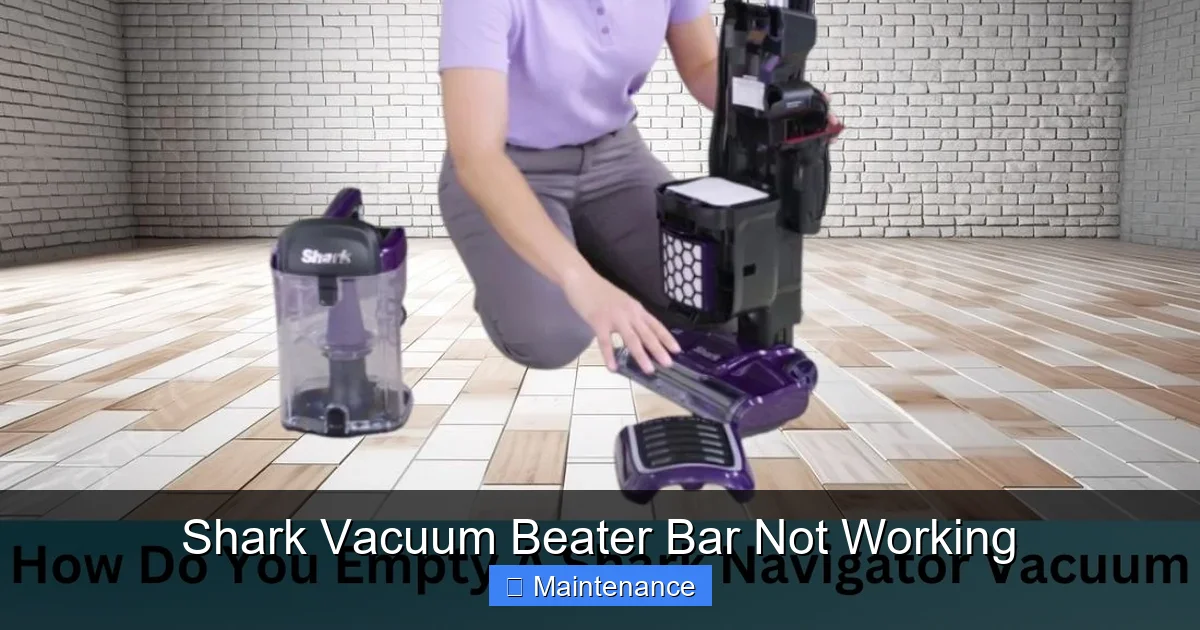
Visual guide about Shark Vacuum Beater Bar Not Working
Image source: sharkvacuum.blog
Symptom Checklist and What They Mean
- The vacuum has strong suction, but the brush doesn’t spin at all. This is the classic sign of a brush roll-specific failure. The main suction motor is fine. The problem is isolated to the brush roll drive system. Causes: tripped reset button, broken/slipping drive belt, jammed brush roll, or failed brush roll motor.
- The brush spins slowly or intermittently. This often points to a slipping belt (it’s stretched or glazed), a partial jam on the brush roll (one side is bound), or a failing brush roll motor that’s losing power.
- The vacuum makes a loud grinding or squealing noise from the floor head. This is a red flag. It usually means the brush roll bearings are seized from debris, causing the belt to burn or slip violently. It could also indicate a broken gear in a clutch mechanism (common in some Shark Rotator models). Unplug the vacuum immediately if you hear this.
- The brush spins for a few seconds, then stops. This classic pattern points to a thermal reset tripping due to overheating. The initial jam causes the motor to overheat, the fuse blows, and power cuts. After cooling, it might work briefly again before repeating. The root cause is the original jam.
- There’s no noise from the brush motor area at all. If you hear the main suction motor but complete silence from the floor head, it could be a tripped reset button, a broken wire to the brush motor, or a failed brush motor itself.
Eliminating Other Possibilities
Before we disassemble anything, let’s rule out two simple things. First, ensure your Shark vacuum is set to “Carpet” mode if it has a floor type selector. On some models (especially stick vacs), the brush roll is electronically disabled on hard floor settings. Second, check that your vacuum isn’t simply clogged *above* the brush roll. A severe clog in the hose or wand can reduce suction so much that it feels like the brush isn’t agitating, even if it is spinning weakly. Detach the hose and wand and test the vacuum directly on the floor head. If suction improves dramatically, you have a clog elsewhere, not a beater bar issue.
Step-by-Step Diagnostic Process: Finding the Root Cause
Don’t guess—test! Follow this logical sequence to pinpoint the exact failure. Always unplug your Shark vacuum before any inspection or disassembly.
Visual guide about Shark Vacuum Beater Bar Not Working
Image source: sharkvacuum.blog
Step 1: The Instant Reset Button Check
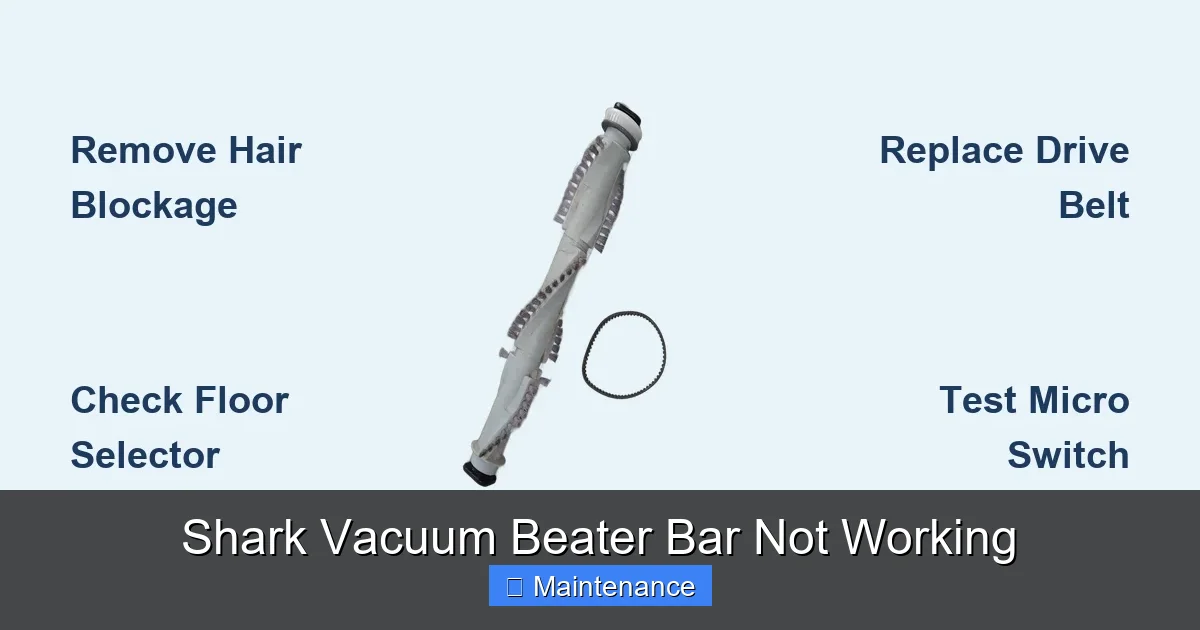
This is your 10-second first step. Locate the reset button. On most Shark uprights (Navigator, Rotator), it’s a small red button on the underside of the floor head, often near the brush roll area. On some stick vacs (like the Shark Vertex), it might be inside the brush roll housing or on the main body. Press it firmly until you hear/feel a click. Then, try vacuuming on carpet again. If this fixes it, you had a thermal overload, likely from a temporary jam. However, you must still find and clear that jam to prevent it from happening again.
Step 2: Visual Inspection and Manual Spin Test
Flip your vacuum over. Look at the beater bar through the opening. Can you see obvious clumps of hair, string, or carpet fiber wrapped around it? Use a flashlight. Now, try to spin the brush roll by hand (it should turn freely). If it’s stiff, won’t turn, or only turns with great difficulty, you have a jam. The jam is likely at the bearings (the ends inside the plastic housing). This is the most common cause of a Shark vacuum beater bar not working. If it spins freely, move to the next step.
Step 3: Accessing the Brush Roll and Belt
To see the drive belt and the brush roll clearly, you need to remove the bottom plate of the floor head. The process varies by model:
- Shark Navigator (Uprights): Usually, there are 4-6 screws on the bottom plate. Some are Torx (star-shaped) screws. Remove them and lift the plate off.
- Shark Rotator (Uprights): Often has a release lever or clip on the side of the floor head. Pressing it allows the bottom plate to swing down and off. Some models still have screws.
- Shark Vertex/DuoClean (Stick Vacs): The entire brush roll housing often detaches from the main body with a release button or by unscrewing a ring. Consult your manual, but it’s typically very tool-free.
Once the plate is off, you’ll see the brush roll and the belt. Take a photo before you disconnect anything! It’s your reference for reassembly.
Step 4: The Belt and Brush Roll Inspection
With the plate off, here’s what you’re looking for:
- The Drive Belt: Is it there? Is it loose, stretched, shiny/glazed, or broken? A good belt should be taut with slight give. If it’s loose or has cracks, it needs replacement.
- The Brush Roll: Pull it out. Check the bearings at each end. Are they clogged with hair? Spin each bearing by hand. They should rotate smoothly. If they’re gritty or seized, you need to clean them thoroughly or replace the brush roll assembly.
- The Brush Roll Pulley: The part the belt sits on. Ensure it’s not cracked or wobbly.
- The Motor Pulley: The small pulley on the motor shaft. Ensure it spins freely and isn’t covered in belt debris.
A broken belt is obvious. A jammed brush roll is obvious. A slipping belt is trickier—it might look okay but won’t grip.
Common Fixes for Shark Vacuum Beater Bar Issues
Now that you’ve diagnosed the problem, let’s fix it. We’ll address the most common culprits in order of frequency.
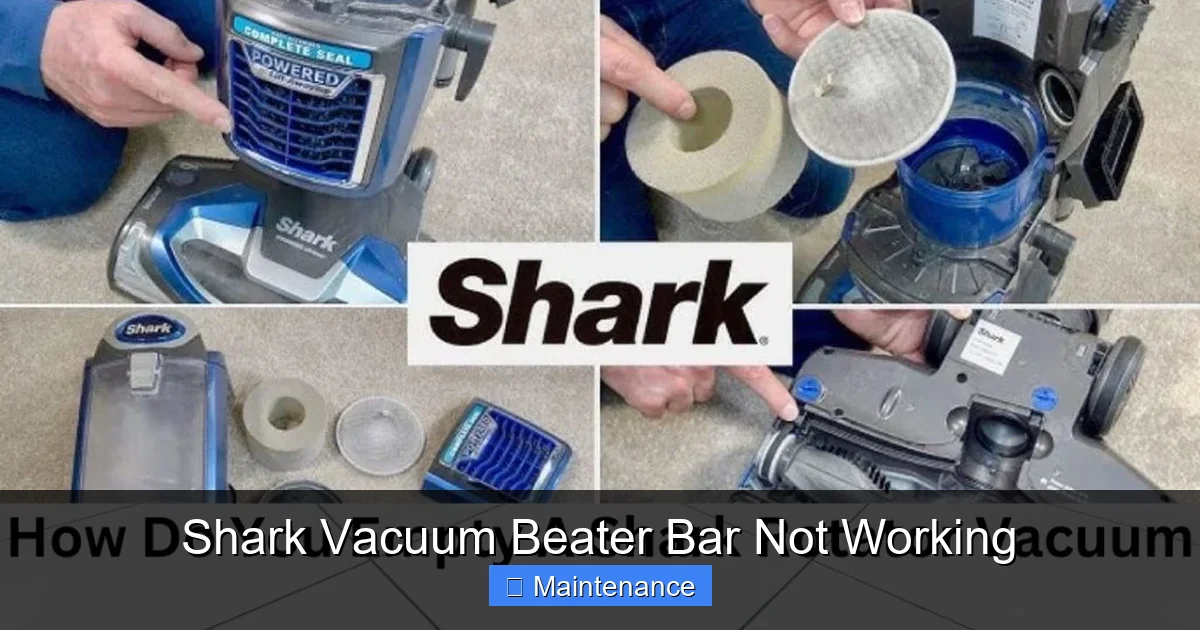
Visual guide about Shark Vacuum Beater Bar Not Working
Image source: sharkvacuum.blog
Fix 1: The Ultimate Hair and Debris Jam Clearance
This fixes 70% of “Shark vacuum beater bar not working” cases. Hair, string, and carpet fibers act like a tourniquet around the brush roll bearings.
Procedure:
- Remove the brush roll from the vacuum as you did in the diagnostic step.
- Take it to a well-lit area. You’ll see hair wrapped around the plastic core and, more importantly, packed into the bearings at each end.
- Use scissors or a sharp utility knife to carefully cut and remove all hair and fibers. Do not use your fingers—you can get a nasty cut or push debris deeper.
- For packed bearings, use a seam ripper, crochet hook, or even a bent paperclip to dig out the tangled mass. Be thorough. Any remaining fibers will cause the roll to bind again.
- Once clear, spin each bearing by hand. It should rotate silently and smoothly. If it’s still gritty, you may need to replace the entire brush roll assembly (they are inexpensive and often come with new bearings).
- Wipe the brush roll core clean with a dry cloth.
- Reinstall the brush roll, ensuring it’s seated properly in its slots so it’s parallel to the floor head. Reattach the bottom plate. Test.
Fix 2: Drive Belt Replacement
If your belt is broken, stretched, or glazed (shiny from overheating), it must be replaced. Shark models typically use specific belt types. The most common is the Shark Belt # 195-AA (or NV100, NV200 series belts), but always verify your model number (found on the back or underside of the vacuum) before ordering.
Procedure:
- With the bottom plate off, stretch the belt off the motor pulley first (it’s usually the smaller pulley).
- Then, stretch and slide it off the brush roll pulley.
- Take the old belt to a hardware store or order an exact replacement online.
- To install the new belt, stretch it over the brush roll pulley first, ensuring it sits in the groove. Then, stretch it over the motor pulley. This can be tricky; you may need to rotate the motor pulley slightly to get the belt on. Never force it.
- Spin the brush roll by hand several times to ensure the belt is seated correctly and not twisted.
- Reinstall the brush roll (if you removed it) and the bottom plate. Test.
Fix 3: Resetting and Addressing the Root Cause
If you pressed the reset button and it worked temporarily, you have a recurring jam or overload. You must perform Fix 1 (the thorough hair removal) to solve the underlying issue. The reset button is a safety feature, not a fix. Ignoring the cause will lead to constant tripping and eventual motor burnout.
Fix 4: Brush Roll Bearing or Assembly Replacement
If, after a meticulous cleaning, the bearings on the brush roll still don’t spin freely, the internal bearings are shot. While you can sometimes replace just the bearings, it’s often more cost-effective and time-efficient to replace the entire brush roll assembly. They are designed as a single unit. Purchase a replacement part for your exact Shark model. Installation is usually just the reverse of removal—slide it into its housing clips.
Model-Specific Considerations for Shark Vacuums
While the core principles are the same, Shark’s designs have nuances. Here’s what to know for the major lines:
Shark Navigator Series (Uprights)
These are the classic “lift-away” designs. The floor head is separate. Beater bar access is almost always via screws on the bottom plate. The drive belt is a simple loop. The reset button is prominently red on the underside. The brush roll itself is a long, narrow cylinder with bristles. Hair jams here are infamous because the bristles trap fibers. Cleaning requires cutting them out.
Shark Rotator Series (Uprights)
These feature a swiveling floor head and often a “powered” brush roll that engages/disengages with a pedal. The brush roll housing can be more complex. Many Rotator models have a clutch assembly instead of a simple belt. If the beater bar doesn’t spin but you hear a whirring motor sound, the clutch may be worn out and not engaging. Diagnosing this requires removing the brush roll housing to inspect the clutch gears. The reset button location is similar to the Navigator.
Shark Vertex & DuoClean Series (Stick/Canister)
These are more modular. The DuoClean has two rollers: a main bristled brush roll and a rubber squeeze roller behind it. The issue is usually with the front bristled brush. Access is often tool-free: a release button or a twist-lock ring on the bottom of the floor head. The belt is inside the housing. Be extra careful with small screws and clips when opening these lightweight housings. The reset button might be on the main body of the stick vac.
Shark ION Robot Vacuums
A “beater bar not working” on a robot is different. It’s almost always a hair jam in the brush roll module. The module is easily removable (usually a clip). Clear the hair from the bristles and the bearing housing. There is no user-serviceable belt; it’s a direct-drive motor. If clearing debris doesn’t work, the brush motor module itself may need replacement.
Preventative Maintenance: Your Best Defense
An ounce of prevention is worth a pound of cure. Integrating these habits into your routine will drastically reduce the chances of a Shark vacuum beater bar failure.
After Every 2-3 Uses: The Quick Clean
Make it a habit. After vacuuming, turn the machine over and use scissors to snip any visible hair or fibers wrapped around the brush roll bristles. Even if it’s not jammed, removing this buildup prevents it from compounding into a major knot. You don’t need to remove the bottom plate for this—just clip what you can see.
Monthly Deep Clean
Once a month, or if you have pets, perform a full removal:
- Remove the bottom plate.
- Take out the brush roll.
- Use a seam ripper or dedicated brush cleaning tool to dig out all embedded hairs from the bearings and core.
- Check the belt for glazing or cracks. Wipe it with a dry cloth.
- Check the suction path in the floor head for blockages.
- Reassemble.
Mind What You Vacuum
Your Shark is powerful, but it has limits. Avoid vacuuming:
- Small objects like pins, paperclips, or staples (they can jam bearings).
- Long, draggy items likeextension cords, curtains, or loose rugs (they can wrap the brush roll and burn the belt).
- Large amounts of fine powder (baby powder, plaster dust). It can clog the entire system and coat the belt, causing slippage.
Inspect and Replace Belts Proactively
Even if not broken, a drive belt lasts about 1-2 years with regular use. If you notice your vacuum isn’t picking up as well on carpets, a slipping belt could be the silent culprit. Consider a belt replacement as part of an annual tune-up.
When to Call a Professional: Knowing Your Limits
You’ve followed every step. The brush roll spins freely, the new belt is on correctly, the reset button is pressed, but the beater bar still doesn’t work. Now what?
If you’ve confirmed:
- A functional brush roll (spins freely by hand).
- A new, correctly installed drive belt that is taut.
- A pressed reset button.
- Good suction from the main motor.
- And you hear no sound at all from the brush roll area when powered on…
…the fault likely lies with the dedicated brush roll motor itself or its wiring. On many Shark uprights, this is a small motor mounted on the side of the floor head. Diagnosing and replacing this requires basic electrical knowledge and soldering skills in some models. At this point, calling Shark customer support for warranty status or seeking a qualified small appliance repair technician is the smart move. The cost of a professional repair may approach the value of an older machine, at which point replacement is the logical choice.
However, if you hear a humming or whirring sound from the brush area but the roll doesn’t turn, and you’ve ruled out a jam and belt slip, the issue is likely a worn clutch mechanism (common in Rotator models) or a stripped gear inside the motor. These are also professional repairs.
Conclusion
A Shark vacuum beater bar not working is a common but usually conquerable problem. The key is methodical diagnosis. Start with the free, 10-second reset. Then, get under the vacuum and look. The vast majority of the time, you’ll find a tangled mess of hair choking the brush roll bearings or a worn-out belt. Armed with a screwdriver, scissors, and maybe a new $10 belt, you have the power to fix it yourself. Remember to consult your specific model’s manual (available online by model number) for exact disassembly steps. By performing regular preventative maintenance, you’ll not only solve this issue but also extend the life and performance of your Shark vacuum for years to come, ensuring your carpets truly get clean every single time.
Frequently Asked Questions
Why does my Shark vacuum beater bar spin for a second then stop?
This almost always indicates a thermal reset has tripped. The beater bar initially spins but encounters resistance (from a jam or overly thick carpet), causing the motor to overheat and shut down. After it cools, it may work again briefly. The solution is to unplug the vacuum, clear any jam in the brush roll and bearings, press the reset button, and try again.
How do I know if my Shark vacuum belt is broken?
A broken belt is obvious—it will be snapped in two or missing entirely. A belt that needs replacement is often stretched, loose, shiny/glazed from heat, or has cracks in the rubber. You can also test by trying to move the belt side-to-side; it should have some tension but not sag excessively. If the brush roll doesn’t spin but the vacuum has suction, a belt issue is a primary suspect.
Can I use my Shark vacuum without the beater bar?
You can, but you shouldn’t for carpets. Without the beater bar, your Shark becomes a suction-only vacuum, which is fine for hard floors but highly ineffective on carpets. It will not agitate dirt out of the pile, leading to poor cleaning results. It’s designed to work as a system.
Where is the reset button on my Shark vacuum?
On most Shark uprights (Navigator, Rotator), it’s a small red button located on the underside of the floor head, usually near the brush roll area. On some stick vacuums like the Shark Vertex, the reset may be on the main body or inside the brush roll housing. Consult your user manual for the exact location for your model number.
How often should I clean my Shark vacuum’s beater bar?
For best performance and to prevent jams, do a quick visual check and snip any visible hair after every 2-3 uses. Perform a full removal and deep cleaning of the brush roll and bearings at least once a month, or more frequently if you have pets or long hair.
My brush roll spins freely by hand but still won’t work in the vacuum. Is the motor bad?
Not necessarily. If the brush roll spins freely by hand, the jam is cleared. The issue is likely the drive belt (slipping or broken) or a tripped reset button. First, confirm the reset button is pressed. Then, with the bottom plate off, power the vacuum briefly (be careful!) and watch the motor pulley. If the motor pulley spins but the brush roll doesn’t, the belt is the problem. If the motor pulley doesn’t spin, the motor or its wiring may be faulty.