If your Shark Nv800w vacuum suddenly refuses to power on, don’t panic. This is a common issue with straightforward solutions, often related to power supply, overheating protection, or simple blockages. Start by methodically checking the outlet, power cord, and reset button before assuming a major failure. Most problems can be resolved at home in minutes with basic troubleshooting.
Key Takeaways
- Always start with the simplest checks: Verify the wall outlet is working and the vacuum’s power switch is fully engaged before disassembling anything.
- The thermal reset button is a primary culprit: Located on the back or underside, it trips if the motor overheats from a clog or jam. Pressing it is often the instant fix.
- Airflow is critical: A completely blocked suction path (from brush roll to hose to exhaust) will trigger safety cut-offs. Clear all debris from every stage.
- Inspect the power cord meticulously: Fraying, cuts, or damage at either end (plug or vacuum connection) can break the circuit and prevent power.
- Overheating isn’t always obvious: The vacuum may feel warm, but the internal fuse could have tripped from a recent, temporary blockage you’ve since cleared.
- Complex internal failures require a pro: If all external checks fail, the issue may be a faulty switch, motor, or internal wiring, necessitating authorized service.
- Safety first: Always unplug the vacuum before inspecting, cleaning, or attempting any internal checks to avoid electric shock.
📑 Table of Contents
- Shark Nv800w Will Not Turn On: A Complete Troubleshooting Guide
- 1. The Absolute Basics: Power Supply & Electrical Checks
- 2. The Usual Suspect: Overheating & Thermal Protection
- 3. The Silent Enemy: Brush Roll & Airflow Obstructions
- 4. The Reset Button & Circuit Breaker Deep Dive
- 5. When Hardware Fails: Internal Component Issues
- 6. Decision Time: DIY Fix or Professional Repair?
- Strong Conclusion: Patience and Methodical Troubleshooting Wins
Shark Nv800w Will Not Turn On: A Complete Troubleshooting Guide
You’re all set to clean. You plug in your trusty Shark Nv800w upright vacuum, flip the switch, and… nothing. No hum, no whirr, just silence. That moment of frustration is all too familiar for many Shark owners. But before you resign yourself to a costly repair or the hassle of buying a new vacuum, take a deep breath. The phrase “Shark Nv800w will not turn on” covers a wide range of potential issues, and the vast majority are not only diagnosable but also fixable by you, at home, with no tools or special expertise required.
This guide is your systematic roadmap from “why won’t you work?!” to “ah, there we go!” We’ll walk through every possible reason, starting with the absolute basics and moving toward more complex internal failures. We’ll talk about the famous reset button, the silent enemy of clogs, and the telltale signs of overheating. By the end, you’ll be equipped with the knowledge to confidently troubleshoot and likely solve the problem yourself. Let’s get started.
1. The Absolute Basics: Power Supply & Electrical Checks
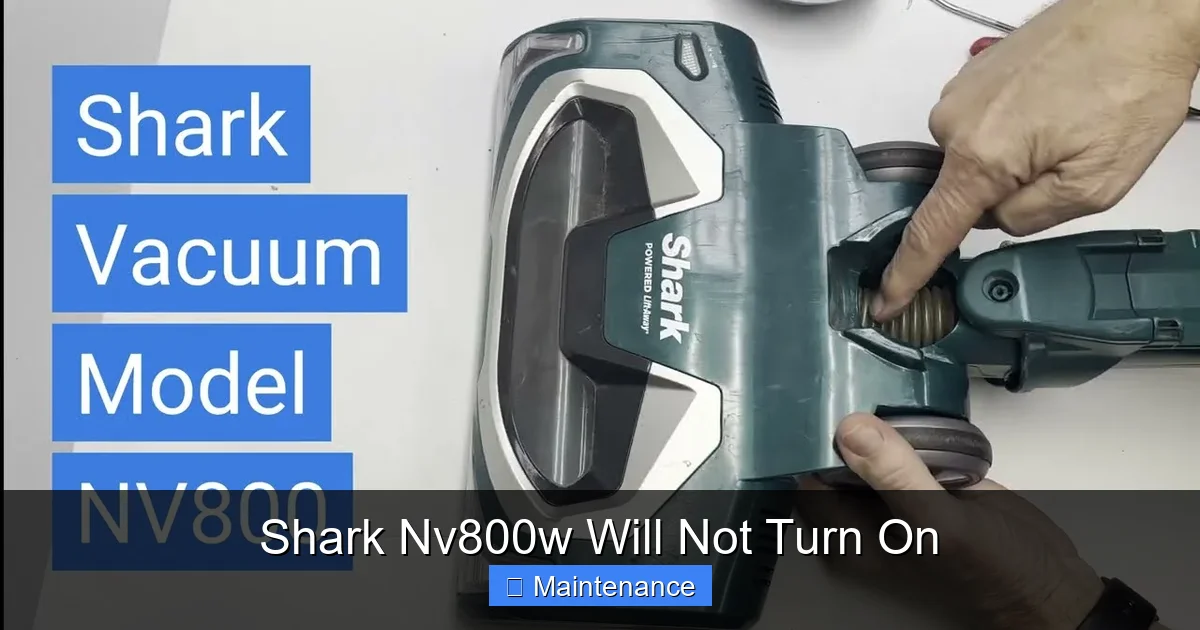
When a Shark Nv800w will not turn on, the first question is always the most obvious: is it getting power? It’s easy to overlook the simplest things when we’re frustrated. We’ll break this down into a foolproof checklist.
Visual guide about Shark Nv800w Will Not Turn On
Image source: i.ytimg.com
Is the Wall Outlet Actually Working?
This is step zero. The issue might not be with your Shark at all. Test the outlet by plugging in a lamp, your phone charger, or any other device you know works. If that device also doesn’t power on, the problem is your home’s electrical circuit. Check for a tripped breaker in your electrical panel or a blown fuse if you have an older home. Once the circuit is restored, your vacuum should power up. If the outlet works with other devices, move to the next step.
Inspecting the Power Cord and Plug
Now, look at your vacuum’s lifeline: the power cord. Unplug it from the wall and give it a thorough visual and tactile inspection from plug to vacuum body.
- Check the Prongs: Are both metal prongs on the plug intact and straight? A bent or broken prong won’t make proper contact in the outlet.
- Examine the Cord Entire Length: Feel along the entire cord for any cuts, nicks, or areas where the outer insulation is worn down to the inner wires. Pay special attention to where the cord enters the vacuum body and where it connects to the plug, as these are stress points prone to damage.
- The “Wiggle Test”: With the vacuum plugged in, gently wiggle the cord near the plug and near the vacuum’s connection point. Does the vacuum flicker on or make a sound? If so, you have a break in the wiring at that stress point. This is a common failure point and requires cord replacement.
The Power Switch Itself
Locate the power switch on your Shark Nv800w. It’s usually a large, red button on the top or back of the vacuum head. Press it firmly and listen. Do you feel or hear a faint click? That click is the internal switch engaging. No click at all suggests the switch itself may be faulty or its connection to the internal wiring is loose. While switch replacement is more involved, it’s still a common and repairable issue.
2. The Usual Suspect: Overheating & Thermal Protection
Shark vacuums, like most modern appliances, have built-in safety mechanisms to prevent fire and damage. The most relevant here is the thermal protection system. If the motor gets too hot, a thermal fuse will trip, cutting all power. This is a very common reason a Shark Nv800w will not turn on, even if you’ve unclogged the issue.
Visual guide about Shark Nv800w Will Not Turn On
Image source: sharkvacuum.blog
How Overheating Happens
Overheating is almost always caused by restricted airflow. Think of it like holding your breath—your body (the motor) works harder and heats up. The vacuum’s “breath” is the air flowing through it. Block that flow, and the motor strains, heats up, and the safety fuse blows. Common airflow blockages include:
- A brush roll jammed with hair, string, and carpet fibers.
- A clogged foam filter (the washable one).
- A clogged exhaust filter (the pleated one, if your model has one).
- A completely full dust cup.
- An object stuck in the hose or wand.
Finding and Using the Reset Button
This is your first line of defense against an overheating shutdown. The reset button on the Shark Nv800w is a small, red, circular button. Its location is key: It is almost always found on the back of the vacuum’s main body, near the base or on the side, sometimes under a small rubber flap. On some models, it’s on the underside.
Here’s the critical procedure: If your vacuum shuts off during use or won’t turn on at all, suspect overheating. First, unplug the vacuum. Then, locate the reset button. Press it in firmly until you feel and hear a click. Wait at least 30 seconds for the internal thermal fuse to fully cool and reset. Now, plug the vacuum back in and try to turn it on. If it starts, you’ve solved it. But remember, the reset is a symptom fix. You must find and clear the original blockage that caused the overheating, or it will trip again immediately.
3. The Silent Enemy: Brush Roll & Airflow Obstructions
As established, blocked airflow is the root cause of most overheating issues. But a severe blockage can also physically prevent the motor from starting, as it creates immense resistance. A Shark Nv800w will not turn on if the motor can’t spin the brush roll or push air through the system. Let’s perform a full airflow autopsy.
Visual guide about Shark Nv800w Will Not Turn On
Image source: howtofinders.com
Step-by-Step Airway Clearance
Work methodically from the intake to the exhaust. Always unplug the vacuum first.
- The Brush Roll: Flip the vacuum over. Use a coin or screwdriver to release the brush roll cover. Remove the brush roll. Pull out all hair, string, and debris wrapped around it and in the bearings. Ensure it spins freely by hand. Clean the cavity where it sits.
- The Suction Path: Look into the opening where the brush roll was. Is there debris lodged in the duct leading up to the hose? Remove it.
- The Hose & Wands: Detach the hose from the vacuum body and from the wand. Look through it. Use a long, flexible brush (or a bent wire coat hanger carefully) to dislodge any deep clogs. Check the wand itself.
- The Dust Cup: Empty the dust cup completely. Check the mesh screen inside the cup for clogs. Rinse it with water if needed (ensure it’s 100% dry before reinserting).
- The Filters: This is non-negotiable. Your Shark Nv800w has at least one foam filter (pre-motor) and often a pleated exhaust filter (post-motor). Remove them. The foam filter should be washed with water and mild soap, then air-dried for 24-48 hours. The pleated filter should be gently tapped out and, if washable (check manual), rinsed. A clogged filter is a guaranteed airflow stopper.
- The Exhaust Vents: Finally, check the exhaust vents on the back or top of the vacuum. Blow through them or use a vacuum’s crevice tool in reverse to clear any dust buildup.
Reassemble everything securely. Ensure the dust cup and all filters are properly seated. Now, try turning it on. In 80% of “won’t turn on” cases, this deep cleaning resolves the issue.
4. The Reset Button & Circuit Breaker Deep Dive
We mentioned the reset button, but let’s cover it in more detail, including the less common but possible circuit breaker issue.
Reset Button: Location, Failure, and Retries
The reset button is a thermal fuse in button form. If it has tripped, you must press it. But what if pressing it does nothing, or it pops out again instantly? That means the overheating condition persists. Go back to Section 3 and perform the full airway clearance again. Be thorough. A single piece of hair in the exhaust filter can be enough to keep the system from cooling.
What if the reset button is missing or broken? Rarely, the button itself can fail. If you can’t find it (consult your user manual for an exact diagram) or if pressing it yields no click and the vacuum remains dead, the internal thermal fuse may have failed permanently. This is a part replacement.
The Internal Circuit Breaker
Some Shark models have a secondary, internal circuit breaker that can trip due to a power surge or severe electrical fault. This is less common than the thermal reset. If you’ve verified power, checked the cord, cleared all blockages, pressed the reset button, and the vacuum is still completely dead with no sound, an internal breaker could be the cause. This is not user-serviceable and points to a need for professional repair.
5. When Hardware Fails: Internal Component Issues
If you’ve traversed every step above—verified outlet power, inspected a flawless cord, cleared every possible clog, pressed the reset button, and ensured all filters are clean—and your Shark Nv800w still will not turn on, the fault lies within the vacuum’s internal components. These are less common but possible.
Faulty Power Switch
The physical on/off button is a mechanical switch with electrical contacts. These contacts can wear out, burn, or break. If you previously noticed the switch feeling “spongy” or requiring multiple presses, this is a strong indicator. Diagnosis requires opening the vacuum’s hood to access and test the switch with a multimeter for continuity. Replacement is the fix.
Motor Failure
The heart of the vacuum has given out. Motor failure can be gradual (with burning smells, loss of suction, odd noises) or sudden. A seized motor will draw so much current that it can blow internal fuses or trip breakers, resulting in a total power loss. Diagnosing this requires professional tools and knowledge. If you smell a strong electrical burning odor from the vacuum, unplug it immediately and do not attempt to run it.
Damaged or Loose Internal Wiring
Over time, vibrations can cause wire connections to loosen or fray, especially near the brush roll head or at the motor terminals. A wire that has rubbed against a sharp edge can have its insulation worn away, causing a short circuit. This is often discovered during a professional teardown. Look for any obvious signs of burnt or disconnected wires if you do open the casing (only if you are comfortable and the vacuum is unplugged).
6. Decision Time: DIY Fix or Professional Repair?
You’ve run the gauntlet. Now, how do you decide the next step? It’s a balance of cost, effort, and the vacuum’s age/value.
Calculate the Cost-Benefit
A new Shark Nv800w typically costs in the range of $200-$300. Professional diagnostic fees can be $50-$100, with parts and labor adding more. If your vacuum is older, heavily used, or you’ve already invested in repairs, replacement might be more economical. If it’s relatively new or a higher-end model, repair is often worthwhile.
Warranty and Authorized Service
Check your warranty status first! Shark offers limited warranties (often 5-7 years for the motor, 1 year for other parts). If your vacuum is still under warranty, your only path is to contact Shark Customer Support. They will guide you to an authorized service center. Do not open the vacuum yourself if it’s under warranty, as this will void it. They will handle all internal component replacements at no or low cost to you.
When to Call a Professional
Call an authorized Shark service technician if:
- All troubleshooting fails, and you suspect a motor, switch, or internal wiring issue.
- The vacuum is still under warranty.
- You are not comfortable performing basic disassembly for cleaning or inspection.
- You smell burning plastic or see smoke.
For simple clogs, filter cleaning, and reset button pressing, you are fully capable. Know your limits. A professional can diagnose complex electrical faults safely and efficiently.
Strong Conclusion: Patience and Methodical Troubleshooting Wins
Facing a Shark Nv800w that will not turn on is a universal cleaning-day nightmare. But as we’ve seen, it’s rarely a death sentence for your appliance. The journey to a solution is a ladder of complexity. You start at the bottom with the power outlet and work your way up through the cord, the reset button, and the entire airway system. Ninety percent of these “no power” cases are solved by finding and pressing that red reset button after a thorough, honest cleaning of every filter and the brush roll. It’s the combination of the visible clog and the hidden thermal fuse trip that creates the perfect storm of confusion.
Embrace the process. Be patient. Unplug, inspect, clear, reset. Give yourself a systematic checklist. This methodical approach not only saves you money and frustration but also deepens your understanding of your machine, making you a more effective owner. You’ll likely have your Shark humming and suctioning again in under 15 minutes. And if you don’t? You now know exactly what information to give a service technician, which can speed up their diagnosis and potentially save you a diagnostic fee. Your vacuum is a tool, and like any tool, understanding its basic mechanics empowers you. Now go check that reset button—it’s probably waiting for you.
Frequently Asked Questions
Where exactly is the reset button on my Shark Nv800w?
Look on the back or bottom of the main vacuum body. It’s a small, red, circular button, often protected by a rubber flap. Consult your user manual for an exact diagram for your specific model number.
My vacuum overheated and I pressed the reset button, but it turns off again after a few seconds. Why?
This means the original airflow blockage that caused the overheating is still present. You must completely clear all obstructions from the brush roll, hose, dust cup, and both filters before the reset will hold.
Can a clogged filter alone cause the Shark Nv800w to not turn on?
Yes. A severely clogged pre-motor foam filter or post-motor exhaust filter will completely block airflow, causing the motor to overheat instantly and trip the thermal reset. Always clean or replace filters as part of your troubleshooting.
What does it mean if I hear a click but the vacuum doesn’t start?
A click likely means the thermal reset button has been pressed or is functional, and the internal switch is engaging. If there’s no motor sound after the click, the issue is likely a major airflow blockage preventing the motor from turning, or a failed motor or internal electrical fault.
Is it safe to keep trying to turn on my Shark if it won’t start?
Yes, but only after you have unplugged it to perform inspections. Repeatedly pressing the on switch while it’s plugged in, if there’s a major internal fault, can cause further damage. Always diagnose first with the vacuum unplugged.
My Shark Nv800w is under warranty. What should I do?
Do not open the vacuum casing, as this will void the warranty. Instead, contact Shark Customer Support directly. They will verify your warranty and guide you to the nearest authorized service center for free diagnosis and repair of covered defects.