If your Shark Nv801’s brush roll has stopped spinning, don’t panic—it’s often a simple fix. The issue is usually caused by a clog from hair, string, or debris jamming the roller or its bearings, a tripped reset button, or a worn drive belt. Start by unplugging the vacuum, turning it over, and manually removing any visible obstructions from the brush roll housing. Check and press the reset button on the underside. If those don’t work, inspect the drive belt for breaks or slippage. Most problems are solvable with basic tools and 15 minutes of your time, saving you a costly service call.
You’re cruising along, vacuuming your living room with your trusty Shark Nv681, when you notice something’s off. The suction feels strong, but that familiar, satisfying whir of the brush roll agitating your carpet has gone silent. You look down, and there it is: the brush roll is just sitting there, stationary. Your heart sinks a little. A non-spinning brush roll on a Shark vacuum is a common but frustrating problem because it turns your powerful deep-cleaner into just a surface sweeper. Before you resign yourself to an expensive repair bill or the hassle of returning a large appliance, take a deep breath. In the vast majority of cases, the reason your Shark Nv681 brush is not spinning is something you can diagnose and fix yourself in under 20 minutes with no special skills. This guide will walk you through every possible cause, from the simplest jam to more complex component failures, with clear, step-by-step instructions. We’ll talk like mechanics in a friendly garage, breaking down exactly what’s happening inside your vacuum and how to bring that brush roll back to life.
First, let’s demystify the system. Your Shark Nv681’s brush roll doesn’t spin by magic. It’s a mechanical system with a few key parts: the motor in the main body creates suction; a motor in the floor head (or a driveshaft from the main motor) powers a small drive belt; that belt turns the brush roll’s pulley. Between the motor and the bristles are bearings that allow smooth rotation. If any link in this chain is broken, obstructed, or locked, the brush stops. Our job is to find the broken link. The most important rule, which we’ll repeat like a mantra, is this: always unplug the vacuum from the wall before you start any inspection or repair. This protects you from the motor accidentally turning on while your fingers are near moving parts. Safety is the first and most critical step.
Key Takeaways
- Debris Jams are the #1 Culprit: Hair, string, carpet fibers, and small objects are the most frequent cause of a Shark Nv681 brush not spinning. Regular cleaning is non-negotiable.
- Always Start with Safety: Unplug the vacuum from the wall outlet before inspecting or touching the brush roll area to prevent accidental startup.
- The Hidden Reset Button is Your First Friend: Shark vacuums have a thermal reset button on the motorized floor head. Pressing it often resolves brush roll issues instantly.
- Inspect the Drive Belt System: A broken, stretched, or slipped belt will disconnect motor power from the brush roll. This is a common wear item.
- Bearings Can Seize: If the brush roll spins freely by hand but not when powered, its internal bearings may be locked up from grime, requiring a new brush roll assembly.
- Motor Failure is Rare: It’s uncommon for the main vacuum motor to fail while the suction remains strong. Focus on the brush roll, belt, and reset first.
- Prevention is Easier Than Repair: A monthly 5-minute brush roll cleaning and periodic belt checks will prevent 90% of “brush not spinning” problems.
📑 Table of Contents
- Understanding the Beast: How Your Shark Nv681’s Brush Roll Works
- The Usual Suspects: Most Common Reasons Your Brush Has Stopped
- Your Diagnostic Mission: A Step-by-Step Troubleshooting Guide
- Proactive Maintenance: Keeping Your Brush Roll Spinning for Years
- When to Call It Quits: Knowing When You Need Professional Help or a New Part
- The Long Haul: Ensuring a Happy Vacuum for the Life of the Appliance
Understanding the Beast: How Your Shark Nv681’s Brush Roll Works
To troubleshoot effectively, you need a basic mental model of the components. Think of the brush roll as the engine of your vacuum’s cleaning power on carpets. The main vacuum motor provides the suction, but the brush roll’s spinning bristles are what actually agitate dirt, lift carpet fibers, and sweep debris into the suction stream. Without it, you’re just pushing dirt around. The system is elegantly simple but prone to a specific set of failures.
The Power Transfer Chain: Motor to Belt to Roller
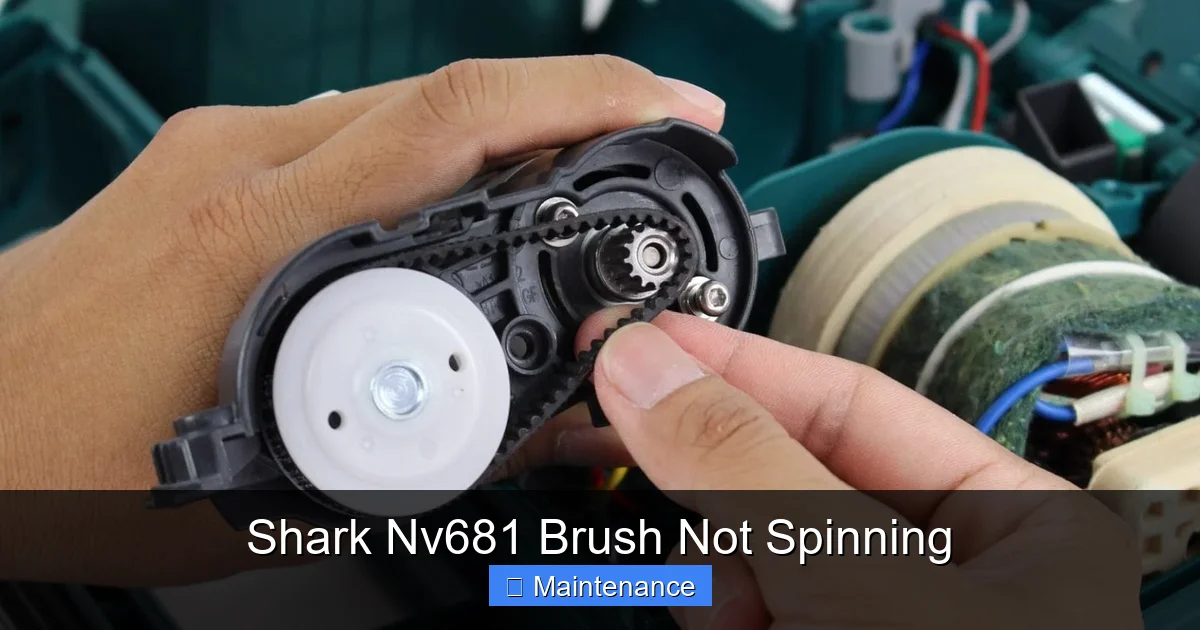
In the Shark Nv681, power typically gets to the brush roll via a small, rubber notched belt. One end of this belt is connected to a small motor pulley inside the floor head (or sometimes a driveshaft from the main unit). The other end wraps around a pulley on the brush roll itself. When the vacuum is on and the floor head is lowered, an idler pulley or clutch mechanism engages, tensioning the belt and causing it to turn the brush roll. If this belt is broken, has jumped off a pulley, or has become so stretched and glazed that it slips, the brush roll will not move. This is a very common point of failure and an easy, inexpensive fix.
The Role of Bearings and Bushings
The brush roll is a cylinder with bristles, and at each end, it has a bearing or bushing that allows it to spin freely inside its housing. These bearings can get clogged with a horrific mix of hair, carpet fibers, dust, and grit. When this gunk hardens or packs in, it creates immense friction, essentially welding the bearing in place. The motor might strain, you might hear a strange noise, but the brush roll won’t turn. Sometimes, you can clean these bearings; often, when they’re seized, the entire brush roll assembly needs replacement.
The Guardian: The Thermal Reset Switch
Shark, like many vacuum manufacturers, builds in a safety feature. If the brush roll jams or the motor in the floor head overheats, a thermal fuse or reset switch will trip, cutting power to the brush roll motor to prevent damage or fire. This is a brilliant feature because it protects your machine, but it means the symptom is a non-spinning brush roll. The reset button is usually a small, red or black button located on the underside of the motorized floor head. It’s your first and easiest thing to check. If it’s tripped, you’ll often feel it slightly protruding or see a visible gap. Simply press it firmly until it clicks back into place.
The Usual Suspects: Most Common Reasons Your Brush Has Stopped
Now that we know the cast of characters, let’s meet the villains. When your Shark Nv681 brush is not spinning, the problem falls into one of these five categories, in roughly this order of likelihood.
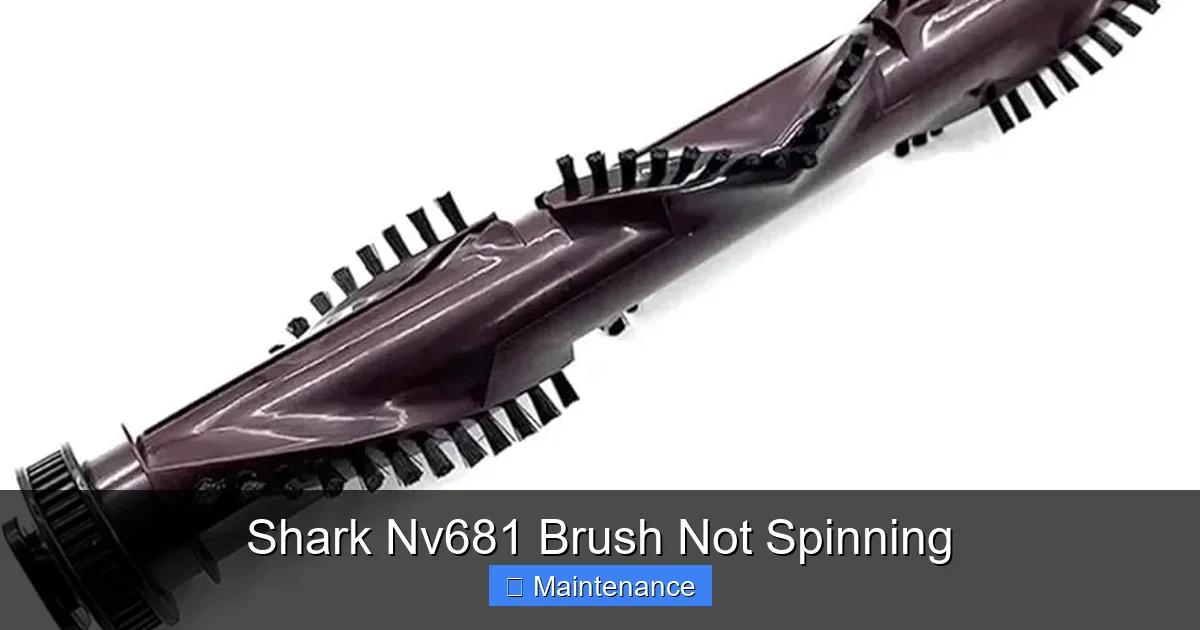
Visual guide about Shark Nv681 Brush Not Spinning
Image source: m.media-amazon.com
Villain #1: The Debris Jam (The Hairball Monster)
This is the heavyweight champion of brush roll problems. Long hair, human and pet, is the number one enemy. It wraps around the brush roll bristles, gets caught in the bearings, and packs into the ends of the brush roll housing. Over time, it forms a dense, felt-like mat that physically prevents the brush roll from rotating. String, twine, carpet fraying, and even small items like socks or paperclips can cause a similar jam. The debris acts as a brake. This is the most common reason for a Shark Nv681 brush not spinning.
Villain #2: The Tripped Reset Button (The Safety Guard)
As mentioned, this is a protective measure. If the brush roll jammed previously, the reset switch likely tripped. Even after you clear the jam, the switch remains open until you manually reset it. Many users clear the debris but forget to press the reset button, leading to continued frustration. It’s so simple, it’s often overlooked.
Villain #3: The Worn or Broken Drive Belt (The Slipping Link)
Rubber belts dry out, stretch, crack, and eventually fail. If the belt breaks entirely, the brush roll gets no power. More insidiously, a belt that has stretched may still be on the pulleys but will slip under load, meaning the motor pulley spins but the brush roll pulley does not. You might hear a high-pitched squealing or smell burning rubber. Belts are wear items and typically need replacement every 1-2 years in a busy household.
Villain #4: Seized Bearings (The Rusty Hinge)
If you remove the brush roll and it spins freely by hand, but doesn’t spin when powered, the issue is likely in the bearings or the motor itself. However, if you remove the brush roll and it’s incredibly difficult or impossible to spin by hand, the bearings inside the brush roll ends are packed solid with debris or have rusted/corroded. The motor is trying to turn it but can’t overcome the friction.
Villain #5: Motor or Clutch Failure (The Powerhouse Down)
This is the least common culprit when suction is still strong. The motor that spins the brush roll (either a separate motor in the floor head or the main motor via a driveshaft) can burn out. A mechanical clutch mechanism that engages the brush roll can also wear out or break. These are more serious failures, but they happen, especially in vacuums that are several years old or have been subjected to frequent severe jams.
Your Diagnostic Mission: A Step-by-Step Troubleshooting Guide
Armed with knowledge, it’s time to play detective. We’ll proceed from the quickest, easiest, and most likely fixes to the more involved ones. Grab a Phillips screwdriver, a pair of scissors, and maybe a flashlight. Let’s open the hood.
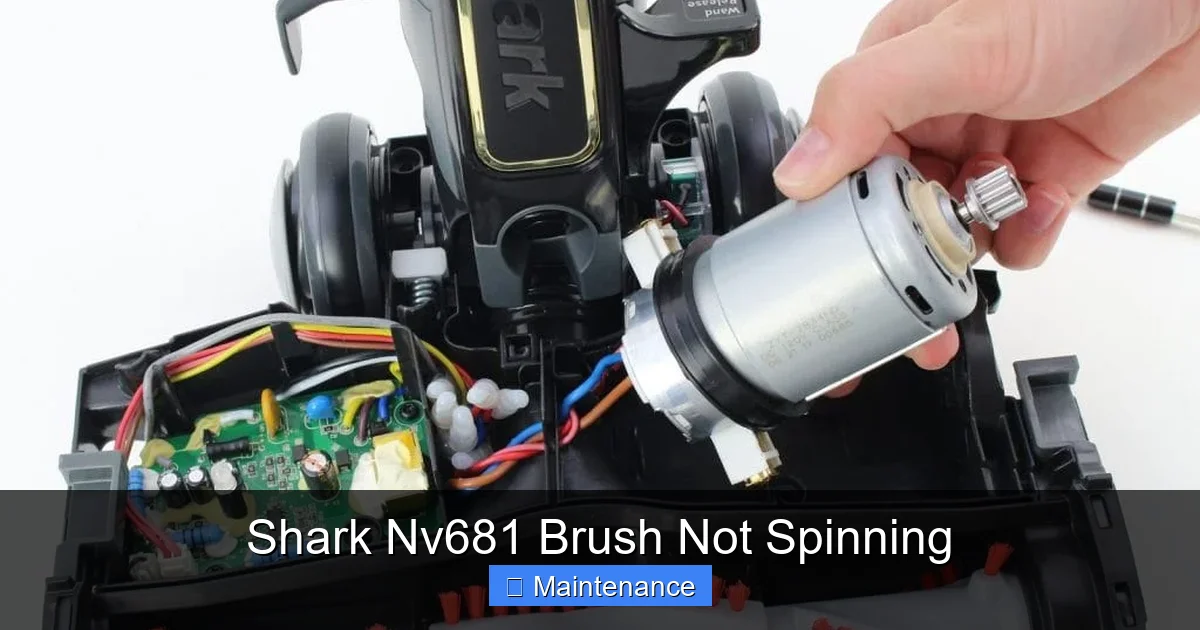
Visual guide about Shark Nv681 Brush Not Spinning
Image source: howtofixit.net
Step 1: The Pre-Checks and Safety First
Before you even touch a screw, perform these vital checks. Unplug the vacuum. Flip the Shark Nv681 over onto its back so you have clear access to the brush roll area. Tilt it if needed. Visually inspect the brush roll through the housing. Can you see obvious clumps of hair or debris wrapped around it? If you can see and reach it easily with scissors, cut it away now. Don’t try to pull it; you’ll just tighten the knot. Next, locate the reset button. On the Nv681, it’s typically on the underside of the plastic housing, near the front or rear, often marked with a small red or black button. Press it firmly several times. You should hear/feel a definite click. Now, plug the vacuum back in and try it on a bare floor for a few seconds. Did it start? If yes, fantastic! You had a jam that tripped the reset. If not, move to the next step. Always test on a hard surface first so you can see the brush roll clearly and avoid creating a new jam on carpet.
Step 2: Deep Dive – Removing and Inspecting the Brush Roll
This is the core of the diagnostic process. You need to get the brush roll out to inspect it and the area around it. On the Shark Nv681, the brush roll is usually held in by two plastic caps or clips on either end. Lay the vacuum on its side or back. Look for a release lever or tab, or simply pry off the plastic end caps. They may snap off. Be gentle but firm. Once the caps are off, the brush roll should slide out easily. If it doesn’t, it’s severely jammed. Work it back and forth gently while pulling. Do not use force that could break the plastic housing. Once you have it out, here’s what to inspect:
- The Brush Roll Itself: Look for hair, string, and carpet fibers wound tightly around the bristles and the metal axle. Use scissors to cut and pick it all out. Be thorough. Check the ends where the bearings are. Clean out any debris packed into the bearing housings on the vacuum body.
- The Bearings/Bushings: Hold the brush roll horizontally and try to spin it by hand. Does it spin freely, smoothly, and quietly? Or is it gritty, stiff, or does it not spin at all? If it’s stiff or locked, the bearings inside the brush roll ends are shot. The brush roll assembly will need to be replaced.
- The Drive Belt Area: With the brush roll out, look into the housing. You’ll see a small rubber belt looped around a motor pulley and the pulley that the brush roll was attached to. Is the belt there? Is it intact, or is it broken, frayed, or missing? Is it loose and sagging? A belt that’s off its pulley or visibly damaged is the problem.
- The Motor Pulley and Idler: Spin the small motor pulley (the one connected to the motor shaft) by hand. Does it spin freely? If it’s seized, the motor may be the issue. Also, check any idler pulleys or tensioners. They should pivot smoothly.
After a thorough cleaning and inspection, re-install the brush roll. Make sure it’s seated properly and the end caps are secure. Plug in and test. If it works, you’ve solved it! If it still doesn’t spin, and the belt was fine, you likely have a seized bearing (requiring brush roll replacement) or a motor issue.
Step 3: The Drive Belt Replacement Procedure
If you identified a bad belt, replacement is straightforward. You’ll need a new Shark-compatible drive belt. These are universal for many models but confirm the part number (often 081-118 or similar for Nv series). To replace: With the brush roll removed, you should be able to see the belt. Stretch it off the motor pulley first. Then, slip it off the brush roll pulley. To install the new one, loop it around the brush roll pulley first, then stretch it over the motor pulley. It may require some tensioning. Ensure it’s seated properly in the groove on both pulleys. Reinstall the brush roll. The belt should now be tensioned correctly by the brush roll’s position. Test before reassembling all screws if possible.
Proactive Maintenance: Keeping Your Brush Roll Spinning for Years
An ounce of prevention is worth a pound of cure. The “Shark Nv681 brush not spinning” problem is almost entirely preventable with a simple, monthly habit. Incorporate this into your vacuuming routine.
Visual guide about Shark Nv681 Brush Not Spinning
Image source: howtofixit.net
The Monthly 5-Minute Clean-Out Ritual
Once a month, or more often if you have pets or long hair, perform this quick maintenance. Unplug the vacuum. Flip it over. Use the included cleaning tool or a pair of scissors to cut and remove any hair or debris visibly wrapped around the brush roll bristles. Don’t pull; always cut. Then, locate the access panels or end caps (you may not need to fully remove the brush roll for this light clean) and use a soft brush or the crevice tool of your vacuum to suck out any debris from the ends of the brush roll housing where the bearings sit. This simple act prevents the debris from packing in and seizing the bearings.
Quarterly Deep Inspection
Every 3-4 months, take the extra 10 minutes to fully remove the brush roll as described in the troubleshooting section. Give it a thorough inspection. Spin it. Clean it meticulously. Check the belt for cracks, glazing (a shiny, hardened surface), or stretching. A belt that feels loose or has lost its elasticity should be replaced preemptively. This is also a good time to check the suction path and clean all filters (the pre-motor foam and felt filters should be washed monthly, the post-motor HEPA filter every 3 months). A clogged filter reduces overall suction and can strain the motors.
Mind What You Vacuum
Your Shark is powerful, but it’s not invincible. Avoid vacuuming large, hard objects (coins, LEGO, small toys), excessive amounts of loose powder (like baking soda or plaster dust—it can clog filters and get into bearings), wet materials, or sharp objects. These can cause immediate jams or damage. When cleaning up after a pet or craft project, do a quick visual sweep of the area first.
When to Call It Quits: Knowing When You Need Professional Help or a New Part
Not all problems are DIY-friendly. After following the steps above, you may still face a non-spinning brush roll. Here’s how to know when to stop and seek help.
Diagnosing a Failed Motor
If you have a brand-new, correctly installed belt on a brush roll that spins freely by hand, and you’ve reset the switch, but the brush roll still doesn’t move while the vacuum has full suction, the dedicated brush roll motor may be dead. Listen carefully. When you turn the vacuum on with the floor head lowered, do you hear a faint whirring or clicking sound from the floor head? If you hear nothing, the motor isn’t getting power or is dead. If you hear a straining motor sound but no movement, it’s likely a severe jam or a broken motor shaft. Diagnosing and replacing a floor head motor is more complex and often requires soldering skills. At this point, contacting Shark customer support for warranty status or finding a reputable small appliance repair shop is the logical step.
Clutch Mechanism Failure
Some Shark models use a mechanical clutch to engage/disengage the brush roll. If this clutch wears out or breaks, it won’t transfer power. Symptoms can include a brush roll that sometimes works and sometimes doesn’t, or a grinding noise. This part is more difficult to access and replace for a novice. If you suspect this, professional repair is advisable.
The Cost-Benefit Analysis: Repair vs. Replace
Consider the age and value of your Shark Nv681. If it’s out of warranty and the repair involves a new motor, brush roll assembly, or clutch, the parts and labor could cost $70-$150. Is the vacuum still in good overall condition? If it’s a newer model you love, repair is likely worthwhile. If it’s an older unit with other issues (cracks, weak suction), the money might be better applied to a new vacuum. A single brush roll replacement (for seized bearings) is usually $25-$40 and is a very common and worthwhile DIY repair.
The Long Haul: Ensuring a Happy Vacuum for the Life of the Appliance
Your Shark Nv681 is a workhorse. With a little care, it can last for years, providing powerful cleaning. The key is integrating the maintenance habits we discussed into your routine. Think of it like changing the oil in your car—a small, regular task that prevents catastrophic engine failure. The brush roll is your vacuum’s “engine” for carpet cleaning. Protect it.
Create a calendar reminder for the first of every month: “Vacuum Maintenance.” On that day, spend 5 minutes with your vacuum upside-down, scissors in hand. It takes less time than loading the dishwasher. Keep a small bowl or container nearby to collect the hair and gunk you remove—it’s a gross but satisfying testament to your work. Store your vacuum in a cool, dry place, not in a hot garage or damp basement, which can accelerate belt and plastic degradation.
Finally, know your resources. Keep the model number (usually on a label on the back or bottom) handy. The Shark website has excellent support pages with diagrams, part numbers, and instructional videos for your specific Nv681 variant. YouTube is a goldmine of user-generated repair videos. Seeing someone else perform the exact task you’re attempting is incredibly reassuring. A community of Shark owners and repair enthusiasts exists online—forums and social media groups can be lifesavers when you’re staring at a confusing part.
In the end, a Shark Nv681 brush not spinning is rarely a death sentence for your vacuum. It’s a mechanical issue with a mechanical solution. By understanding the system, performing systematic diagnostics, and committing to simple, regular maintenance, you can keep your vacuum operating at its peak for years. You’ll save money, reduce waste, and gain the satisfying confidence of someone who can fix their own stuff. Now go grab that screwdriver, unplug that vacuum, and get that brush roll spinning again!
Frequently Asked Questions
Will a Shark Nv681 brush not spinning damage the main vacuum motor?
No. The brush roll has its own dedicated motor or is driven separately. If the brush roll jams, the thermal reset will trip to protect the brush roll motor, but your main suction motor will continue to work normally. However, repeatedly trying to run the vacuum with a jammed brush roll can eventually cause the brush roll motor to overheat and fail.
How often should I replace the drive belt on my Shark Nv681?
There’s no set mileage, but as a preventive rule, inspect the belt every 3-6 months. Replace it if you see any cracks, glazing (a shiny, hardened surface), stretching, or if it slips. With average use (2-3 times per week), a belt typically lasts 1-2 years. If you have pets or vacuum very abrasive debris (like kitty litter), check it more frequently.
Can I use my Shark Nv681 on hard floors with the brush roll off?
Yes, absolutely. The Shark Nv681 is designed to be used on hard floors without the brush roll spinning. You can either manually lock the brush roll off (some models have a switch) or simply use it as is. The suction alone will pick up debris on tile, hardwood, and laminate. Just be aware that without the agitating bristles, it won’t deep-clean textured or soiled hard floors as effectively.
My brush roll spins freely by hand but not when the vacuum is on. What is it?
This classic symptom points to one of two issues. First, re-check the reset button on the underside of the floor head—it’s the most common oversight. Second, if the reset is fine and the belt is good and properly installed, the dedicated brush roll motor inside the floor head has likely failed. This is a more serious repair that may require professional service or a motor replacement.
Is it worth replacing the brush roll assembly if the bearings are seized?
Almost always, yes. A new brush roll assembly for the Shark Nv681 typically costs between $25 and $40. Trying to clean or repack the sealed bearings inside the brush roll is nearly impossible for a DIYer and rarely successful. A new brush roll is a straightforward, inexpensive fix that will restore your vacuum’s deep-cleaning ability on carpets. It’s one of the most common and cost-effective repairs for this model.
Where is the exact location of the reset button on the Shark Nv681?
The thermal reset button is located on the underside of the motorized floor head (the part that swivels and contacts the floor). Turn your vacuum completely over. Look at the plastic housing on the bottom. You’re searching for a small, circular button, usually red or black, often near the front or rear edge, sometimes recessed. It may have a tiny arrow or “reset” molded next to it. Press it firmly until you feel a distinct click. This button is your first and easiest troubleshooting step.