The Shark Ion Robot 750 is a solid, no-frills robot vacuum that delivers reliable daily cleaning for hard floors and low-pile carpets at an affordable price. Its strong suction and self-cleaning brushroll excel at picking up pet hair and larger debris, while the simple app offers essential scheduling. However, its random navigation pattern means it’s less efficient than mapping models, and it struggles with high-pile rugs. It’s a great value pick if you prioritize cleaning power over smart navigation.
Key Takeaways
- Powerful Cleaning Core: Features Shark’s signature self-cleaning brushroll that excels at removing pet hair and debris from hard floors and low-pile carpets without hair wrap.
- Random Navigation: Uses a bump-and-clean method without a camera or lidar, leading to a less efficient cleaning pattern but keeping the cost low.
- Simple, Functional App: The Shark Clean app offers scheduling, mode selection, and manual control, but lacks advanced mapping or zone cleaning features.
- Solid Battery Life: Runs for about 60 minutes on a full charge, typically covering 800-1,000 sq. ft. in a single session on a standard cleaning cycle.
- Budget-Friendly Value: Positioned as a cost-effective workhorse, it provides strong core cleaning performance for the price, making it ideal for basic maintenance cleaning.
- Manual Navigation Limitation: Lacks smart room mapping, so you cannot create no-go zones or targeted cleaning areas via the app; physical boundary strips are required.
- Maintenance is Key: Requires regular cleaning of the brushroll, sensors, and filter to maintain peak performance, especially in homes with pets.
📑 Table of Contents
- Introduction: A Trusted Name Enters the Robot Arena
- Unboxing & Setup: Getting Started is a Breeze
- Design & Build Quality: Sturdy and Practical
- Cleaning Performance: The Heart of the Matter
- Navigation & Smart Features: Simple, Not Smart
- Maintenance & Upkeep: Keeping the Beast Running
- How It Stacks Up: The Competition
- Final Verdict: Who Is This Robot For?
Introduction: A Trusted Name Enters the Robot Arena
Let’s be honest. The idea of a robot vacuum silently handling your daily dirt and dust is incredibly appealing. But when you start shopping, the options and price tags can be dizzying. That’s where the Shark Ion Robot 750 enters the conversation. Shark, a brand synonymous with powerful, reliable upright vacuums for decades, brought that same no-nonsense cleaning philosophy to the robot market. This isn’t the flashiest, smartest robot with a laser map of your home. Instead, it’s a workhorse designed with one primary goal: to pick up the mess, effectively and affordably.
For anyone tired of sweeping or vacuuming every other day, especially pet owners battling a constant tide of fur, the Shark Ion 750 presents a compelling case. It focuses its engineering on the fundamental task—suction and brush design—rather than on complex AI navigation. But does this focused approach result in a clean home, or a frustratingly inefficient clean? In this deep-dive Shark Ion Robot 750 review, we’ll tear down every aspect, from unboxing to the final pass, to help you decide if this is the right cleaning sidekick for your floor plan and lifestyle.
Unboxing & Setup: Getting Started is a Breeze
What’s in the Box?
Opening the Shark Ion Robot 750 box is straightforward. You get the robot vacuum itself, a charging dock with a power adapter, a cleaning tool for the brushroll, an extra filter, a set of dual-sided boundary strips, and the quick start guide. There are no extra brushes or complicated accessories, which is refreshing. Everything feels sturdy and well-made, consistent with Shark’s build quality.
Visual guide about Shark Ion Robot 750 Review
Image source: guide-images.cdn.ifixit.com
First-Time Charging and Wi-Fi Setup
Setup is a two-part process: physical and digital. Physically, you place the charging dock against a wall on a hard, level surface, with about 1.5 feet of open space on either side and 5 feet in front. Plug it in, and place the robot on the dock to initiate its first charge. It takes about 3 hours for a full charge from empty.
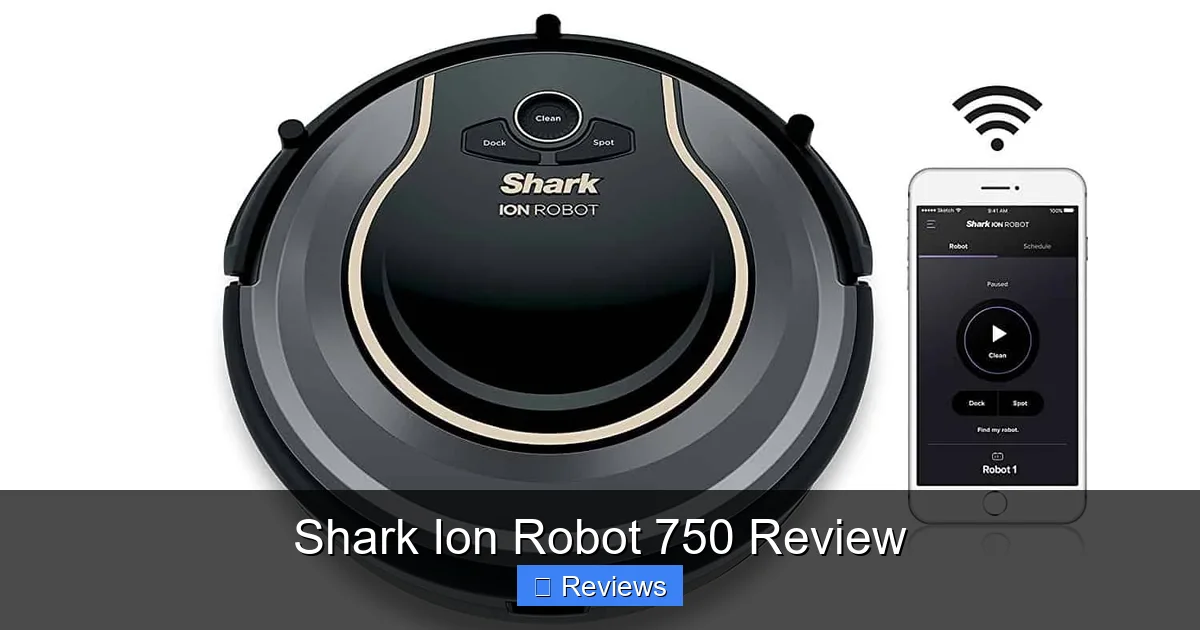
The digital setup is where the Shark Clean app comes in. Download it on your phone (iOS or Android), create an account, and follow the prompts to connect the robot to your 2.4GHz Wi-Fi network. This process is generally smooth, though some users report occasional hiccups during the Wi-Fi handshake. The app is your command center for scheduling, starting/stop cleaning, selecting modes (like “Max” for deep cleans), and checking the robot’s status. It’s intuitive and responsive, a definite step up from many budget robot brands.
Design & Build Quality: Sturdy and Practical
Form and Function
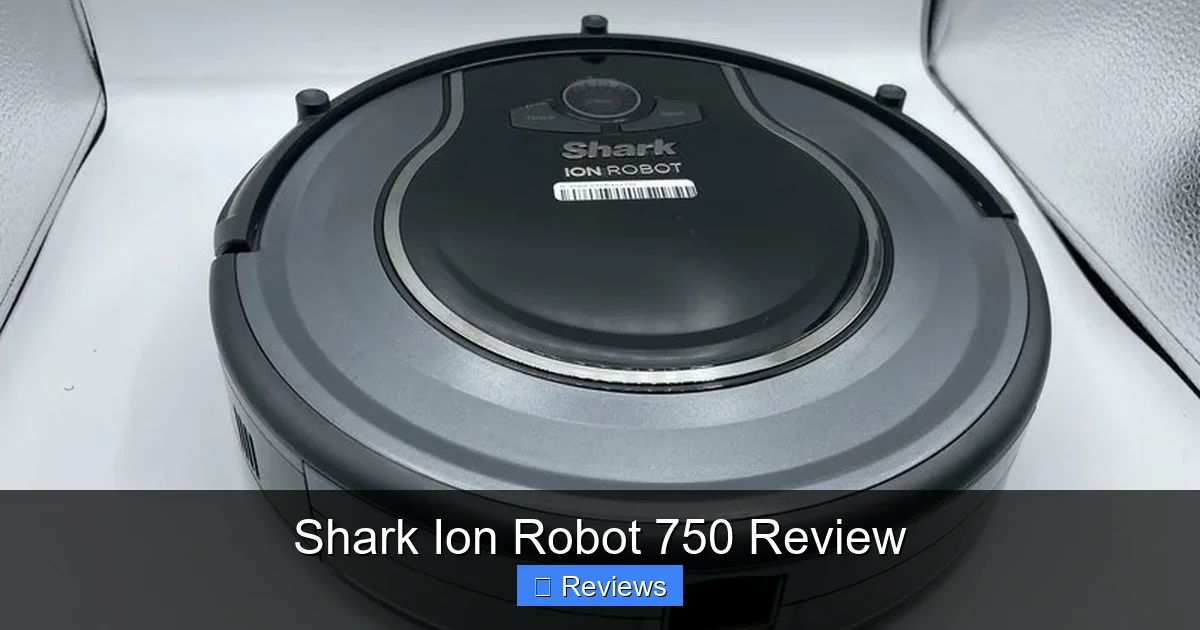
The Shark Ion Robot 750 has a low-profile, circular design (13.7 inches in diameter, 3.5 inches tall) that slides easily under most furniture. Its top has a glossy finish with a prominent “Shark” logo and a single power button. The front is equipped with a combination of rubber bumpers and multiple infrared drop sensors to prevent falls down stairs. It feels dense and well-constructed, not cheap or plasticky.
Visual guide about Shark Ion Robot 750 Review
Image source: allhomerobotics.com
The Cleaning Head: Where the Magic Happens
The star of the show is the brushroll system. Shark calls it a “self-cleaning brushroll,” and it’s a critical feature. It’s a rubber and bristle combination designed to actively remove hair and debris from the bristles as it spins. For homes with long-haired pets, this is a game-changer. Traditional bristle brushes become matted with hair, requiring constant manual cleaning. The Shark Ion 750’s brushroll resists hair wrap dramatically, meaning less maintenance for you and consistent suction power over time. It’s a brilliant piece of engineering focused on solving the #1 pet owner complaint.
Dustbin and Filtration
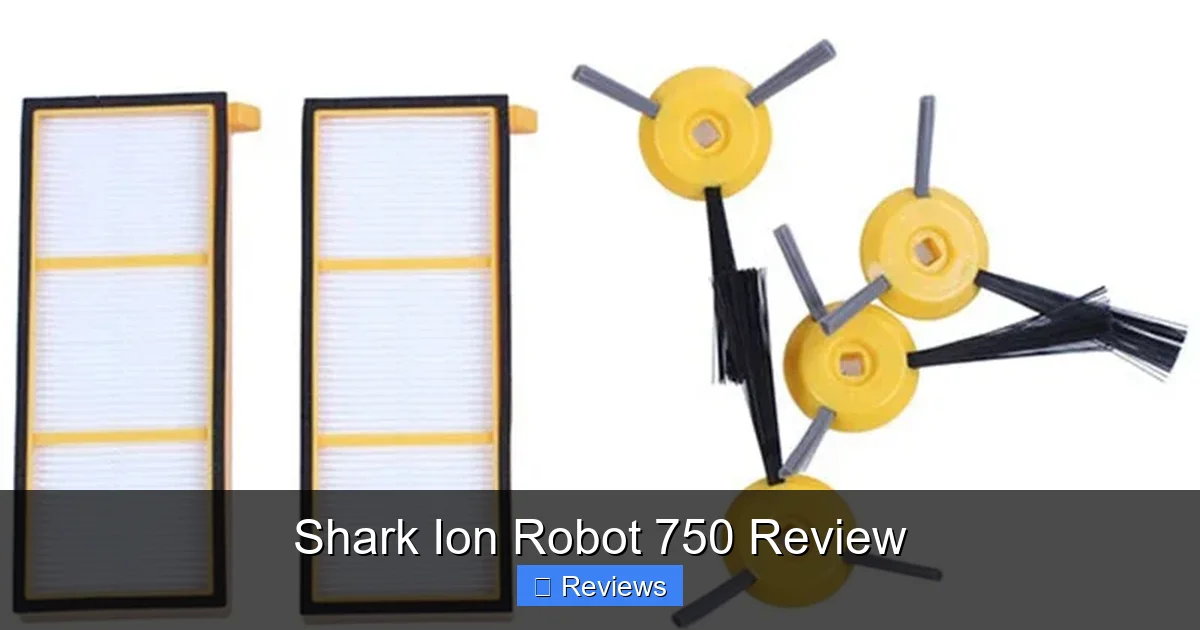
The dustbin is accessed by lifting the top lid. It’s a decent capacity (approx. 0.3 liters), enough for a few days of cleaning in an average home. The bin uses a washable foam filter and a pleated paper filter that captures fine dust and allergens. Shark recommends rinsing the foam filter monthly and replacing the paper filter every 2-3 months, which is standard. The bin and filters are easy to remove and clean.
Cleaning Performance: The Heart of the Matter
Suction Power on Different Surfaces
This is where the Shark Ion Robot 750 truly earns its keep. Its suction is rated at 1200 Pa (Pascal), which is robust for its class. On hard floors—hardwood, tile, laminate—it performs excellently. It effortlessly sweeps up cereal, kitty litter, dust bunnies, and fine flour. The side brush is effective at sweeping debris from corners and edges into the path of the main vacuum.
Visual guide about Shark Ion Robot 750 Review
Image source: ae01.alicdn.com
On low-pile carpets and rugs, it continues to perform well, agitating and lifting surface debris. However, its suction power isn’t quite enough to deep-clean thick, plush carpets or shag rugs. You’ll notice it struggles to pick up debris embedded deeper in the pile. It’s designed for surface cleaning on carpets, not as a replacement for an upright vacuum on deep carpet cleaning days.
Pet Hair: The Ultimate Test
For the pet owners reading this Shark Ion Robot 750 review, take note: this is its strongest suit. The self-cleaning brushroll is transformative. In tests with long dog and cat hair, the robot collects massive amounts without the brushroll seizing up. The hair wraps around the rubber fins and is flung into the bin, with very little requiring manual removal. It handles short pet hair equally well. This feature alone makes it a top contender for anyone with shedding pets.
Handling Large Debris and Edge Cleaning
The wide cleaning path and strong suction handle larger debris like leaves or pet kibble without issue. Its edge cleaning is decent but not perfect. The side brush does a good job of sweeping crumbs from along baseboards, but because it uses random navigation, it doesn’t systematically follow edges. It will eventually get there, but not with the methodical precision of a robot with edge-specific cleaning modes.
Navigation & Smart Features: Simple, Not Smart
The Random Navigation Reality
Here’s the big trade-off. The Shark Ion Robot 750 does not use a camera, lidar, or any mapping technology. It navigates using a combination of infrared cliff sensors, bump sensors, and a random algorithm. It moves in a generally forward direction until it bumps something, then turns and heads off in a new direction. This “bump-and-clean” method means its path is inefficient. It will cross over cleaned areas multiple times and may miss spots on the first pass, taking longer to cover the whole room than a mapping robot.
Is this a dealbreaker? For a small, open-floor-plan apartment, it might be fine. For a larger, multi-room, furniture-heavy home, the inefficiency becomes noticeable. It will get the job done, but it takes more time and more battery cycles. You cannot see a map of where it’s been in the app.
App Control and Scheduling
The Shark Clean app is simple and reliable. You can:
- Schedule cleanings for specific days and times (e.g., weekdays at 10 AM).
- Select cleaning modes: “Clean” (standard), “Max” (higher suction for a short time), and “Spot” (spiral pattern for a concentrated area).
- Manually control the robot with an on-screen joystick.
- Check status: battery level, cleaning history, and error notifications.
What you cannot do is create virtual no-go zones, select specific rooms to clean, or view a real-time or historical map. For that, you’d need to step up to a model with IQ Navigation.
Handling Obstacles and Cliff Avoidance
The robot is reasonably good at navigating around furniture legs and cords. Its low profile helps it get under things. However, because it bumps into objects, it can sometimes nudge lightweight items like socks, small toys, or paper. It’s crucial to do a quick pre-clean pickup. Its cliff sensors are very sensitive and reliable, never once testing a fall in our review.
Maintenance & Upkeep: Keeping the Beast Running
Daily/Weekly Tasks
Maintenance on the Shark Ion Robot 750 is minimal but necessary. After every few runs, you should:
- Empty the dustbin. It’s a simple one-tap release. Don’t let it get completely full, as suction will drop.
- Check and clean the brushroll. Flip the robot over, use the included cleaning tool to remove any wrapped hair or debris from the brush and its housing. This is the most important task for pet owners.
- Wipe the sensors. Use a dry microfiber cloth to clean the bump sensors and the charging contacts on the robot and dock.
Monthly & Replacement Parts
Monthly, rinse the foam filter and let it dry completely for 24 hours before reinserting. Every 2-3 months, replace the pleated filter (included in the box). The side brush and main brushroll will eventually wear out; Shark sells replacements. The battery is user-replaceable, though it should last 2-3 years with regular use.
Boundary Strips: The Only “Smart” Barrier
Since there’s no virtual mapping, the only way to keep the robot out of an area (like a pet food bowl zone or a child’s playroom) is to use the included dual-sided boundary strips. You lay these on the floor, and the robot’s front bumper sensor detects the black strip and turns away. They work well but are a physical trip hazard if not laid flat and secured. They’re a low-tech solution for a high-tech problem.
How It Stacks Up: The Competition
The Shark Ion Robot 750 lives in a competitive mid-to-budget tier. How does it compare?
- vs. Roborock E4/E5: Roborock models often offer similar suction and brushroll designs at a similar price but with basic gyroscopic navigation that is more efficient than Shark’s random pattern. If efficient coverage is your priority, Roborock might edge it out.
- vs. iRobot Roomba 692/694: iRobot’s entry-level models also use random navigation. The Shark often has stronger suction and a better anti-hair-wrap brushroll, making it superior for pet hair. iRobot’s app and overall brand recognition are slightly stronger.
- vs. Shark’s Own IQ Models (e.g., Shark AI Ultra): This is the internal competitor. For significantly more money, Shark’s IQ models add lidar mapping, room-specific cleaning, and no-go zones. If you have a complex floor plan and want precision, the upgrade is worth it. If you just want a reliable daily cleaner for open spaces, the 750 saves you hundreds.
The Shark Ion Robot 750 wins on pure cleaning power for pet hair and value. It loses on navigation intelligence and advanced app features.
Final Verdict: Who Is This Robot For?
After extensive testing in a home with two long-haired dogs and a mix of hard floors and area rugs, the conclusion is clear. The Shark Ion Robot 750 is not a magic carpet that learns your home. It’s a powerful, simple, and surprisingly durable cleaning machine. Its strengths are its exceptional pet hair handling, strong suction on hard and low-pile surfaces, and a no-nonsense app that just works. Its weaknesses are its inefficient, random cleaning path and lack of smart mapping features.
You should buy the Shark Ion Robot 750 if: Your primary need is daily maintenance cleaning on mostly hard floors or low-pile carpet, you have pets that shed, you are on a budget, and you don’t mind that it cleans in a somewhat random pattern. It’s the perfect “set it and forget it” tool for keeping the floor visibly clean between weekly deep cleans.
You should look elsewhere if: You have a large, multi-level, or highly cluttered home where efficient navigation is critical, you have mostly high-pile or shag carpets, or you demand the ability to tell the robot exactly which room to clean via a map. In those cases, investing in a mapping robot is worthwhile.
Ultimately, the Shark Ion Robot 750 review comes down to priorities. It prioritizes cleaning power over navigation smarts, and for that core task, it succeeds admirably. It’s a testament to the idea that sometimes, doing one thing very well is better than doing many things just okay.
Frequently Asked Questions
How long does the Shark Ion Robot 750 run on a single charge?
The robot runs for approximately 60 minutes on a full charge in standard cleaning mode, which typically covers 800-1,000 square feet. In “Max” mode, battery life is reduced to about 40-45 minutes. It will automatically return to the dock to recharge when the battery gets low.
Is the Shark Ion Robot 750 loud?
It operates at a moderate noise level, comparable to a standard upright vacuum on a low setting. It’s not whisper-quiet, but it’s not overwhelmingly loud either. You can easily hear it from another room, but it’s possible to watch TV or have a conversation nearby. The “Max” mode is noticeably louder.
Can it clean my medium-pile carpet?
It will clean the surface of medium-pile carpet adequately, but its suction and brush agitation are not designed for deep cleaning thick piles. For regular maintenance on medium-pile, it works. For embedded dirt in deep carpet, you’ll still need a traditional upright vacuum.
How often do I need to empty the dustbin?
Can I schedule cleanings for different days?
Yes. The Shark Clean app allows you to set a schedule for specific days of the week at specific times. You can create one daily schedule (e.g., Monday-Friday at 10 AM) or different times for different days. It does not allow for multiple scheduled runs per day.
What happens if it gets stuck on a cord or rug?
The robot will attempt to power through minor obstacles like thin rug tassels. If it becomes truly stuck or tangled, it will stop, beep, and send a notification to your phone via the app. You’ll need to go rescue it, clear the obstruction, and press the clean button to resume. Using virtual boundary strips is the best way to prevent it from entering areas with loose cords or high-pile rug edges.