When your Shark cordless vacuum stops working, the culprit is often a simple fix like a dead battery, clogged filter, or tripped safety lock. This guide walks you through systematic troubleshooting for the most common power, suction, and brush roll failures. Start with the basics—check the battery charge, clean all filters, and inspect for blockages—before moving to more complex motor or sensor repairs. Many issues are user-serviceable, but knowing when to contact Shark support is key to avoiding costly mistakes.
You’re in the middle of cleaning, and your trusty Shark cordless vacuum suddenly sputters and dies. Or maybe it won’t power on at all. That sinking feeling is all too familiar. Before you panic and start shopping for a replacement, take a deep breath. The phrase “Shark cordless vacuum not working” covers a huge range of issues, many of which are surprisingly simple to fix yourself. This guide is your roadmap from frustration to function. We’ll break down every common failure point, from the battery to the brush roll, in plain language. Think of it as a friendly conversation with a vacuum repair expert. Our goal is to empower you to diagnose and solve the problem safely, saving you time, money, and the hassle of a service call. Let’s get your Shark back in action.
Key Takeaways
- Battery & Charging: Always test with a known-good charger and clean charging contacts. Lithium-ion batteries degrade over time and may need replacement after 2-3 years.
- Suction Loss: The #1 cause is a clogged filter or blocked airway. Wash foam filters monthly and check all tubes for obstructions like hair and debris.
- Brush Roll Stuck: Remove tangled hair and carpet fibers from the brush roll and its bearings. A seized brush roll triggers an automatic motor shut-off as a safety feature.
- Overheating Protection: Shark vacuums have thermal cut-offs. If the motor overheats from clogs or dense debris, the vacuum will shut down until it cools completely.
- Safety Lock & Sensors: Ensure the dust cup is properly seated and all latches click. Dirty brush roll or floor sensing LEDs can prevent startup.
- Warranty & Professional Help: Attempting complex motor or electronic repairs can void your warranty. Contact Shark support first for authorized service options if basic fixes fail.
- Preventative Maintenance: A quick post-use cleaning routine—empty the cup, check for blockages, and wipe contacts—prevents 80% of “not working” scenarios.
📑 Table of Contents
- Understanding Your Shark: The Core Systems That Can Fail
- Battery and Charging Failures: The Most Common “Not Working” Cause
- Suction Loss: When the Motor Runs but There’s No Pull
- Brush Roll Not Spinning: The Hand That Doesn’t Work
- Overheating and Automatic Shut-Offs: The Safety Mechanisms Kicking In
- Electronic and Sensor Glitches: The “Brain” Problems
- When to Call It Quits (On DIY): Warranty, Safety, and Professional Repair
- Preventative Maintenance: Your Best Defense Against Failure
- Conclusion: From Frustration to Function
Understanding Your Shark: The Core Systems That Can Fail
To troubleshoot effectively, you need a basic mental map of your Shark cordless vacuum’s key systems. It’s not a magic box; it’s a coordinated team of parts. The battery and charging system is the heart, providing power. The motor and fan assembly is the lungs, creating suction. The brush roll (on models with a rotating head) is the hands, agitating carpet fibers. A network of airways, filters, and sensors acts as the nervous system. When your Shark cordless vacuum stops working, the failure is happening in one of these areas. A systematic check from power source to floor head is the most efficient way to find the weak link. We’ll explore each system in depth, but this framework helps you stay organized. Don’t just randomly poke at things; follow the energy flow: Battery → Motor → Airflow → Brush Roll.
The Usual Suspects: A Quick Diagnosis Flow
Before diving into tools, ask yourself these quick questions. Does the vacuum have any power? Do lights or the screen come on? If yes, the issue is likely with suction or the brush roll. If no power at all, the battery or charging circuit is the prime suspect. Is the problem intermittent? That often points to overheating or a loose connection. Is there a strange noise? A grinding or whining sound usually means a foreign object is jammed in the brush roll or motor fan. A complete loss of suction with the motor running typically means a severe clog or a failed seal. This initial mental triage will save you hours of unnecessary disassembly.
Battery and Charging Failures: The Most Common “Not Working” Cause
When your Shark cordless vacuum won’t turn on, the battery is suspect number one. These vacuums use lithium-ion (Li-ion) batteries, which are fantastic but have a lifespan. After 2-3 years of regular use, their capacity degrades significantly. They might charge fully but drain in minutes, or they won’t take a charge at all. But don’t assume the battery is dead yet—many charging issues are actually with the charger or the connection points.
Visual guide about Shark Cordless Vacuum Not Working
Image source: i.ytimg.com
Step-by-Step Battery & Charger Troubleshooting
- 1. Test the Wall Outlet: Plug another device into the same outlet. A tripped GFCI or a dead circuit is a simple fix.
- 2. Inspect the Charger: Look for frayed cables, bent prongs, or damage to the charging brick. If you have a multimeter, you can test the output voltage (check your charger’s label for the correct VDC). If it’s not outputting, the charger is dead.
- 3. Clean the Contacts: This is huge. Locate the metal charging contacts on both the vacuum’s battery (or body) and the charger’s plug. Use a cotton swab dipped in a tiny bit of isopropyl alcohol to wipe away dust, hair, and oxidation. A poor connection here will prevent charging entirely. Let it dry completely.
- 4. Reset the Battery Management System (BMS): Some Shark models have a reset procedure. A common method is to plug the vacuum in, let it charge for 10 seconds, unplug it, then press the power button for 10-15 seconds to reset the internal electronics. Reconnect the charger. Consult your manual for model-specific instructions.
- 5. Check for Physical Damage: If the battery pack is swollen, cracked, or leaking, stop immediately. Do not attempt to charge or use it. Li-ion batteries in this state are a fire hazard and must be disposed of at an e-waste facility.
If you’ve verified the outlet and charger are good, and the contacts are spotless, but the vacuum still won’t charge or hold a charge, the battery itself is likely at the end of its life. Shark sells official replacement batteries for most models. While third-party batteries are cheaper, they often have lower quality cells and poor BMS protection, posing safety risks. For a Shark cordless vacuum not working due to power issues, a genuine replacement battery is the safest long-term bet.
Suction Loss: When the Motor Runs but There’s No Pull
This is a very common and often frustrating scenario: you press the trigger, hear the motor whirring, but the vacuum isn’t picking up dirt. The motor is working, but the airflow is blocked. The problem is almost always somewhere in the air path between the floor head and the exhaust. A Shark cordless vacuum not working properly in terms of suction is usually a clog, a bad seal, or a filter issue.
Visual guide about Shark Cordless Vacuum Not Working
Image source: sharkvacuum.blog
Follow the Air Path: From Floor to Exhaust
Start your investigation at the point of failure—the floor head.
- Check the Brush Roll Area (if applicable): For models with a rotating brush roll (like the Shark Vertex or IZ series), this is the #1 clog spot. Flip the vacuum over. Use a seam ripper, scissors, or a dedicated brush roll cleaning tool to cut away and remove all hair, string, and carpet fibers wrapped around the brush roll and its bearings. A clogged brush roll creates immense drag, killing suction and potentially overheating the motor. This is a critical, often overlooked step when your Shark cordless vacuum not working seems motor-related but is actually a mechanical jam.
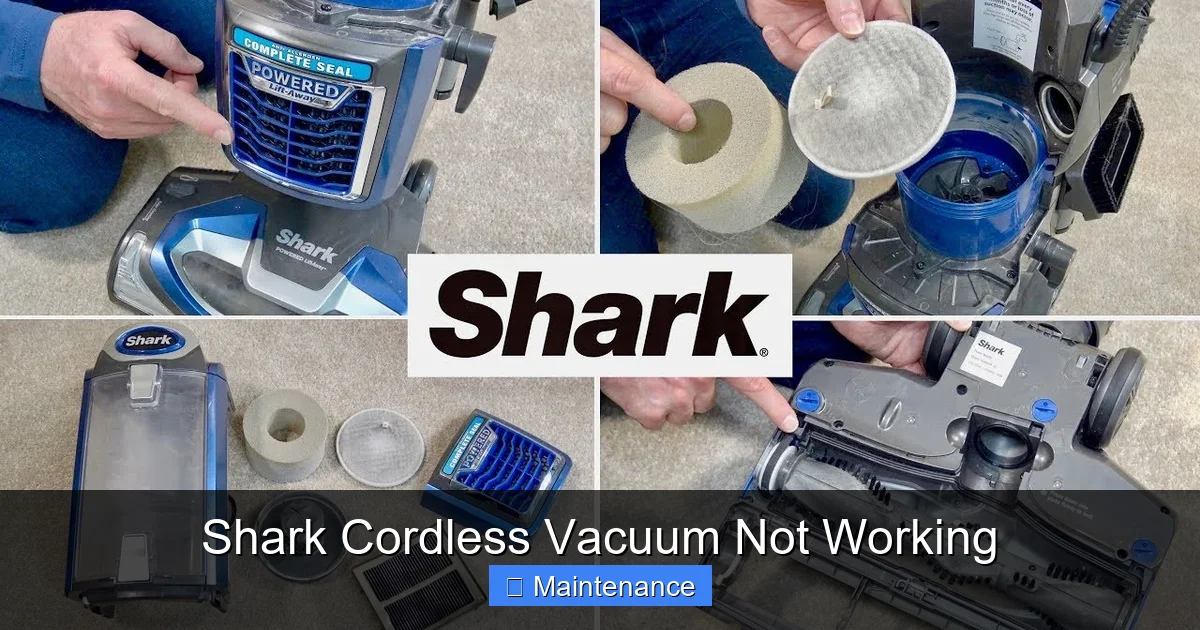
- Inspect the Dust Cup & Filter: Empty the dust cup. Now, look at the mesh screen inside the cup and the foam pre-motor filter. If they are caked with fine dust, they are strangling airflow. The foam filter is washable. Rinse it under lukewarm water until the water runs clear. Let it air-dry completely for at least 24 hours before reinserting. A damp filter will destroy the motor. The pleated HEPA or felt filters are not washable; tap them out gently over a trash can to dislodge debris. If they are discolored and dense, they need replacing.
- Examine All Airway Tubes: Detach the hose or extension wand. Look down into the tube from both ends. Use a long, flexible brush (a coat hanger with a cloth tied on the end works in a pinch) to dislodge any lodged debris. Pay special attention to the bends where debris loves to hide.
- Check the Exhaust Filter: Locate the exhaust filter on the back or bottom of the vacuum body. This is the last line of defense before air re-enters the room. If it’s dirty, clean or replace it according to the manual. A clogged exhaust filter causes backpressure, killing suction and making the motor work harder, leading to overheating.
After reassembling, test suction by placing your hand over the floor head’s intake. You should feel a strong, steady pull. If suction is still weak after a complete airway and filter cleaning, the motor’s fan blades may be damaged, or there could be an internal leak in the housing—issues that require professional assessment.
Brush Roll Not Spinning: The Hand That Doesn’t Work
On powered brush roll models, the vacuum relies on that spinning bar to agitate carpet fibers. If it’s not spinning, you’re essentially using a suction-only tool on deep-pile carpet, and it will feel like your Shark cordless vacuum is not working effectively. There are two primary causes: a mechanical jam or a drive system failure.
Visual guide about Shark Cordless Vacuum Not Working
Image source: sharkrobovacuum.com
Diagnosing a Dead Brush Roll
First, listen and feel. When you power on the vacuum on carpet mode, do you hear a distinct change in motor sound or feel a slight vibration when the brush roll engages? If the motor sound remains constant and smooth, the brush roll drive may be disengaged or broken. If you hear a straining motor sound, it’s likely jammed.
- 1. The Jam (Most Common Fix): As detailed in the suction section, thoroughly clean the brush roll and its bearings. Even a small amount of tangled hair can stop it cold. Ensure the brush roll spins freely by hand after cleaning.
- 2. The Belt (if applicable): Not all Shark cordless models use a belt. Some have a direct drive gear system. If yours has a belt (a small rubber loop), it could be broken, stretched, or slipped off. You’ll need to access the brush roll housing (usually by removing a few screws) to inspect it. A broken belt is an easy, inexpensive fix.
- 3. The Motor/Pinion Gear: The small drive motor that spins the brush roll has a plastic gear that can strip its teeth over time, especially if you frequently vacuum dense debris or rugs with tassels. If the brush roll is clean and spins freely but doesn’t engage when powered, this stripped gear is the likely culprit. This repair is more complex and may indicate a need for a replacement brush roll motor assembly.
- 4. The Safety Switch: Shark vacuums have a safety interlock switch that detects if the brush roll housing is properly seated. If the housing is slightly misaligned or the switch is dirty, the vacuum will run but not spin the brush roll to prevent damage. Ensure the housing clicks firmly into place on all sides. Clean the contact points with a dry cotton swab.
A non-spinning brush roll on a carpet is a classic symptom of a Shark cordless vacuum not working as intended on carpets. Start with the 5-minute clean. If that fails, move to belt and gear inspection.
Overheating and Automatic Shut-Offs: The Safety Mechanisms Kicking In
Modern Shark vacuums are packed with thermal protection. This is a good thing—it prevents a fire or catastrophic motor failure. But it can be confusing when your vacuum runs for 30 seconds and then powers down. If your Shark cordless vacuum not working involves it starting up, losing power, and then being unresponsive for 10-30 minutes, overheating is almost certainly the cause.
Why It Overheats and How to Cool It Down
The motor generates heat. Normally, the airflow from suction carries that heat away. When that airflow is restricted, heat builds up rapidly. The thermal fuse or sensor trips, cutting power. The vacuum will not restart until it cools to a safe temperature.
Primary Causes of Overheating:
- Severe Airflow Blockage: As covered in the suction section, a clogged filter, blocked hose, or jammed brush roll dramatically reduces cooling airflow.
- Dense Debris: Trying to vacuum thick, wet debris, large amounts of pet hair, or construction dust can overload the motor and generate excess heat.
- Clogged Exhaust: If the exhaust filter or vent is blocked, hot air cannot escape.
- Faulty Cooling Fan: Less common, but the internal fan that cools the motor could be damaged or obstructed.
What to Do:
- Immediately turn off and unplug the vacuum. Do not try to restart it while hot.
- Place it in a well-ventilated area away from carpets and let it cool completely for at least 45-60 minutes.
- Perform a FULL cleaning procedure: Empty the cup, wash the foam filter, clear all hoses, and clean the brush roll. This is non-negotiable. The overheating is a symptom of the blockage.
- After cooling and cleaning, try again. If it overheats quickly again, even with clean filters, there may be an internal obstruction or a failing motor drawing too much current.
Repeated overheating cycles can permanently damage the motor. If cleaning doesn’t resolve the rapid shut-off, it’s time to contact Shark support. Persistently running an overheating vacuum is a fire risk.
Electronic and Sensor Glitches: The “Brain” Problems
Your Shark cordless vacuum has a small computer board and various sensors. Issues here can manifest as a vacuum that won’t power on, lights that flash erratically, or modes that won’t change. These are less common than mechanical failures but can be trickier to diagnose.
Common Electronic Faults and Resets
- Faulty Power Trigger/Switch: The trigger switch can wear out or get gummed up with dust. If pressing it feels sticky or doesn’t click, it may need cleaning or replacement. A loose connection inside the handle is also possible.
- Dirty or Faulty Floor Sensing LEDs: Many Shark models use infrared LEDs at the front to sense floor type (carpet vs. hard floor) and auto-adjust suction or brush roll speed. If these tiny lenses are covered in dust or debris, the sensor fails, and the vacuum may not start. Gently clean the clear plastic windows on the front of the floor head with a microfiber cloth.
- Software Glitch: Like any electronics, the control board can have a hiccup. A full reset can help. The procedure varies: often it involves holding the power button for 10-30 seconds while the vacuum is unplugged and the battery is removed (if removable). Check your manual for the exact “hard reset” instructions for your model number.
- Battery Communication Error: The battery and vacuum body communicate via a small set of pins. If these pins are dirty or bent, the vacuum may think the battery is faulty or missing. Clean these tiny pins carefully with a dry toothbrush. Ensure the battery is clicked firmly into its seat.
- Damaged Wiring: Look closely at the wire that runs from the vacuum body down into the floor head (the “pigtail” wire). This wire flexes constantly during use and can fray or break internally. If you see any cracking in the insulation near the connection points, that wire needs to be replaced.
Diagnosing these issues requires a bit more comfort with small electronics. If you’re not confident, this is where a call to Shark customer service or an authorized service center is the wisest move. They can run diagnostics on the main board.
When to Call It Quits (On DIY): Warranty, Safety, and Professional Repair
Your Shark cordless vacuum not working has been a journey. You’ve cleaned, inspected, and possibly replaced a filter. But what if the problem persists? Knowing the limits of DIY repair is crucial for safety and protecting your investment.
The Warranty is Your First Stop
Before you take a screwdriver to any internal component, check your warranty status. Shark typically offers a 5-year limited warranty on their cordless vacuums (terms vary by model and region). If your vacuum is still within that window, contact Shark Customer Support first. Attempting to repair the motor, main PCB, or sealed battery unit yourself will almost certainly void the warranty. They will troubleshoot with you over the phone and, if needed, provide a prepaid shipping label to send it to an authorized service center. This is the free or low-cost path to a fixed vacuum. Have your model number and serial number ready (usually on a label on the back or battery).
Red Flags That Mean “Stop and Call a Pro”
- Burning Smell or Visible Smoke: Shut off immediately. This indicates a short circuit or severe motor failure. Do not attempt to use or repair.
- Swollen or Damaged Battery: As stated, this is a fire hazard. Do not charge. Dispose of properly and replace.
- Motor Grinding or Loud Rattling: This often means internal motor bearings are shot or a fan blade is broken. The motor unit needs professional rebuild or replacement.
- Repeated Overheating After Perfect Cleaning: Points to an internal obstruction or failing motor drawing excessive current.
- No Power After Confirmed Good Battery/Charger: Likely a failed main switch or PCB. Diagnosing and replacing circuit boards requires soldering skills and component knowledge.
For models out of warranty, you must weigh the cost of a professional repair (which can be $80-$150+ in labor plus parts) against the cost of a new vacuum. Shark cordless vacuums are moderately priced. If the repair quote is over 50% of the cost of a new comparable model, replacement is often the more economical choice. However, for beloved models or those with unique features, a repair might be worth it.
Preventative Maintenance: Your Best Defense Against Failure
The absolute best way to deal with a “Shark cordless vacuum not working” situation is to prevent it from ever happening. A consistent, 2-minute post-cleaning routine will add years to your vacuum’s life and maintain peak performance.
The 2-Minute Daily/Weekly Maintenance Ritual
- Empty the Dust Cup After Every Use. Don’t let it fill to the max line. A full cup restricts airflow and forces the motor to work harder.
- Check and Clean the Brush Roll. Use the seam ripper or cleaning tool that came with your vacuum. Clip away any hair or fibers wrapped around it. This takes 30 seconds and prevents the #1 cause of brush roll jams and motor strain.
- Wipe the Charging Contacts. Once a week, give the metal pins on the vacuum and charger a quick wipe with a dry microfiber cloth. Prevents oxidation and charging issues.
- Tap Out the Filters. After every 2-3 uses, remove the foam and exhaust filters and give them a firm tap over the trash can to dislodge loose dust. This extends the time between washes.
- Monthly Deep Clean: Wash the foam filter with water. Let it dry completely (24+ hours). Use a vacuum’s crevice tool or a soft brush to clean out the intake ports, exhaust vents, and the area around the brush roll bearings.
- Store Properly: Store the vacuum upright, not leaning against a wall. Don’t wrap the cord (if it has one) too tightly. Keep it in a cool, dry place away from direct sunlight or extreme temperatures, which degrade the battery.
Think of your Shark not as a disposable appliance but as a tool with needs. This simple habit will ensure your Shark cordless vacuum is always working when you need it, and you’ll rarely encounter the frustration of a sudden breakdown.
Conclusion: From Frustration to Function
Facing a Shark cordless vacuum not working can feel like a sudden, expensive problem. But as we’ve seen, it’s usually a symptom of a single, identifiable fault in a specific system. The power is in the systematic approach: start with the simplest, most common causes—battery charge, filter cleanliness, and brush roll jams—before suspecting major component failure. Your vacuum’s manual is your best friend; it contains model-specific diagrams, part numbers, and safety warnings. By understanding the core systems—power, suction, agitation, and electronics—you transform from a frustrated user into an empowered troubleshooter. Remember the golden rules: always unplug before inspecting, never use a wet filter, and respect the thermal safety systems. Most importantly, know when your DIY journey should end and a professional’s should begin, especially under warranty. With a little knowledge and regular care, your Shark can be a reliable cleaning partner for years to come, banishing the phrase “not working” from your vocabulary.
Frequently Asked Questions
Why does my Shark cordless vacuum charge for a few minutes then stop charging?
This is almost always due to dirty charging contacts on either the vacuum or the charger. Clean both sets of metal pins thoroughly with isopropyl alcohol and a cotton swab. If cleaning doesn’t work, the battery’s internal protection circuit may have tripped due to a deep discharge, or the charger itself is faulty.
My Shark vacuum smells like burning and shuts off quickly. What is safe to do?
Stop using it immediately. Unplug it and let it cool for an hour. A burning smell indicates overheating, usually from a severe clog in the filter, hose, or brush roll. After it cools, perform a full, deep cleaning of all airways, filters, and the brush roll. If the smell returns during the next use, there is likely an internal motor fault, and you should stop and contact Shark support.
The brush roll on my Shark isn’t spinning, but the suction seems fine. What’s wrong?
The most likely cause is a jammed brush roll from wrapped hair or carpet fibers. Flip the vacuum over and clean the brush roll thoroughly, ensuring it spins freely by hand. If it’s clean, check for a broken or slipped drive belt (if your model has one) or a stripped gear in the brush roll motor. Also, ensure the brush roll housing is properly clicked into place, as a safety switch may disengage it.
How often should I wash the filters in my Shark cordless vacuum?
The foam pre-motor filter should be washed with water every 1-2 months under normal use, or more frequently if you have pets or allergies. The HEPA/exhaust filter is not washable; tap it out gently every few uses and replace it according to your manual’s schedule (usually every 6-12 months). Always let foam filters air-dry for 24+ hours before reinserting.
My vacuum’s battery dies in 5 minutes. Can I fix it, or must I buy a new one?
A drastic drop in runtime from, say, 60 minutes to 5 is a classic sign of a worn-out lithium-ion battery. After 2-3 years of regular charging cycles, battery cells degrade. While some shops may offer a cell replacement service, it’s often not cost-effective. The safest and most reliable solution is to purchase a genuine Shark replacement battery for your specific model number.
The vacuum turns on but immediately turns off. No overheating smell. What could it be?
This often points to a safety interlock switch not being engaged. Ensure the dust cup is empty and firmly latched, and the brush roll housing (if removable) is snapped securely into place. Check that the battery is fully clicked into its slot. A loose connection in the power trigger or a faulty internal switch could also cause this, requiring professional diagnosis.