Adjusting your Shark vacuum’s carpet height is a simple yet critical step for achieving a truly clean home. Using the wrong setting can lead to poor suction, damaged carpets, or a vacuum that’s a struggle to push. This guide unlocks the full potential of your Shark by demystifying its height adjustment system, providing model-specific instructions, troubleshooting tips, and expert advice to ensure your vacuum works *with* your floors, not against them. Proper adjustment means better debris capture, easier maneuverability, and a longer lifespan for both your vacuum and your carpets.
You’ve unboxed your shiny new Shark vacuum, eager to tackle the dust bunnies and pet hair plaguing your home. You hook it up, turn it on, and… it feels like you’re pushing a brick through molasses across your living room carpet. Or worse, it glides effortlessly but leaves half the crumbs behind. Before you blame the vacuum or your carpets, there’s one fundamental, often overlooked, step: adjusting the carpet height. This isn’t a fancy gimmick; it’s the core mechanic that determines whether your Shark vacuum is a powerful cleaning tool or a frustrating floor ornament. This complete guide will transform you from a confused user into a master of your machine, ensuring every pass over your carpet is efficient, effective, and effortless.
Think of your vacuum’s brush roll—that spinning cylinder bristling with nylon filaments—as the heart of its cleaning system on carpets. Its job is to agitate carpet fibers, loosening trapped dirt and sweeping it into the suction path. But for that to happen, the brush roll needs to make perfect contact. If it’s too high, it spins uselessly above the carpet, tickling the tops of fibers but missing the debris embedded deep down. If it’s too low, it’s buried in the pile, creating immense drag (that hard-to-push feeling), overheating the motor, and potentially scorching or fraying delicate low-pile carpets. The adjust carpet height Shark vacuum mechanism exists to let you find that Goldilocks zone—just right—for every surface in your home.
We’re going to walk through everything. We’ll start by understanding the “why” behind the adjustment, then dive into the “how” for every major Shark series. We’ll troubleshoot common symptoms that point to a wrong setting, discuss how different floor types (from plush berber to tight loop) demand different approaches, and even touch on how a proper height setting interacts with Shark’s signature technologies like DuoClean and Zero-M. By the end, you won’t just know *where* the dial is; you’ll understand *how* to use it to achieve a level of clean you might not have thought possible from your current vacuum.
Key Takeaways
- Optimal Cleaning Depends on Height: The correct carpet height setting ensures the brush roll engages the carpet fibers properly for maximum dirt agitation and suction without causing damage or excessive resistance.
- It’s a Manual, Not Automatic, Process: Unlike some premium brands, most Shark vacuums require you to manually adjust the height based on your floor type—there is no automatic sensor for carpet thickness.
- Listen and Feel for the Right Setting: The ideal height allows the vacuum to glide smoothly with a slight resistance. You should hear a consistent whirring sound, not a straining motor or a silent brush roll.
- Wrong Settings Cause Specific Problems: Too low = hard to push, can burn out the motor or damage low-pile carpet. Too high = poor agitation, leaving debris embedded in high-pile carpets.
- Location Varies by Model Series: The adjustment dial/lever is typically on the vacuum head itself, but its exact position (front, side, top) differs between SharkNavigator, Rotator, Vertex, and IZOO models.
- Maintenance Includes Height Checks: Part of regular vacuum upkeep is confirming the height dial moves freely and the brush roll spins freely at each setting to prevent clogs and wear.
- One Setting for All Carpets Rarely Works: Homes with a mix of low-pile rugs, medium-pile carpet, and high-pile area rugs will need frequent adjustments as you move between rooms.
📑 Table of Contents
- Why Carpet Height Adjustment is Non-Negotiable for Performance
- Locating and Understanding Your Height Adjustment Mechanism
- Step-by-Step: How to Adjust for Any Carpet Type
- Troubleshooting: What Your Symptoms Are Telling You
- Advanced Considerations: Brush Roll Type and Floor Interaction
- Conclusion: Making the Adjustment Second Nature
Why Carpet Height Adjustment is Non-Negotiable for Performance
Let’s establish the core principle: your vacuum’s suction power and its brush roll’s agitation are a team. Suction pulls air (and loose debris) upward. The brush roll’s job is to dislodge the stubborn stuff—the ground-in pet hair, the tracked-in soil, the crumbs that have settled into the carpet’s foundation. For the brush roll to dislodge effectively, its bristles need to penetrate the carpet pile to a depth where they can sweep debris toward the suction inlet. This penetration depth is controlled entirely by the height adjustment.
The Physics of the Perfect Contact
Imagine trying to sweep dust off a shaggy rug with a broom held an inch above it. Useless. Now imagine pressing the broom so hard into the shag that the bristles are smushed flat and you can’t move it. Also useless. You need the broom to sink in just enough to move the fibers. It’s the same with your vacuum. The correct height allows the bristles to flex slightly within the carpet pile. This flexing action is what creates the sweeping, agitating motion that lifts debris. When the setting is too high, the bristles don’t flex—they just slap the surface. When too low, they’re overloaded and can’t flex; they just drag and stall.
This “flex zone” is also why you often hear a change in the vacuum’s sound and feel. At the correct height, the motor hum is steady, and you feel a firm but yielding resistance. The vacuum is working *efficiently*. If the sound gets higher-pitched and strained (like it’s struggling), that’s a classic sign the brush roll is too deep, overloading the motor. If the sound is softer and the vacuum feels like it’s floating, the brush roll is likely too high, spinning freely without load and thus without effective agitation.
The Consequences of Ignoring the Setting
Using the wrong height consistently has real, tangible costs:
- For Your Cleaning Results: Embedded dirt stays embedded. You’ll find yourself going over spots multiple times, or resorting to a carpet rake, because your vacuum isn’t doing its primary job.
- For Your Vacuum: Excessive strain from a too-low setting burns out motors, wears belts prematurely, and can even cause the brush roll bearings to seize. A too-high setting isn’t as damaging mechanically but renders the machine ineffective, making you think it’s broken or weak when it’s just misadjusted.
- For Your Carpets: A brush roll set too low on a low-pile or looped carpet (like berber) can actually pull and fray the loops, causing permanent damage. It can also grind dirt deeper into the foundation rather than lifting it.
- For Your Energy & Sanity: Fighting a vacuum that’s too hard to push is a workout that leads to frustration and abandoned cleaning tasks. A vacuum that’s too light feels unsatisfying and makes you doubt its power.
Thus, mastering the adjust carpet height Shark vacuum process is the single most important user-controlled factor for performance. It’s the difference between a $200 machine cleaning like a $50 one and a $200 machine cleaning like a $500 one.
Locating and Understanding Your Height Adjustment Mechanism
Before you can adjust, you must find the control. Shark has used several designs over the years, but the principle is universal. The mechanism is almost always located on the cleaning head itself—the part that contacts the floor. It is not on the canister or the wand. Here’s a breakdown of the common types you’ll encounter across Shark’s major lines: Navigator, Rotator, Vertex, and IZOO.
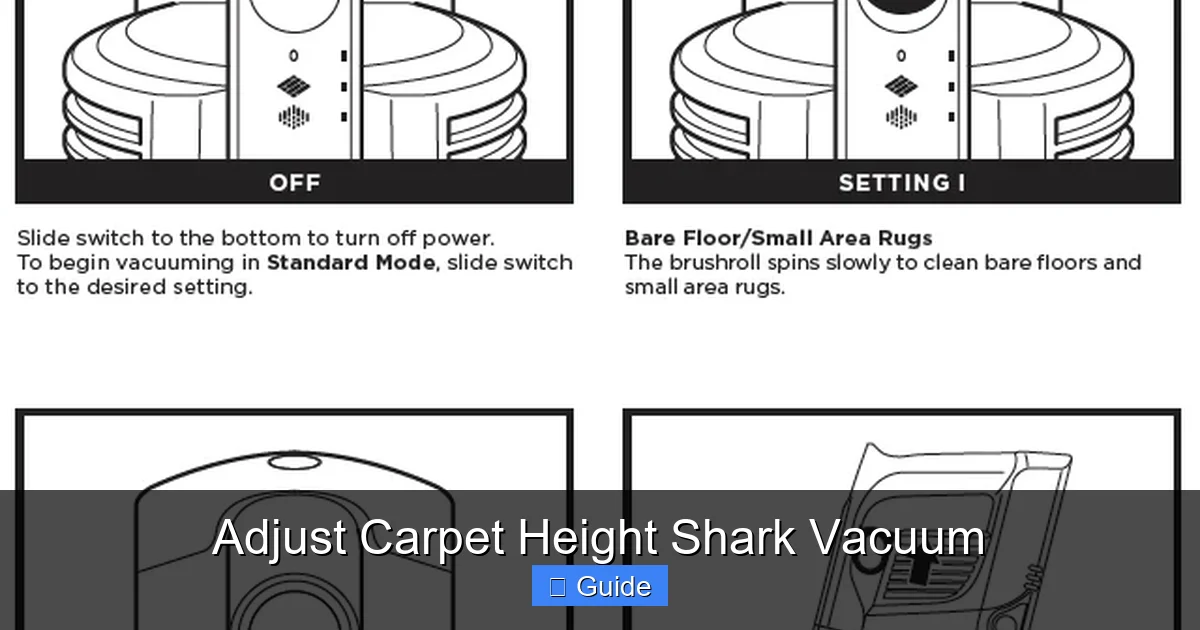
Visual guide about Adjust Carpet Height Shark Vacuum
Image source: sharkcleanapac.zendesk.com
The Classic Dial (Navigator & Early Rotator Models)
This is the most common and iconic design. You’ll find a large, ribbed plastic dial, usually about the size of a CD, positioned on the top or front of the cleaning head. It’s often yellow, gray, or red. The dial has numbers (1, 2, 3, etc.) or icons representing carpet types (e.g., a flat icon for hard floor, a shaggy icon for high-pile carpet). To use it, you simply turn the dial with your foot or hand. A click indicates a new setting. The dial physically raises or lowers the front casters (small wheels) and/or the entire brush roll housing relative to the suction inlet.
Pro Tip: On many of these models, the dial is connected to the front caster wheels. Setting “1” (often for hard floors) raises the front wheels completely, so only the brush roll and suction glide on the floor. Setting a higher number lowers the wheels, which tilts the head slightly and effectively lowers the brush roll relative to the carpet pile.
The Lever or Slider (Modern Rotator, Vertex, & Some IZOO Models)
Sleeker designs often use a lever or a sliding tab. You might find a small lever with a “+” and “-” or a picture of a low-pile and high-pile carpet on the side of the head. Pushing the lever forward or sliding the tab adjusts the height. Sometimes, this mechanism adjusts the height of the entire suction inlet/brush roll housing relative to the head’s base plate. The action is usually smoother than a dial but just as effective.
The “Auto-Height” Misconception
It’s crucial to address a frequent point of confusion. Some Shark models, particularly in the Vertex series, advertise “Auto-Height” or “Automatic Height Adjustment.” This does not mean the vacuum senses carpet thickness and adjusts itself. What it actually means is that the cleaning head has a *suspension system* (like independent wheels or a floating soleplate) that allows it to automatically conform to minor variations in floor height—like transitioning from a low-pile rug to a bare floor—without you having to stop and change a dial. The *primary* height setting for your main carpet type is still set manually via the dial or lever. The “auto” feature just provides a smoother transition between different *level* surfaces. Do not expect it to adjust from a ½-inch berber rug to a 2-inch shag carpet without manual intervention.
Where to Look: A Model-Specific Cheat Sheet
- Shark Navigator Lift-Away (e.g., NV352, NV356): Large ribbed dial on the top-front of the head.
- Shark Rotator (e.g., NV500, NV600 series): Often a dial on top, but some later models have a lever on the side.
- Shark Vertex (e.g., AZ6002, AZ8002): Typically a small lever or slider on the right side of the head, near the wheel. Look for “+” and “-” symbols.
- Shark IZOO (Handheld/Hybrid): The main floor head usually has a small dial or slider on its top surface.
- Shark Stratos/Apex: Similar to Vertex, often a side-mounted lever.
Action Step: Turn your vacuum over. Examine the cleaning head thoroughly. The mechanism will be near the wheels or the brush roll housing. It’s designed to be accessible, often operable with your foot while the vacuum is upright.
Step-by-Step: How to Adjust for Any Carpet Type
Now for the practical part. This is a simple process, but it requires a bit of observation and testing. The goal is to find the setting where the vacuum is most effective and most manageable to push.

Visual guide about Adjust Carpet Height Shark Vacuum
Image source: i.ytimg.com
The Universal Testing Method
Follow this sequence on the carpet you want to clean:
- Start Low: Set the dial/lever to the lowest number (usually “1” or the “hard floor” icon). This raises the brush roll the most.
- Test and Listen: Push the vacuum over a 5-foot section of your carpet. Notice two things: a) How easy or hard is it to push? b) What does the motor sound like? It should be a steady, deep hum. A high-pitched whine indicates strain.
- Increase Gradually: Move the setting up one number (e.g., from 1 to 2). Test again. The vacuum should feel slightly more resistant, and the sound may deepen slightly as the brush roll engages more.
- Find the Sweet Spot: Continue increasing until you feel a firm, consistent resistance. It should require some effort to push, but not a struggle. The motor sound should be strong and steady, not strained or fluctuating. This is your optimal setting for that specific carpet.
- The “Too Far” Test: If you go one setting too high, you’ll notice the resistance lessen again, and the sound may become quieter or more “whooshy.” The vacuum will feel lighter but less effective at picking up debris. This indicates the brush roll is no longer digging in properly.
Remember: Thicker, plusher carpets (like shag or high-pile Saxony) require a higher number setting to lower the brush roll into the deep pile. Low-pile, dense carpets (like commercial grade or looped berber) require a lower setting to prevent the brush roll from bottoming out and causing drag.
Model-Specific Nuances and Examples
For Standard Low-to-Medium Pile Carpet (Most Homes):
Start with setting “2” or “3” on a dial-based Shark. This is the workhorse setting for the majority of residential carpets. Perform the test above. You’ll likely land here for hallway runners, bedroom carpets, and living room areas with standard pile.
For High-Pile/Shag Carpet:
Begin at setting “4” or “5” if your dial goes that high. The deep, loose fibers of shag carpet need the brush roll to sink in substantially to agitate the base of the pile. Without a higher setting, the vacuum will ride on top of the long fibers, doing almost nothing. The push will feel moderately heavy, and that’s normal for this carpet type.
For Low-Pile/Rug & Loop Carpet (Berber):
Extreme caution here. Start at setting “1” (hard floor). On many low-pile carpets, this is actually the correct setting because the brush roll barely penetrates and primarily uses suction. For tight-loop berber, a setting that’s too low can cause the brush roll to contact the loops aggressively, potentially pulling and damaging them. If setting “1” feels like the brush roll is scratching or catching on the loops, you may need to try setting “2” to raise the brush roll just enough to glide. The brush roll should not be combing aggressively through the loops.
For Area Rugs on Hard Floors:
Treat the rug as its own carpet type. A thick wool rug on a hardwood floor will need a higher setting than the hardwood itself. Adjust when you transition onto the rug. When you move off the rug onto the hard floor, always remember to readjust back to a lower setting (1 or “hard floor”). Running a high-pile setting on hard floor can cause the brush roll to scrape the floor and scatter debris.
Troubleshooting: What Your Symptoms Are Telling You
Before you call customer service, use your vacuum’s behavior as a diagnostic tool. Here’s a simple guide to decode common problems that are almost always solved by a height adjustment.
Visual guide about Adjust Carpet Height Shark Vacuum
Image source: sharkvacuum.blog
Symptom: “It’s Impossible to Push!”
Diagnosis: Height setting is too low. The brush roll is buried in the carpet, creating immense drag. The motor is likely working too hard.
Solution: Increase the height setting by one number. Test again. Repeat until the push is firm but manageable. If it’s still brutally hard on a low-pile carpet, check that the brush roll isn’t clogged with hair or carpet fibers—a clogged roll also creates massive drag.
Symptom: “It Glides Too Easily, But Doesn’t Pick Up Much.”
Diagnosis: Height setting is too high. The brush roll is spinning above the carpet, not agitating it. You’re getting suction-only cleaning, which is ineffective on carpets.
Solution: Decrease the height setting by one number. Test. You should immediately feel more resistance and likely see more debris in the canister after a few passes. The sound may also deepen.
Symptom: “The Motor Sounds Like It’s Screaming / High-Pitched Whine.”
Diagnosis: This is the sound of a motor under severe strain, almost always from the brush roll being set too low for the carpet. The bristles are packed so tightly in the pile that the motor can’t spin the roll freely.
Solution: Immediately increase the height setting. Continuing to use the vacuum like this will overheat and likely burn out the motor or belt. Turn it off, let it cool, adjust, and try again.
Symptom: “It’s Leaving Trails of Debris / Not Picking Up Pet Hair.”
Diagnosis: Could be too high (no agitation) OR a clogged brush roll/hose/filters. Rule out clogs first. If the pathways are clear, the setting is likely too high.
Solution: Lower the setting incrementally. Also, inspect the brush roll. If it’s matted with hair, turn the vacuum off and use scissors or the provided cleaning tool to cut it free. A clean brush roll is essential for performance at any height.
Symptom: “It’s Scraping/Scratching My Hardwood Floor.”
Diagnosis: You are using a carpet setting (e.g., 2, 3, 4) on a hard floor. The brush roll is contacting the floor directly.
Solution: For Shark vacuums with a brush roll that can be turned off, use the “hard floor” or “bare floor” setting. On models without an off switch, you must adjust the height dial to the lowest possible setting (“1” or the hard floor icon) to raise the brush roll completely clear of the floor surface. Some models have a protective rubber strip on the soleplate; if it’s worn or missing, it can also cause scratching.
Advanced Considerations: Brush Roll Type and Floor Interaction
Not all brush rolls are created equal, and Shark’s innovations impact how you should think about height.
Zero-M Technology (Anti-Hair Wrap)
Models with Zero-M (like most newer Rotators and Vertices) have a self-cleaning brush roll with rubber fins and a unique design that resists hair wrap. This is fantastic for pet owners. However, the adjustment principle remains identical. You still need the correct height for the bristles/fins to engage the carpet. The benefit of Zero-M is that even if you accidentally use a slightly lower setting on a high-pile carpet, it’s less likely to immediately clog with hair, but you’ll still feel the drag and strain on the motor. Don’t use Zero-M as an excuse to ignore proper height setting.
DuoClean (Two Roller System)
This is Shark’s premium system found in models like the Vertex AZ6002. It uses two tandem brush rolls: a bristled roll followed by a rubber fin roll. The first roll agitates; the second roll lifts and polishes. The height adjustment on these models is even more critical because you are coordinating two rolls. The same rule applies: start low, test, and increase until you feel optimal resistance. On very thick carpets, you may need the highest setting to allow both rolls to penetrate. The result, when correct, is an incredibly deep clean and a polished finish that a single roll can’t match.
Felt Strip and Hard Floor Protection
Some Shark heads have a soft felt strip along the front edge. This protects hard floors from scratches if you accidentally use a carpet setting. However, this felt can wear down, collect debris, and eventually scratch floors itself. Part of your maintenance should be checking this strip. If it’s rough, worn, or full of grit, replace it (Shark sells replacements). A proper height setting for hard floors (dial at “1”) should make the brush roll the primary contact point, with the felt strip barely touching or just clearing the floor.
Conclusion: Making the Adjustment Second Nature
Adjusting the carpet height on your Shark vacuum is not a set-it-and-forget-it task. It’s a dynamic part of the cleaning process, as dynamic as choosing the right tool for the job. Your home is a mosaic of surfaces—entryway mat, kitchen linoleum, hallway runner, plush living room carpet, bedroom area rug. Each demands a different setting from your trusty Shark.
The process takes less than 10 seconds once you know where the control is. Make it a habit: as you approach a new room or surface type, glance down at the head of your vacuum. Is the dial where it should be? If you’ve just come off a high-pile rug, did you remember to lower it for the hardwood? This small mindfulness pays massive dividends in cleaning performance, machine longevity, and your own physical comfort. You’ll stop fighting your vacuum and start partnering with it. You’ll notice more debris in the canister after a single pass. You’ll feel that perfect, firm glide that indicates the brush roll is doing its job.
So, flip your Shark over today. Find that dial or lever. Run the simple test on your most-used carpet. Find that sweet spot. Then, the next time you clean, adjust consciously. You’ve unlocked a hidden layer of performance that was there all along, waiting for you to take control. Your carpets—and your vacuum—will thank you for it.
Frequently Asked Questions
How often should I adjust my Shark vacuum’s height setting?
You should adjust it every time you transition between significantly different floor types. For example, from a low-pile rug to a high-pile carpet, or from carpet to bare floor. If all the carpet in a room is the same type, one setting will suffice for that entire room.
What happens if I use the wrong height setting all the time?
Using a setting that’s too low will make the vacuum extremely hard to push, strain the motor, and can damage low-pile or looped carpets. Using a setting that’s too high will result in very poor cleaning performance on carpets, as the brush roll won’t agitate the fibers effectively.
Is the “Auto Height” feature on my Shark Vertex automatic?
No. The “Auto Height” or “Automatic Height Adjustment” feature on some Shark models refers to a suspension system that allows the head to glide smoothly over minor floor level changes (like a rug on carpet). The primary height setting for your main carpet type is still set manually via the dial or lever on the head.
My vacuum has a brush roll ON/OFF switch. Do I still need to adjust the height?
Yes, absolutely. The ON/OFF switch is for turning the brush roll off entirely when cleaning hard floors to avoid scattering debris. The height adjustment is for optimizing the brush roll’s performance *when it is turned ON* for carpets. You still need the correct height setting for effective carpet cleaning.
Can adjusting the height fix a vacuum that’s lost suction?
Indirectly, yes. If the height is set too low on a thick carpet, the clogged brush roll and strained motor can reduce overall suction. Correcting the setting will improve airflow. However, lost suction is more commonly caused by clogged filters, a full dust cup, or a blocked hose or wand. Always check those first.
Why does my Shark vacuum feel lighter on the highest setting?
The highest setting raises the brush roll the farthest from the carpet. With less bristle penetration, there’s much less resistance (drag) from the carpet fibers. This makes the vacuum easier to push but also means the brush roll is doing almost no agitation, leading to poor cleaning results on carpets. This setting is typically only suitable for very high-pile shag carpets or for use on hard floors (if no lower “hard floor” setting exists).