If your Shark Apex vacuum’s brush roll has stopped spinning, don’t panic—it’s a very common issue with often simple solutions. The problem typically stems from tangled hair, debris clogs, a tripped reset button, or a worn belt, not a major motor failure. This guide walks you through systematic troubleshooting, from quick visual checks to component replacement, empowering you to diagnose and fix the issue yourself. By following these clear, step-by-step instructions, you can save on costly service calls and restore your vacuum’s powerful deep-cleaning action.
Key Takeaways
- Tangled debris is the #1 culprit: Hair, string, and carpet fibers wrap around the brush roll and its bearings, creating immense resistance that stops it from spinning. Regular cleaning is non-negotiable.
- Always check the reset button first: Shark vacuums have a thermal reset button on the brush roll housing. It pops out if the motor overheats from a clog. Pressing it is the fastest possible fix.
- Belt failure means no power transfer: The rubber belt connecting the motor shaft to the brush roll can stretch, break, or slip off. A broken or missing belt is a clear reason for a stationary brush.
- Clogs are silent killers: Blockages in the suction path, especially in the wand or brush roll housing, reduce airflow and can cause the brush motor to stall. Clearing all airways is essential.
- Bearings can seize solid: If debris gets into the brush roll’s end caps, it can weld the bearings shut. The brush roll won’t turn even by hand and must be replaced.
- Diagnosis is a process of elimination: Start with the simplest checks (reset button, visual debris) before moving to more complex ones (belt, brush roll removal). This saves time and effort.
- Preventative maintenance is key: Cleaning the brush roll after every few uses and periodically inspecting the belt and airways will prevent most “not spinning” occurrences.
📑 Table of Contents
- The Frustration of a Silent Brush: Understanding the Shark Apex’s Heart
- First Responder: Immediate Checks & The All-Important Reset
- Getting to the Root: The Most Common Causes of a Non-Spinning Brush
- Step-by-Step Surgery: Diagnosing & Fixing the Problem Yourself
- When the Brush Roll Itself is the Problem: Replacement & Advanced Signs
- The Golden Rule: Proactive Maintenance to Avoid Future Spins
- Knowing When to Wave the White Flag: Seeking Professional Help
- Conclusion: Your Vacuum’s Spin Cycle is Back in Your Control
The Frustration of a Silent Brush: Understanding the Shark Apex’s Heart
You’re mid-clean, your Shark Apex is humming along, and you notice the carpet isn’t getting that deep-down pick-me-up it usually does. You look down, and there it is: the iconic brush roll is perfectly still. That powerful spinning bristle bar, the very heart of your vacuum’s cleaning prowess on carpets and rugs, has gone silent. The immediate thought is often, “Oh no, is it broken for good?”
Take a deep breath. A Shark Apex not spinning is one of the most frequent – and most fixable – issues owners encounter. It’s rarely a sign of a terminal motor problem. Instead, it’s usually the vacuum’s way of telling you it’s working too hard against a physical blockage or a worn part. The Shark Apex series, including the popular AZ9002, AZ1002, and others, uses a robust but mechanically straightforward brush roll system. Understanding this system is your first step toward becoming your own vacuum repair technician.
This guide is built for the everyday user. We’ll use plain language, focus on safe, tool-light procedures, and walk you through every single potential cause, from the embarrassingly simple to the slightly more involved. By the end, you’ll know exactly why your brush isn’t spinning and, more importantly, how to make it spin again. Let’s roll up our sleeves.
First Responder: Immediate Checks & The All-Important Reset
Before you even think about grabbing a screwdriver, you must perform two critical, immediate checks. These solve a huge percentage of “Shark Apex not spinning” cases in under 60 seconds.
Visual guide about Shark Apex Not Spinning
Image source: sharkvacuum.blog
The Thermal Reset Button: Your First Stop
Shark vacuums are equipped with a safety feature: a thermal reset button. This is a small, usually red or black, button located on the brush roll housing (the black plastic casing at the front of your vacuum head). Its job is to pop out if the brush roll motor overheats. Overheating happens almost exclusively because the brush roll is physically obstructed from turning—think massive hair tangles or a severe clog—causing the motor to labor and overheat.
Here’s what to do: Turn the vacuum OFF and unplug it from the wall. Locate the reset button. You’ll often need a flashlight. Press it firmly until you feel it click back into place. That’s it. Now, plug the vacuum back in, turn it on, and test the brush roll on a carpet. In many instances, this single action solves the problem. If the button pops out again immediately after you start the vacuum, it means the underlying blockage or resistance is still present, and you must proceed to the next steps.
The Obvious Visual Inspection
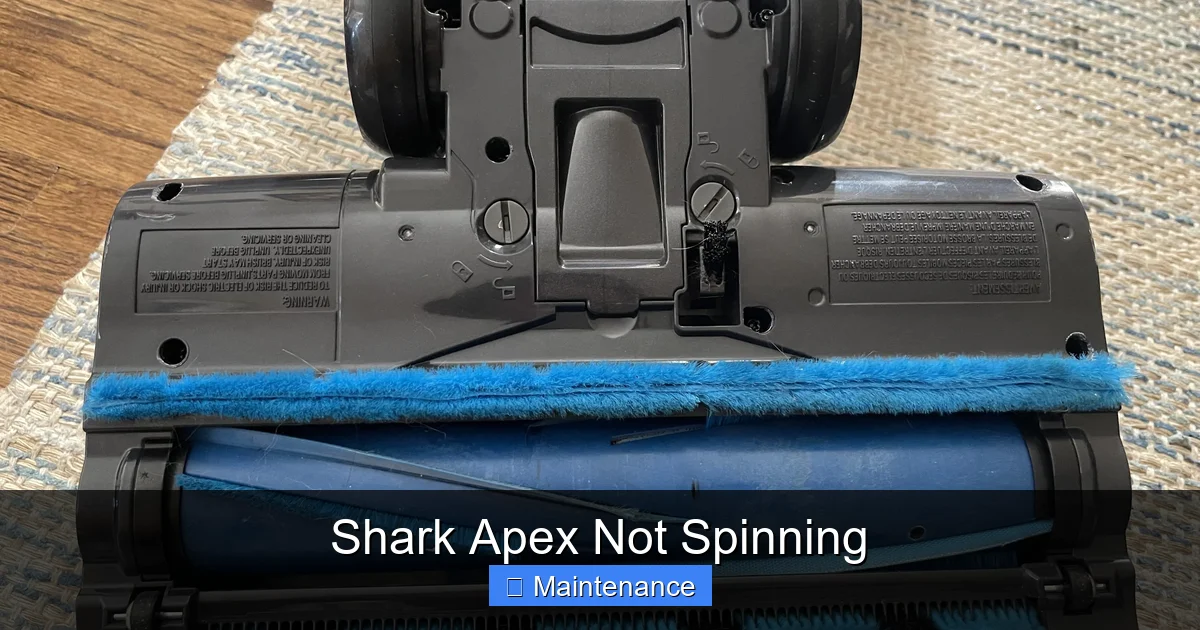
With the vacuum unplugged, flip it over onto its back. Look directly at the brush roll through the housing. Can you see it? Is it coated in a thick, felt-like carpet of hair, string, and fibers? Is there a large piece of debris, like a sock or rug fringe, visibly jammed between the bristles? If the answer is yes, you’ve found your problem. This visual clutter creates so much drag that the motor can’t overcome it. We will detail how to clean this thoroughly in the next section, but for now, just confirm this is the issue.
Getting to the Root: The Most Common Causes of a Non-Spinning Brush
If the reset button was popped and the visual inspection showed a clean(ish) brush roll, or if cleaning it didn’t solve the issue, it’s time to dig deeper. The problem falls into a few key categories: blockages, drive system failure, or component seizure.
Visual guide about Shark Apex Not Spinning
Image source: i.rtings.com
Cause 1: The Tangled Nightmare (Brush Roll & Bearings)
This is the heavyweight champion of brush roll problems. Over time, human hair, pet fur, carpet fibers, and even thin plastic strings (like from a toy or a plastic bag) wrap around the metal axle of the brush roll and, more critically, work their way into the plastic end caps that house the bearings. Once inside, this debris acts like glue, welding the bearing races to the axle. The brush roll becomes physically impossible to turn.
How to check: With the vacuum unplugged, try to manually spin the brush roll by hand. Can you feel it catch, grind, or is it completely solid? A healthy brush roll spins freely with a slight, smooth resistance. A seized one won’t budge or will only turn with great difficulty in short, jerky bursts. You must remove the brush roll to inspect and clean the end caps properly.
Cause 2: The Broken or Slipping Belt
The Shark Apex uses a rubber drive belt (like a tiny, continuous rubber band) to transfer rotational power from the motor shaft to the brush roll. This belt can fail in several ways: it can snap completely, it can stretch so much it slips off the pulleys, or it can become so glazed and worn that it slips on the pulleys without breaking. A broken belt means zero power reaches the brush roll. The motor will hum, but the brush stays still.
How to check: You must access the brush roll housing. Once the brush roll is removed (instructions coming), you’ll see the belt looped around a pulley on the motor and the brush roll spindle. Look for it. Is it there? Is it intact? Does it have a shiny, glazed appearance? Is it loose and hanging off? If it’s missing or visibly broken, that’s your answer.
Cause 3: The Hidden Clog (Airway Blockage)
Your vacuum’s brush roll motor is separate from the main suction motor, but it shares the same electrical circuit and can be affected by severe airflow restrictions. If the suction path is blocked—in the wand, the hose, or the brush roll housing itself—it creates back pressure. This can cause the brush roll motor to stall under the extra load, tripping the thermal reset or simply not starting. A clogged filter can also contribute to this systemic strain.
How to check: Detach the hose from the vacuum body. Look through it—can you see light? Use a long, flexible tool (like a straightened wire coat hanger with a small hook) to gently feel for obstructions. Check the inlet where the hose connects to the vacuum body. Remove the brush roll housing from the vacuum head and look up into the suction channel. Is it clear?
Step-by-Step Surgery: Diagnosing & Fixing the Problem Yourself
Now, let’s get our hands dirty. We’ll proceed from the simplest, most likely fix to the more involved. Always, always work with the vacuum unplugged.
Visual guide about Shark Apex Not Spinning
Image source: i.redd.it
Step 1: The Deep Clean – Removing & Servicing the Brush Roll
This is the most common and crucial step. Even if you saw hair on it, you need to get it out completely.
- Lay the vacuum on its back. Position it so you have clear access to the brush roll housing.
- Release the brush roll housing. On most Shark Apex models, there are two release latches on the underside of the housing, near the wheels. Press them inward and pull the entire housing off the vacuum body. It should come away easily.
- Remove the brush roll. With the housing in hand, locate the brush roll. It’s held in by two plastic caps on either end. Gently pry these caps off with a flathead screwdriver. They are usually clipped on. Once both caps are off, the brush roll will slide out.
- Clean the brush roll and end caps. Take the brush roll to a well-lit area. Use scissors or a seam ripper to meticulously cut and pull away all hair and fibers wrapped around the bristles and, most importantly, the metal axle. Then, take a cotton swab or a small piece of cloth dampened with rubbing alcohol and clean out the inside of each plastic end cap. You must remove every speck of debris from the bearing housing inside the cap. This is often where the seizing occurs. Spin the brush roll by hand—it should now rotate smoothly.
- Reassemble. Slide the cleaned brush roll back into the housing, ensuring it seats properly. Snap the plastic end caps back on firmly. Reattach the housing to the vacuum body until it clicks.
Plug in and test. If it spins, you’ve solved it! If not, move to Step 2.
Step 2: Inspecting the Drive Belt
With the brush roll housing still off (or easily removable), you can see the belt.
- Locate the belt. You’ll see a rubber loop running from a small pulley on the brush roll’s spindle to a larger pulley on the motor shaft inside the vacuum body.
- Check its condition and position. Is it there? Is it intact with no cracks or breaks? Is it properly seated on both pulleys? A common issue is that the belt jumps off the motor pulley and gets stuck in the housing groove. If it’s off, simply stretch it back over the motor pulley. If it’s broken, stretched, or glazed, it needs replacement.
- Replacing the belt. Shark Apex belts are inexpensive and model-specific (check your manual or the old belt’s part number). To replace it, you will likely need to remove the brush roll housing completely and may need to access the motor pulley from underneath the vacuum body, sometimes requiring the removal of a few screws. The belt simply stretches over the motor pulley and then the brush roll spindle. Ensure it’s sitting in the groove on both pulleys.
Step 3: The Full Airway Audit
If the brush roll is clean and the belt is good, the blockage is likely elsewhere.
- Wand & Hose: Detach the wand and hose from both the vacuum body and the handle. Visually inspect and use a flexible brush or bent wire to clear any obstructions.
- Vacuum Body Inlet: Remove the brush roll housing. Look up into the large suction port on the vacuum body where the hose normally connects. You should see a clear path to the fan. Use a flashlight. If you see debris, carefully reach in with needle-nose pliers or a flexible grabber tool.
- Filters: Remove and clean or replace both the pre-motor foam filter and the post-motor HEPA filter. A clogged filter creates immense back pressure. Washable foam filters should be completely dry before reinserting (24+ hours).
- Exhaust Port: Check the exhaust vents on the back of the vacuum body. Ensure they are not clogged with dust.
After clearing any clogs, reassemble everything, ensure all filters are clean and dry, and test again.
When the Brush Roll Itself is the Problem: Replacement & Advanced Signs
You’ve done the deep clean, the belt is perfect, and the airways are clear as a bell. You’ve pressed the reset button a dozen times. Yet, the brush roll still doesn’t spin. At this point, the fault likely lies within the brush roll assembly itself or the motor that drives it.
Signs of a Failed Brush Roll Motor
The Shark Apex uses a small, dedicated motor for the brush roll, housed in the brush roll housing. If this motor has failed (burned out windings), you will hear a faint click or hum when you turn the vacuum on, but the brush roll will not move, even with no belt attached. To test: with the belt removed, turn the vacuum on. If the brush roll spindle does not try to turn at all, the motor is suspect. If it tries to turn but stops immediately under the slight resistance of the brush roll bearings, the problem is still the seized brush roll.
Seized Bearings: The Point of No Return for the Brush Roll
If you removed the brush roll and found that, even after cleaning the end caps, the axle is still fused to the plastic cap and will not spin freely, the bearings inside that cap are permanently damaged. The only fix is to replace the entire brush roll assembly. Shark sells the brush roll as a single unit (bristles, axle, and end caps). It’s a straightforward part swap. Note the part number from your old brush roll (it’s often printed on the plastic) or look up your specific Shark Apex model number (usually on the back or underside of the vacuum) to find the correct replacement.
Replacing the Brush Roll Assembly
This is the final, simple mechanical fix. Purchase the correct replacement brush roll. Remove the old one as detailed in Step 1 (pop off the end caps, slide it out). Discard the old one. Install the new one by sliding it into the housing, ensuring the notches on the end caps align with the housing, and snap the caps back on. Reattach the belt, reinstall the housing, and test. If this doesn’t solve it, the fault is almost certainly the dedicated brush roll motor, which is a more complex internal repair often best left to a professional or considered for replacement if the vacuum is older.
The Golden Rule: Proactive Maintenance to Avoid Future Spins
An ounce of prevention is worth a pound of cure. Integrating a 30-second brush roll check into your weekly cleaning routine will save you hours of troubleshooting down the line.
The Post-Clean Blow-Out
After you finish vacuuming, especially on carpets or with pets, unplug the vacuum, flip it over, and use the crevice tool attachment on your vacuum’s hose (set to suction, not blow—some Sharks have a blow function, use suction) or a canned air to blast out any loose hair and debris from the brush roll and its housing. This prevents the gradual buildup that leads to seizing.
Monthly Deep Dive
Once a month, go through the full brush roll removal and cleaning process described in Step 1, even if it looks clean. You’ll be shocked at the fine dust and tiny hairs that accumulate inside the end caps. While you’re there, inspect the belt for cracks, glazing, or stretching. A belt that’s loose or has lost its elasticity should be replaced proactively. A new belt costs less than $10 and takes two minutes to install.
Filter Discipline
Follow Shark’s guidelines for filter maintenance. Washable foam filters should be rinsed with cold water, squeezed dry, and air-dried for a full 24 hours. Never reinstall a damp filter. The HEPA filter is not washable and should be replaced according to the manual’s schedule (usually every 6-12 months with regular use). A clean filter system ensures optimal airflow, reducing strain on all motors.
Knowing When to Wave the White Flag: Seeking Professional Help
You are a DIY champion. You’ve cleaned the brush roll, replaced the belt, cleared every conceivable clog, and the reset button still pops or the brush remains dead. Now what?
At this stage, the remaining failure points are internal and more complex: a failed brush roll motor, a broken motor mount, or a wiring issue within the vacuum’s main body. Diagnosing and repairing these requires more advanced tools, electrical knowledge, and disassembly of the vacuum’s main chassis. For most users, this is the point where the cost-benefit analysis shifts.
Consider professional repair if: Your Shark Apex is less than 3-5 years old and was a higher-end model. A repair shop can diagnose the motor for a fee, and a motor replacement might be a viable, cost-effective option compared to buying a new vacuum.
Consider replacement if: The vacuum is older, the repair estimate is close to half the price of a new comparable Shark model, or you’ve simply grown tired of the maintenance burden. Shark vacuums are built to last, but like all appliances, they have a finite lifespan. Sometimes, the most efficient solution is to invest in a new, more efficient model and recycle the old one responsibly.
Conclusion: Your Vacuum’s Spin Cycle is Back in Your Control
A Shark Apex not spinning feels like a major setback, but as we’ve seen, it’s usually a minor, mechanical issue with a clear solution. The power to fix it has been in your hands the entire time—literally. By understanding the core components (the brush roll, the belt, the reset button, the airways) and following a logical, methodical diagnostic process, you can troubleshoot and resolve this problem 90% of the time without spending a dime on service.
The key is to start simple: reset, look, clean. Don’t immediately assume the worst. That tangled hair around the brush roll’s axle is almost always the villain. Make the deep clean a habit, and you’ll keep your Shark Apex performing at its peak for years. You’ve now joined the ranks of informed owners who don’t fear a non-spinning brush—they see it as a quick, 10-minute maintenance task. So go forth, flip that vacuum over, and restore its powerful, spinning glory.
Frequently Asked Questions
Why does my Shark Apex brush roll stop spinning after a few minutes?
This is the classic sign of the thermal reset button tripping due to overheating. The most common cause is a severely clogged brush roll or suction airway that causes the motor to labor. Clear all debris from the brush roll, housing, and hose, then firmly press the red reset button on the brush roll housing.
Can I use my Shark Apex without the brush roll spinning?
You can use it on bare floors in “suction only” mode by turning the brush roll off (if your model has that switch), but you will lose all the agitating cleaning power on carpets and rugs. It’s designed as a two-surface cleaner, and the brush roll is essential for its performance on carpeted surfaces.
Is a broken belt obvious to see?
Sometimes. A completely snapped belt will be lying in the housing. More commonly, the belt is stretched and has slipped off the motor pulley, hiding in the groove. It may also just look old, glazed, and shiny without being broken. Always confirm the belt is present, intact, and snug on both pulleys.
My brush roll spins freely by hand, but not when the vacuum is on. What gives?
If the brush roll spins freely by hand, it’s not seized. This points to a drive issue. First, re-check that the belt is properly installed and not broken. Second, ensure the brush roll housing is clicked securely into the vacuum body—a poor connection can prevent the motor from engaging. Finally, the dedicated brush roll motor itself may be faulty.
How often should I clean my Shark Apex brush roll?
For best results, do a quick visual check and remove any visible hair or debris after every few uses, especially if you have pets or long hair. Perform the full removal and deep cleaning of the brush roll and end caps at least once a month to prevent hidden buildup that causes seizing.
Where is the reset button on a Shark Apex?
It’s located on the underside of the brush roll housing—the black plastic part at the front of the vacuum head. Turn the vacuum over and look for a small, circular red or black button. You may need to use a flashlight to see it clearly. It’s designed to be pressed with a firm finger push.