A Shark Ionflex Duoclean vacuum that won’t turn on, charge, or suction properly is incredibly frustrating, but most issues are fixable at home. The problem is usually something simple like a clogged filter, a jammed brush roll, a depleted battery, or a tripped thermal fuse. This guide walks you through every common failure point with clear, safe diagnostic steps and practical solutions. We’ll help you identify whether it’s a user-fixable blockage or a sign of a failing component needing professional repair or replacement.
You’re in the middle of cleaning, you press the power button on your trusty Shark Ionflex Duoclean, and… nothing. Or maybe it starts but has zero suction. The panic is real. This cordless powerhouse is a significant investment, and when it stops working, your whole cleaning routine falls apart. Before you resign yourself to an expensive repair bill or the sorrow of shopping for a new vacuum, take a deep breath. The phrase “Shark Ionflex Duoclean not working” covers a huge range of symptoms, and the vast majority have straightforward, do-it-yourself solutions. This guide is your comprehensive roadmap to diagnosis and repair. We’ll move systematically from the simplest checks to more complex investigations, arming you with the knowledge to fix it yourself or confidently explain the problem to a professional.
Think of your vacuum like your own body. A lack of energy (power) could be a dead battery (nutrition issue). Shortness of breath (poor suction) is almost always a clogged airway. A weird noise or sudden shutdown is like a fever—your body’s (vacuum’s) safety system kicking in to prevent damage. By learning to “listen” to your vacuum and check its vital systems, you become its best caretaker. Let’s get into the nitty-gritty and get your Shark Ionflex Duoclean working again.
Key Takeaways
- Always start with the basics: Check the battery charge, power switch, and that the unit is properly seated on its charging dock before assuming a major failure.
- Loss of suction is almost always a blockage: Inspect and clean the hose, wand, brush roll housing, and all filters. A single clogged filter can cripple performance.
- The brush roll is a common failure point: Hair and debris wrap will stop it cold. Regularly remove and clean the brush roll and its end caps to prevent jams and motor strain.
- Error codes and sudden shutdowns often indicate overheating: This is usually from a severe clog or a clogged filter causing the thermal fuse to trip. Clear all blockages and let the vacuum cool completely.
- Regular maintenance is non-negotiable: Cleaning filters weekly and checking for blockages monthly prevents 90% of “not working” scenarios and extends the vacuum’s lifespan dramatically.
- Know when to seek help: If the vacuum has no power on a full battery, the motor makes grinding noises, or you smell burning, stop immediately and contact Shark Support or a qualified appliance repair technician.
📑 Table of Contents
- 1. The Power Problem: Why Won’t It Turn On or Charge?
- 2. The Suction Struggle: When the Motor Runs but There’s No Power
- 3. Brush Roll Blues: Spinning Poorly, Not Spinning, or Making Noise
- 4. Decoding Error Codes and Sudden Shutdowns
- 5. Advanced Diagnostics: When the Fix Isn’t Obvious
- 6. The Foundation of Function: Proactive Maintenance Schedule
- Conclusion: Empowerment Through Understanding
1. The Power Problem: Why Won’t It Turn On or Charge?
This is the most common and often the simplest group of issues. A Shark Ionflex Duoclean that appears completely dead usually has a power delivery problem, not a dead vacuum. Let’s eliminate the obvious culprits first.
Check the Obvious: Outlet, Dock, and Switch
It sounds silly, but always verify the charging dock is plugged into a working wall outlet. Test the outlet with another device, like a lamp or phone charger. Ensure the dock’s prongs are clean and undamaged. Next, confirm the vacuum is seated correctly on the dock. The metal charging contacts on the vacuum must align perfectly with the pins on the dock. A slight misalignment, often from debris on the contacts, will prevent charging. Use a dry, lint-free cloth to wipe both sets of contacts. Finally, press the power button firmly. The Ionflex has a safety feature where the brush roll won’t spin if the vacuum isn’t fully assembled, but the main suction motor should still turn on. If the power button feels sticky or unresponsive, it may need cleaning or replacement.
Battery Health and Reset Procedures
The Ionflex uses a lithium-ion battery, which degrades over time (typically 2-3 years of regular use). A battery that won’t hold a charge is a prime suspect. First, try a full reset. Unplug the dock from the wall, remove the vacuum, and let it sit for 60 seconds. This clears any temporary electronic glitch. Plug the dock back in and reseat the vacuum. Let it charge undisturbed for at least 3-4 hours.
If it still won’t charge, the battery itself may be exhausted. Look for signs: does the charging indicator light (if equipped) behave oddly, or does the vacuum run for just a minute or two on a full charge? Replacing the battery is a common and cost-effective repair for older models. Shark sells official replacement batteries, and third-party options exist. Ensure you get the correct model number (often found on a label on the battery or vacuum body).
Internal Fuse and Safety Cut-offs
Your vacuum has safety mechanisms. The most critical is the thermal fuse. If the motor overheats due to a severe clog or dirty filter, this fuse will trip, cutting all power to protect the motor. The fix is usually simple: unplug the vacuum (or remove the battery if accessible), find the cause of the overheating (clog, dirty filter), clear it, and let the vacuum cool completely for 1-2 hours. The fuse will often reset on its own once cooled. If it doesn’t, the fuse may be permanently blown and require replacement—a more advanced repair.
2. The Suction Struggle: When the Motor Runs but There’s No Power
This is a distinct issue. You hear the motor whirring, but there’s no airflow at the wand tip. The vacuum is “working” but useless. This is almost always an airflow restriction problem. Air must travel in a perfect, unobstructed path from the floor, through the brush roll housing, up the wand, through the hose, into the dust cup, and finally through the exhaust filter. A blockage anywhere in this path kills suction.

Visual guide about Shark Ionflex Duoclean Not Working
Image source: sharkvacuum.blog
Methodical Blockage Hunting
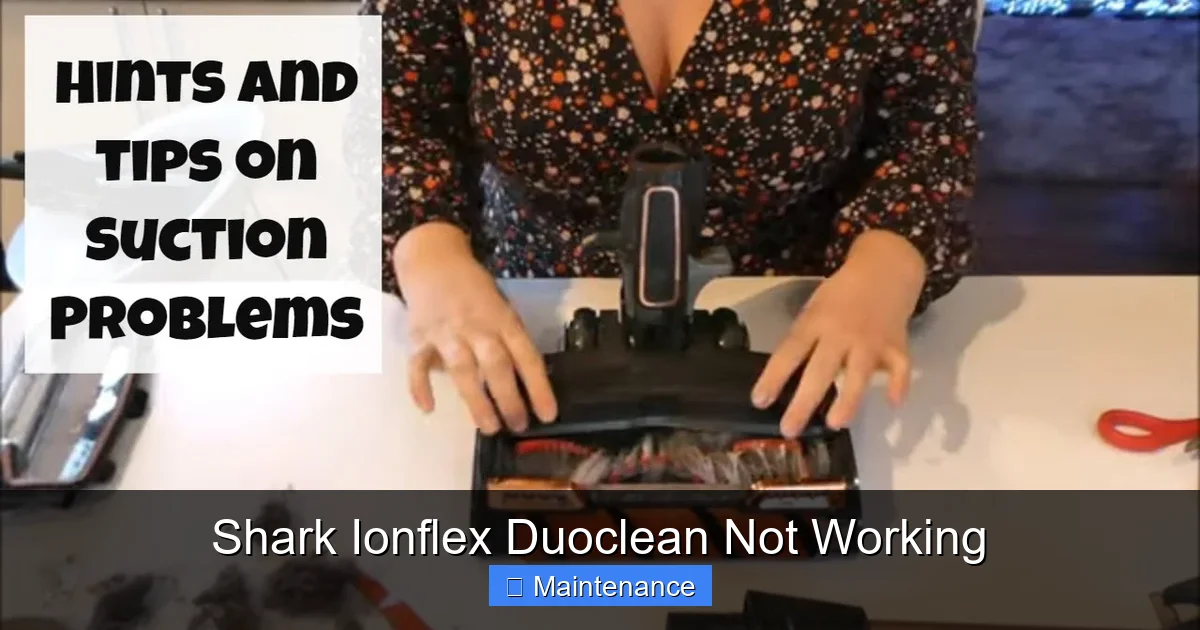
You must become a detective. Start at the source: the brush roll housing. Detach the wand/hose from the main body. Look directly into the opening where the wand connects. Can you see light? Can you feel strong airflow with your hand? If not, the clog is likely in the main housing. Turn the vacuum over and remove the brush roll (usually a release lever or two screws). Look into the cavity. Use a flashlight. You’ll often find a solid mat of hair, carpet fibers, or a large object like a sock or piece of paper. Use long-nose pliers or a dedicated clog-clearing tool to extract it.
Next, inspect the hose and wand. Detach them from each other. Shine a light through one end. Look for obstructions. A long, flexible brush (like a bottle brush) or a straightened wire coat hanger (used with extreme care to avoid puncturing the hose) can dislodge clogs. Pay special attention to the wand’s telescoping sections and the connection points where debris loves to accumulate.
The Filter Factor: The #1 Cause of Reduced Suction
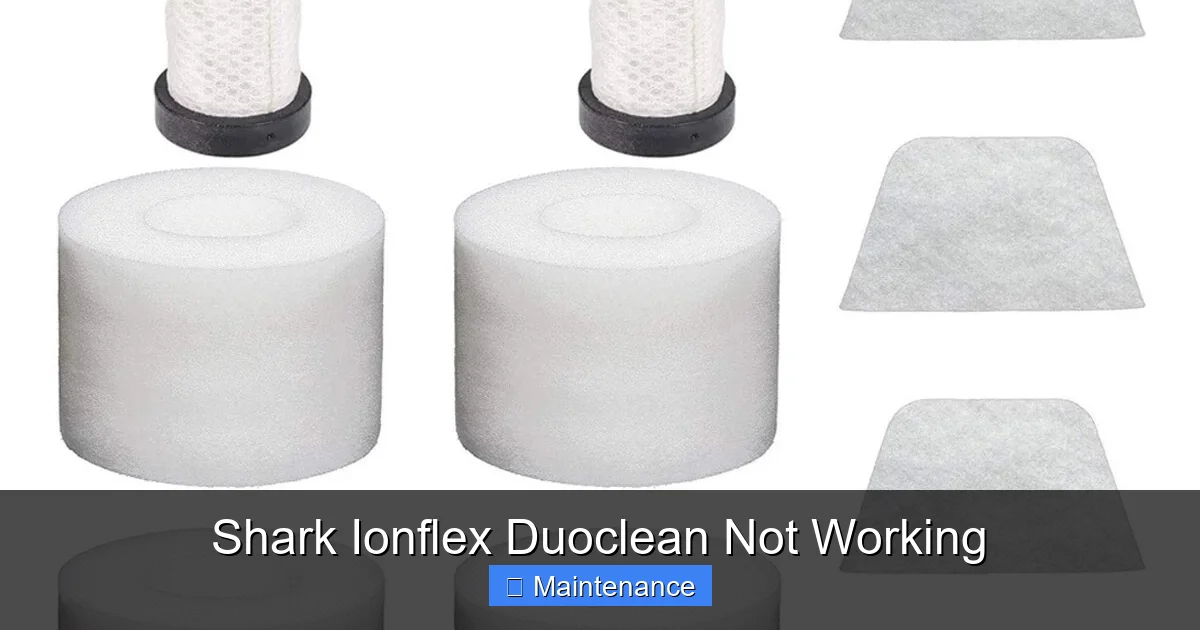
Even with a perfectly clear path, dirty filters will strangle your vacuum’s performance. The Shark Ionflex Duoclean typically has at least two filters: a foam pre-motor filter inside the dust cup and a pleated post-motor exhaust filter (often behind a grille on the back or top). These must be cleaned regularly. The foam filter should be removed, rinsed under lukewarm water until clean, and air-dried completely for 24 hours before reinserting. The exhaust filter can often be tapped out to remove loose dust, but it is not washable and will need replacing every 3-6 months depending on use. A clogged exhaust filter doesn’t just reduce suction; it forces the motor to work harder, leading to overheating and potential motor failure. Make filter maintenance a weekly habit.
3. Brush Roll Blues: Spinning Poorly, Not Spinning, or Making Noise
The brush roll (the spinning roller with bristles) is the active cleaning component for carpets. If it’s not spinning correctly, your vacuum is essentially an expensive blower on hard floors. Issues here range from simple jams to mechanical failures.
Hair Wrap and Debris Jam
This is the most frequent brush roll problem, especially in homes with pets or long hair. Hair winds tightly around the axles and bristles, creating immense friction. The motor may strain, the brush roll may spin slowly, or it may not spin at all. Always turn off and unplug the vacuum (or remove the battery) before inspecting the brush roll. Lay the vacuum on its side. Locate the brush roll release mechanism—usually a lever or two screws on the housing. Remove the brush roll entirely. You’ll likely see a solid cylinder of hair. Use scissors to cut it lengthwise and pull it off. Be meticulous and remove all debris from the end caps and the space between the bristles. While you have it out, check that the brush roll spins freely by hand. If it’s gritty or doesn’t spin, its bearings may be damaged, requiring a brush roll replacement.
Drive Belt and Motor Coupler Issues
The brush roll is powered by a small rubber belt or a direct-drive plastic coupler from the motor. On some Ionflex models, a broken or stretched belt will cause the brush roll to stop. If you’ve cleared all hair and the brush roll still doesn’t spin when the vacuum is on (but the suction motor runs), the drive system may be broken. This requires disassembling the brush roll housing to inspect. If the belt is broken or the plastic coupler is stripped or broken, both are inexpensive parts to replace. Look for the part number on the old component or in your manual.
4. Decoding Error Codes and Sudden Shutdowns
Modern vacuums like the Ionflex Duoclean have onboard diagnostics. A flashing light pattern or a sudden, unexpected shutdown is your vacuum’s way of sending an SOS. Don’t ignore it.
Visual guide about Shark Ionflex Duoclean Not Working
Image source: i.ebayimg.com
Common Light Patterns and Their Meanings
Consult your user manual for the exact code meanings for your specific model number, as patterns can vary. However, common signals include: a rapidly blinking battery light (battery failure or communication error), a solid red light on the brush roll indicator (brush roll jam), or a sequence of flashes indicating a sensor fault. When you see an error, the first step is always the same: power cycle. Turn the vacuum off, remove it from the dock, remove the battery if possible, wait 60 seconds, and restart. If the error persists, it points to a specific, unresolved issue—most commonly a persistent brush roll jam or a sensor (like the 2-in-1 floor sensor) that is dirty or faulty.
Thermal Fuse Tripping: The Overheating Sentinel
As mentioned earlier, if your vacuum runs for 10-30 seconds and then shuts off completely, and won’t restart for a while, the thermal fuse has tripped due to overheating. The cause is always a severe restriction of airflow. You must find and eliminate the clog. Check every single point in the airflow path with extra diligence. Once you’re certain it’s clear, let the vacuum cool in a room-temperature environment for at least an hour. The fuse should reset. If it trips again immediately after restarting with no clog found, the fuse itself may be faulty or there’s an internal motor issue causing excessive heat draw.
5. Advanced Diagnostics: When the Fix Isn’t Obvious
You’ve checked the battery, cleared every clog, cleaned every filter, and inspected the brush roll. The vacuum still doesn’t work right. Now it’s time for deeper investigation.
Visual guide about Shark Ionflex Duoclean Not Working
Image source: i.ytimg.com
Testing the Motor and Electrical System
If the vacuum has no power on a known-good, fully charged battery, and you’ve ruled out the switch and fuses, the main suction motor may have failed. This is characterized by a complete silence when the power button is pressed. Similarly, if the motor runs but makes a grinding, whining, or burning smell, the motor brushes are worn out or the armature is damaged. These are not simple user repairs. They require multimeter testing of continuity and often soldering skills. At this stage, you must weigh the cost of a new motor (plus labor if you don’t DIY) against the price of a new vacuum.
Sensor and PCB (Circuit Board) Failures
The Ionflex Duoclean uses sensors to detect floor type and adjust the brush roll speed. A dirty or faulty sensor can cause error codes and prevent operation. Locate the sensor (usually a small, clear window on the underside near the brush roll). Clean it gently with a cotton swab and isopropyl alcohol. If problems persist, the issue could be with the printed circuit board (PCB) that controls everything. Diagnosing a bad PCB is difficult without technical schematics. Symptoms include random shutdowns, lights that behave erratically, or the vacuum simply not powering on despite all other components being good. PCB replacement is a professional repair.
6. The Foundation of Function: Proactive Maintenance Schedule
Prevention is infinitely better than cure. A well-maintained Shark Ionflex Duoclean will rarely leave you stranded. Adopt this simple schedule:
- After Every 2-3 Uses: Empty the dust cup. Tap out the foam pre-motor filter over a trash can. Wipe the vacuum’s exterior and the charging contacts with a dry microfiber cloth.
- Weekly: Remove the foam filter, rinse thoroughly under cool water until the water runs clear, and let it air-dry for 24 hours. Have a spare filter to swap in while the other dries. Visually inspect the brush roll for hair wrap and clean if necessary.
- Monthly: Perform a full blockage check. Remove the hose and wand, look through them with a flashlight. Remove the brush roll and clean its housing thoroughly. Check the exhaust filter for clogs; tap it out gently outdoors. If it’s visibly dirty, replace it.
- Every 6 Months: Deep clean all components. Inspect the drive belt/coupler for wear. Clean all sensors with alcohol. Check the battery’s runtime—if it’s dropped below 50% of its original capacity, start budgeting for a replacement.
Following this routine will keep your vacuum’s performance consistent and catch small problems before they become big, show-stopping ones.
Conclusion: Empowerment Through Understanding
A “Shark Ionflex Duoclean not working” message doesn’t have to be the end of the story. By understanding the core systems—power, airflow, and brush actuation—you can diagnose and solve most common failures. Start with the simplest, most likely causes: a dead battery, a clogged filter, or a hair-wrapped brush roll. Work methodically through the checklist we’ve provided. The tools you need are mostly already in your home: a screwdriver, a pair of scissors, a flashlight, and some patience.
Remember, your vacuum is a machine with many moving parts and filters that interact with dirt daily. It requires care. Investing 15 minutes a month in proactive maintenance will save you hours of frustration and potentially hundreds of dollars in repair costs. If you’ve followed every step in this guide and your Ionflex Duoclean still refuses to cooperate, the fault likely lies with a failed internal component like the motor, fuse, or control board. At that point, the most cost-effective decision may be to contact Shark’s customer support (if under warranty) or a reputable appliance repair service for a diagnostic quote. You’ve now got the knowledge to have an informed conversation about the fix. Here’s to a clean home and a reliably working vacuum!
Frequently Asked Questions
My Shark Ionflex Duoclean charges but won’t turn on. What gives?
This usually points to a tripped thermal fuse from a past overheating event or a faulty power switch. First, ensure the battery is fully charged. Perform a full reset by removing the battery/vacuum from the dock for 60 seconds. If it still won’t start, the thermal fuse may need replacing, or the power switch could be faulty. These are more advanced repairs.
Why is my vacuum making a loud, high-pitched noise?
A high-pitched whine or scream typically indicates a severe airflow restriction causing the motor to strain. Immediately turn it off and check for clogs in the hose, wand, brush roll housing, and filters. A grinding or rattling noise, however, often means debris is caught in the brush roll or, more seriously, that the motor bearings are failing.
How often should I really clean the filters?
For optimal performance, clean the foam pre-motor filter after every 2-3 uses by tapping out debris. Rinse it with water weekly and let it dry for 24 hours. The exhaust filter should be tapped out monthly and replaced every 3-6 months. Neglecting the exhaust filter is a prime cause of lost suction and motor overheating.
My brush roll spins but the vacuum has no suction. Is it broken?
Almost certainly not. If the brush roll spins but there’s no suction, the airflow path is blocked. The clog is not in the brush roll area but further up, likely in the hose, wand connection, or a filter. Detach the hose and wand and check them thoroughly with a flashlight and a long, flexible brush.
Can I wash the exhaust filter?
No. The pleated exhaust filter is not designed to get wet. Washing it will destroy its structure and render it useless. You can gently tap it outdoors to dislodge dust, but once it’s visibly dirty or discolored, it must be replaced with a new one.
Is it worth fixing an old Ionflex Duoclean, or should I just buy new?
It depends on the fault and the age. Simple fixes like a new battery ($40-$70), a new brush roll ($25-$40), or a new filter are almost always worth it. Major repairs like a new motor or control board can cost $100+ in parts alone. If your vacuum is over 4 years old and requires a major component replacement, investing in a new model with a fresh warranty may be more economical in the long run.