A non-spinning roller on your Shark Navigator is almost always caused by a simple jam or hair wrap, not a broken motor. This guide walks you through the exact, step-by-step troubleshooting process to identify and clear the blockage, reset the belt, and perform essential maintenance. You’ll learn how to access the roller, clean it thoroughly, inspect the belt and bearings, and know when a part replacement is truly needed. Most issues are resolved in under 10 minutes with no tools, saving you from costly service calls.
Key Takeaways
- Jams are the #1 culprit: Hair, string, and carpet fibers are the primary reason a Shark Navigator roller stops spinning. A thorough visual inspection and cleaning almost always fixes the problem.
- Access is simple: You don’t need tools to remove the roller brush assembly on most Navigator models. It’s designed for user maintenance and clicks out easily.
- The belt is a common point of failure: A broken, stretched, or dislodged drive belt will prevent the roller from spinning. Checking its integrity is a critical step.
- Bearings can seize: If the roller spins freely when removed but the vacuum head feels stiff, the roller’s internal bearings may be locked and require replacement.
- Reset the vacuum: After clearing a jam, unplugging the vacuum for 60 seconds resets the motor’s thermal protection, which often trips during a stall.
- Prevention is key: Regular, quick maintenance—cutting wrapped hair from the roller ends and checking for debris—prevents 90% of future roller failures.
- Motor failure is rare: It’s highly unlikely the main motor is broken if the vacuum still powers on and has suction. Focus your troubleshooting on the roller path first.
[FEATURED_IMAGE_PLACEHOLDER]
📑 Table of Contents
- The Frustration of a Silent Roller: Understanding the Problem
- First Responder Steps: Immediate Actions When the Roller Stops
- Deep Dive: Removing and Inspecting the Brush Roll Assembly
- The Drive System: Checking the Belt and Pulley
- Beyond the Roller: Other Potential Culprits
- Preventive Maintenance: Keeping Your Roller Rolling for Years
- When to Say “Uncle”: Knowing When to Replace Parts
- Conclusion: Empowerment Through Understanding
The Frustration of a Silent Roller: Understanding the Problem
You plug in your trusty Shark Navigator, flip the switch, and hear the familiar hum of the motor… but something’s missing. That critical, agitating sound of the brush roll—the heartbeat of your vacuum’s cleaning power—is silent. The floor isn’t getting the deep carpet cleaning it needs, and you’re left wondering if you’ve just inherited a very expensive paperweight. Before you panic or call for service, take a deep breath. A Shark Navigator roller not working is one of the most common vacuum issues, and the fantastic news is that in over 90% of cases, the fix is something you can do yourself in minutes, with no special tools or technical knowledge. This isn’t a complex appliance failure; it’s a mechanical blockage or wear point, and we’re going to become detectives together.
Think of your vacuum’s brush roll as the engine in your car. It needs a clear path to rotate, a connected drive system (the belt) to transfer power, and smooth bearings to spin freely. When any part of this system is compromised—by a hair tangle, a broken belt, or gummed-up bearings—the whole system grinds to a halt. The motor might be running perfectly, but that power isn’t reaching the floor. Our goal is to methodically check each link in this chain to find the weak spot. We’ll start with the most probable cause and work our way down. This systematic approach will save you time, money, and the frustration of guessing.
First Responder Steps: Immediate Actions When the Roller Stops
Before you even flip the vacuum over, there are two critical, immediate actions to take. These steps protect your machine and set the stage for safe, effective troubleshooting.
Visual guide about Shark Navigator Roller Not Working
Image source: sharkvacuum.blog
Unplug and Reset: The Golden Rule
This is non-negotiable. The moment you notice the roller isn’t spinning, unplug the vacuum from the wall outlet. Why? Shark vacuums, like most modern models, have a thermal protection circuit built into the motor. If the roller jams severely, the motor strains, overheats, and this safety switch trips, shutting the motor down to prevent damage. If you try to immediately restart it, it won’t turn on. By unplugging it and waiting 60 full seconds, you allow this thermal fuse to reset. After waiting, plug it back in and try again. Sometimes, a minor jam that briefly stalled the motor is all it takes to trigger this, and a simple reset is the full solution. If the roller still doesn’t spin after this reset, proceed with the inspection.
The Visual Inspection: Looking for Obvious Obstructions
With the vacuum unplugged, turn it over and look at the brush roll housing—the rectangular or oval opening on the soleplate. Can you see any large, obvious objects? A sock, a piece of string wound tightly around the end of the brush, or a clump of pet hair? If you see something and can safely reach in with needle-nose pliers or even your fingers (being careful of any sharp debris) to pull it out, do so. Do not use scissors near the roller bristles; you could accidentally cut them. Use a seam ripper or the tip of a utility knife to carefully slice through wrapped hair or string. This quick visual check might solve 10% of problems instantly.
Deep Dive: Removing and Inspecting the Brush Roll Assembly
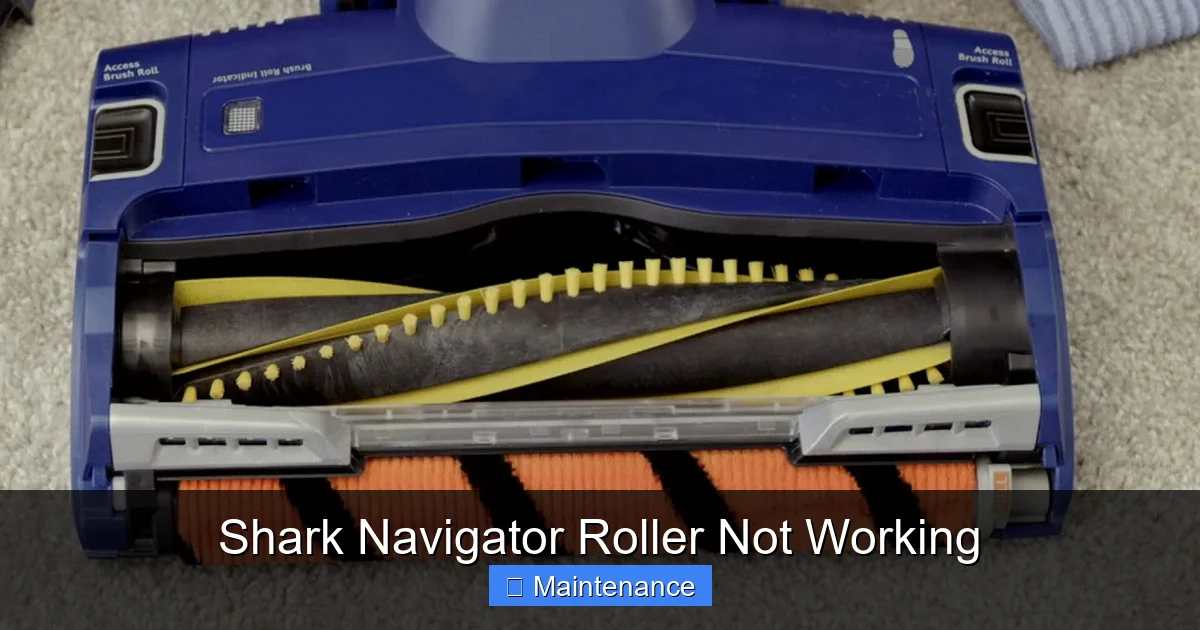
For most Shark Navigator models (like the Lift-Away, Rotator, or Professional series), accessing the brush roll for a full cleaning is designed to be user-friendly. You typically do not need a screwdriver. Here’s how to get it out safely and what to look for once it’s in your hands.
Visual guide about Shark Navigator Roller Not Working
Image source: i.ytimg.com
How to Remove the Roller (No-Tool Method)
1. Lay the vacuum on its side on a clean surface, with the brush roll side facing up.
2. Locate the two plastic end caps on the brush roll. On each side, you’ll see a small, often red or gray, release tab or lever.
3. Push in and pull up on each tab simultaneously. You may need to use two hands, one on each side. The entire brush roll assembly (the roller itself, the two end caps, and the short belt that rides on it) will lift straight up and out of the vacuum’s housing.
4. Gently set it down on a towel or newspaper. Be mindful of the small drive belt that may be sitting in the groove of the roller; it’s easy to lose.
The 3-Point Inspection Checklist
Once the roller is out, your inspection begins. You are looking for three specific things:
- Hair & Fibers: This is the prime suspect. Hair winds around the roller’s axle (the metal rod through the center) and gets caught in the bristles, especially at the ends. It packs in tightly, creating a “hair cast” that binds the roller. You must remove this completely. Use a sharp tool like a seam ripper, a dedicated brush cleaning tool, or even the edge of a old credit card to scrape and cut it away. Pull the hair off in pieces; don’t just try to yank it, as it will tighten.
- Debris in Bearings: At each end of the roller, where the metal axle meets the plastic end cap, are tiny ball bearings. Look into these openings. Do you see grit, dust bunnies, or hardened hair? If so, this is grinding the bearings and causing them to seize. Use a cotton swab dipped in rubbing alcohol to clean these openings out meticulously.
- Bristle Damage: Are the nylon bristles broken, melted (from contact with a hot vacuum motor), or severely matted? Severely damaged bristles can indicate a past severe jam or overheating event and may contribute to poor cleaning even if the roller spins.
After cleaning, try to spin the roller by hand. It should rotate smoothly and silently for several seconds. If it feels gritty, stiff, or makes noise, the bearings are likely permanently damaged and the entire roller assembly needs replacement.
The Drive System: Checking the Belt and Pulley
With the roller removed, your eye should immediately go to the belt. This is the crucial link that transfers the motor’s spinning power to the brush roll. If this link is broken, the roller gets no power.
Visual guide about Shark Navigator Roller Not Working
Image source: i.ytimg.com
Locating and Assessing the Belt
Inside the vacuum’s brush roll housing, you’ll see a small rubber belt, typically black or dark gray. One end is looped around the motor shaft (a small metal peg), and the other end sits in a groove on the roller’s axle. Follow these checks:
- Is it there? Sometimes, during a severe jam, the belt can snap and fall off completely, landing inside the housing or even getting ejected. Make sure it’s present and seated on both the motor shaft and the roller axle.
- Is it intact? Look for any visible cracks, splits, or fraying in the rubber. Stretch it gently. If it’s stretched out and loose, it will slip and not turn the roller effectively. A good belt has firm elasticity.
- Is it properly aligned? The belt should sit flat in the groove on the roller. If it has flipped or twisted, it won’t engage properly.
Replacing the Belt: A Simple Fix
If the belt is broken, stretched, or missing, replacement is straightforward. Shark Navigator belts are inexpensive and model-specific (check your manual or the sticker on your vacuum for the exact model number, like NV350, NV356, etc.). To install the new belt, stretch it over the motor shaft first, then stretch the other side into the groove on the roller axle. It requires a firm pull to seat it. Reinstall the roller assembly, ensuring the belt is not pinched between the roller and the housing. The roller should now spin freely when you turn it by hand, with the belt providing slight resistance.
Beyond the Roller: Other Potential Culprits
If you’ve cleared the roller, checked the bearings, and installed a new belt but the roller still doesn’t spin when the vacuum is on (and you’ve done the 60-second reset), the problem lies deeper in the drive system.
The Clutch or Gear Assembly (On Some Models)
Some Shark Navigator models, particularly those with “Lift-Away” technology, have a clutch or gear mechanism in the floor head. This engages/disengages the brush roll when you switch between carpet and bare floor modes. If this plastic gear set is stripped or broken, power won’t transfer to the roller. You’ll often hear a grinding or whirring sound from the floor head, but the roller stays still. Diagnosing and replacing this requires more disassembly of the floor head and is a less common issue than a jam or belt.
The Motor Itself: The Last Resort
True motor failure is exceptionally rare. If your vacuum has full suction (you can feel strong airflow at the wand/hose) and the main body motor runs loudly, but the brush roll in the floor head gets no power, the issue is almost certainly in the floor head’s drive path (belt, roller, clutch). The motor that drives the brush roll is a separate, smaller motor in the floor head on some models, but more commonly, power is transferred via the belt from the main motor. If you have no suction at all and the main body is silent, that points to a main motor or electrical issue, which is a different problem entirely from the roller not working.
Preventive Maintenance: Keeping Your Roller Rolling for Years
The best fix is the one you never need. A few minutes of regular care will prevent the vast majority of roller issues and keep your Shark Navigator performing at its peak.
Make It a Habit: The 60-Second Post-Vacuum Check
Every time you finish vacuuming, before you even wind the cord, do this: Flip the vacuum over and use the seam ripper or your fingers to check the ends of the brush roll. Pull off any hair or carpet fiber that has started to wind around the axle. This takes 30 seconds. If you have pets or long hair, do it every time. This prevents the “hair cast” from building up into a solid, immovable blockage.
Monthly Deep Clean
Once a month, or if you notice a drop in cleaning performance, follow the full removal and cleaning process outlined above. Take out the roller, clean the bearings, clear all debris from the housing, and inspect the belt. Wipe down the inside of the housing with a dry cloth. This is like an oil change for your vacuum.
Mind What You Vacuum
Your Shark Navigator is a powerful machine, but it’s not indestructible. Avoid vacuuming:
- Hard, small objects (coins, paperclips, pins) – they can jam the roller or damage bearings.
- Large, bulky items (socks, large pieces of paper) – they can wrap the roller and stall it.
- Wet anything. Never use a dry vacuum on wet spills.
- Very long, drapery cords or string. These are the #1 cause of severe jams.
Being mindful of what goes under the brush roll extends its life dramatically.
When to Say “Uncle”: Knowing When to Replace Parts
Even with the best care, parts wear out. Here’s your guide to knowing when a repair is worth it versus when to replace the component.
Replace the Brush Roll Assembly If:
- After a thorough cleaning, the roller still does not spin freely by hand (bearings are seized).
- The bristles are melted, severely matted, or broken off in large sections, rendering it ineffective.
- The plastic end caps are cracked or broken.
OEM (Original Equipment Manufacturer) Shark Navigator brush rolls are readily available online for $15-$30. Given the tool-free removal, this is a very economical and simple DIY replacement. Keep your model number handy.
Replace the Belt If:
- It shows any signs of cracking, stretching, or glazing (a shiny, hardened surface).
- It’s been on the vacuum for over a year ( belts are a wear item).
- It slips on the motor shaft even when the roller is clear.
Belt packs are cheap, often sold in multi-packs for under $10. Replacing it annually as preventive maintenance is a smart move.
Consider Professional Service If:
- You’ve replaced the roller and belt and the problem persists.
- You suspect a stripped clutch/gear assembly and are uncomfortable with that level of disassembly.
- The main vacuum motor itself is faulty (no suction, strange smells, smoke).
At this point, the cost of diagnosis and repair at a service center may approach the value of an older machine. Shark’s customer service can advise if your model is still under warranty.
Conclusion: Empowerment Through Understanding
A Shark Navigator roller not working is a solvable problem. It’s a mechanical issue with a mechanical solution. By moving past the initial frustration and adopting a systematic, detective-like approach—unplug and reset, remove and inspect the roller, check the belt, then consider deeper components—you reclaim control over your appliance. You move from a frustrated user to an empowered maintainer. The tools you need are likely already in your kitchen drawer: a seam ripper, a flashlight, and a bit of patience. The reward is a fully functional vacuum that will continue to tackle your floors with its signature powerful agitation for years to come. Remember, that silent roller is almost always just asking for a little attention. Listen to it, give it the 10-minute tune-up it needs, and you’ll have your Shark Navigator back in action, spinning and cleaning like new.
Frequently Asked Questions
My Shark Navigator roller spins but the vacuum doesn’t pick up debris. Is that the same problem?
Not necessarily. If the roller spins but pickup is poor, the issue is likely suction-related—a clogged filter, a full dust cup, or a blockage in the hose or wand. The roller working but not picking up indicates the brush is agitating but the airflow to carry debris away is restricted. Start by cleaning all filters and checking the hose for clogs.
How often should I clean my Shark Navigator’s brush roll?
For optimal performance, perform a quick hair check at the roller ends after every few uses, especially if you have pets or long hair. A full removal, deep cleaning, and bearing inspection should be done at least once a month for average use, or more frequently in high-debris environments.
Can I wash the Shark Navigator brush roll with water?
You can rinse the plastic parts of the roller and end caps with water, but never submerge the entire assembly or get water inside the bearing housings. Water can penetrate the bearings and cause them to rust or seize. If you rinse it, let all parts dry completely for 24 hours before reassembling to prevent mildew and motor strain.
What does a broken belt look like? Can I still use the vacuum with a broken belt?
A broken belt will have a visible split, crack, or may be completely severed or missing. You may also find rubber shavings in the housing. Do not use the vacuum with a broken or missing belt. The roller will not spin, and the loose belt can get tangled in other components, causing further damage. Replace it immediately.
My roller spins freely when I remove it, but the vacuum still won’t spin it. What gives?
This is a classic sign of a broken, stretched, or dislodged drive belt. With the roller out, look into the housing. You should see the belt connected from the motor shaft to where the roller’s axle sits. If it’s snapped, missing, or not properly seated on the motor shaft, that’s your problem. Install a new belt correctly.
Is it worth fixing an old Shark Navigator, or should I just buy a new one?
Shark Navigators are built to last. If your model is under 5-7 years old and the issue is a jammed roller, a $20 brush roll, or a $5 belt, it’s almost always worth fixing. The cost of parts is minimal compared to a new vacuum. If the main motor fails or multiple components are broken on a very old model, replacement might be more sensible. Check your model’s serial number for warranty status first.