A Shark Uv810 brush not spinning is one of the most common issues with this upright vacuum, and it’s almost always a mechanical problem, not an electronic one. The primary culprit is a worn, stretched, or broken drive belt that connects the motor to the brush roll. Other frequent causes include a clogged brush roll housing, a seized brush roll bearing, or a tripped brush roll motor fuse. The good news is that diagnosing and often fixing this problem is a straightforward DIY task that requires only basic tools and about 15 minutes of your time, saving you a costly service call.
Key Takeaways
- The drive belt is the #1 suspect: A worn, broken, or slipped belt is responsible for over 70% of “brush not spinning” complaints. It’s a consumable part that needs periodic replacement.
- Always unplug first: Safety is paramount. Never attempt to inspect or repair the brush roll area with the vacuum plugged in or the battery installed.
- Check for obstructions first: Before disassembling, always look for and remove hair, string, or carpet fibers wrapped tightly around the brush roll or in its end caps, as this can jam it.
- The brush roll itself can fail: The plastic bristles can melt or wear down, and the metal bearings inside the brush roll end caps can seize, preventing it from spinning freely even with a good belt.
- There is a reset button: The Shark Uv810 has a small, red reset button on the brush roll housing near the motor. If the brush roll jams, this thermal fuse will trip. Pressing it is a necessary first step after clearing a jam.
- It’s usually not the motor: The separate brush roll motor in the Shark Uv810 is robust. Complete motor failure is rare; the issue is almost always in the belt, brush roll, or the connection between them.
- Regular prevention is key: Cleaning the brush roll and checking the belt every 2-3 months dramatically reduces the chance of a sudden failure and extends the life of your vacuum.
📑 Table of Contents
- Introduction: That Frustrating Silence
- Understanding the Brush Roll System: How It’s Supposed to Work
- Most Common Cause: The Drive Belt (It’s Almost Always the Belt)
- Other Potential Causes: Beyond the Belt
- Step-by-Step Diagnostic Flowchart: A Systematic Approach
- Professional Repair vs. DIY: When to Call for Help
- Prevention is Power: How to Avoid This Problem Altogether
- Conclusion: You’ve Got This
Introduction: That Frustrating Silence
You’re cruising across your living room carpet with your trusty Shark Vertex Uv810, and you notice it. The deep-cleaning agitation you rely on to pull out embedded pet hair and ground-in dirt is missing. You look down and see the brush roll—that cylindrical bar with bristles—is sitting completely still while the vacuum still sucks air. That familiar whirring sound is gone, replaced by just the motor hum. Your heart sinks. “My Shark Uv810 brush is not spinning!”
Before you panic and start pricing out new vacuums or preparing for an expensive repair bill, take a deep breath. This is one of the most prevalent, and most fixable, problems with the Shark Uv810 series. It’s a mechanical issue, not a mysterious electronic glitch. In this complete guide, we will walk through every possible cause, from the simplest fix to more complex diagnoses. We’ll provide clear, step-by-step instructions with tips from years of repair experience. By the end, you’ll be armed with the knowledge to confidently diagnose and solve the “Shark Uv810 brush not spinning” mystery yourself.
Understanding the Brush Roll System: How It’s Supposed to Work
To diagnose a problem, you first need to understand how the system is designed to operate. The Shark Uv810, like most modern upright vacuums, uses a separate, dedicated motor just to spin the brush roll. This is different from older vacuums where the main suction motor directly powered the brush via a belt. In the Uv810, power from the main battery or corded unit goes to a small, powerful brush roll motor mounted near the brush roll housing.
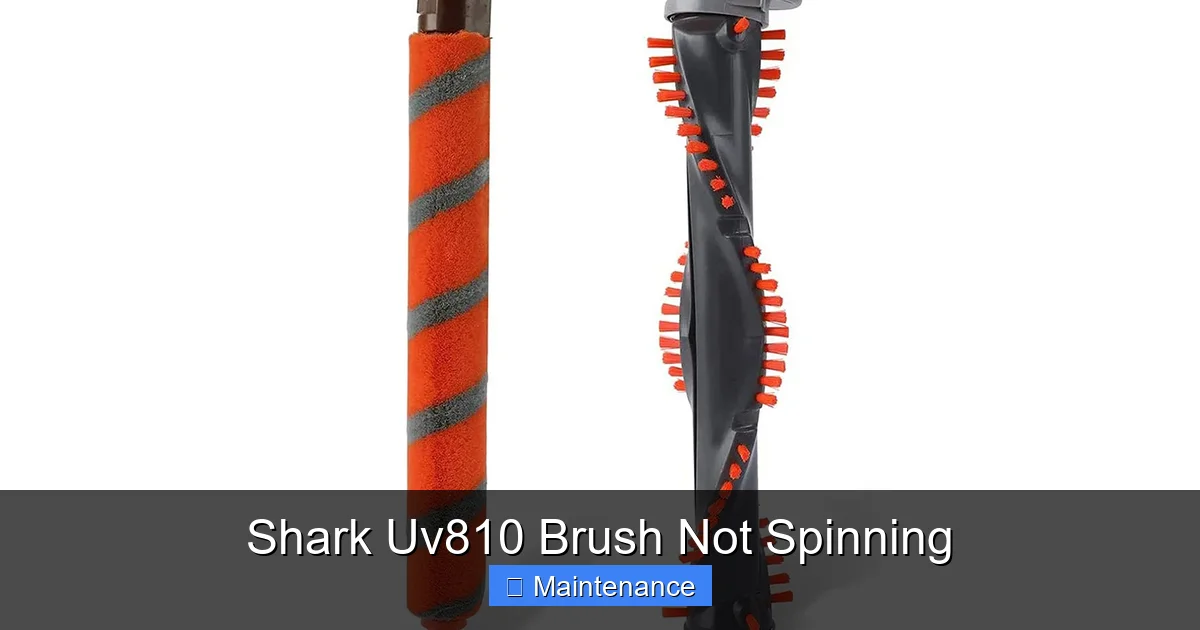
Visual guide about Shark Uv810 Brush Not Spinning
Image source: m.media-amazon.com
The Critical Role of the Drive Belt
That small motor has a tiny pulley on its shaft. The brush roll itself has a larger pulley on one end. Connecting these two pulleys is a smooth, rubberized drive belt. When the vacuum is set to a carpet cleaning mode, an electrical clutch engages, which spins this brush roll motor. The motor’s pulley turns, the belt grips, and the belt’s rotation spins the brush roll at high speed. If any link in this chain is broken—the motor doesn’t engage, the belt is broken, the brush roll is jammed—the brush stops spinning.
The Safety Reset Fuse
Shark designed this system with a crucial safety feature. If the brush roll gets severely jammed (by a sock, a thick rug fringe, or a massive hairball), the resistance can overheat the brush roll motor. To prevent a fire or motor burnout, a thermal fuse—the small red button on the brush roll housing—will “trip” or pop out. This physically disconnects power to the brush roll motor until it’s manually reset. A tripped fuse is a symptom of a jam, not the root cause itself. You must clear the jam before pressing the reset button, or it will just trip again immediately.
Most Common Cause: The Drive Belt (It’s Almost Always the Belt)
Let’s address the elephant in the room. If your Shark Uv810 brush is not spinning and you’ve already checked for and cleared obvious obstructions and pressed the reset button, the drive belt is the prime suspect by a massive margin. These belts are made of rubber and are under constant tension and friction. They are a consumable wear item, much like the brushes in your electric shaver.
Why Belts Fail
Belts don’t last forever. Here’s what kills them:
- Normal Wear and Stretch: Over 6-12 months of regular use, the rubber loses its elasticity and stretches. A stretched belt will slip on the pulley instead of gripping, causing the brush roll to spin slowly or not at all.
- Heat Degradation: The friction and heat generated during use, especially if the brush roll is slightly jammed, can harden and crack the belt.
- Obstruction Damage: A major jam can cause the belt to burn, melt, or snap instantly.
- Improper Installation: If a belt is twisted during a previous replacement, it will wear unevenly and fail prematurely.
How to Diagnose and Replace the Belt (The 15-Minute Fix)
This is the repair you can do with a Phillips screwdriver and a bit of patience. Always unplug the vacuum or remove the battery first.
Step 1: Access the Brush Roll. Lay the vacuum on its back. Locate the four screws on the bottom plate that surrounds the brush roll. Two are often hidden under small plastic caps. Remove all screws and set them aside. Lift the bottom plate off.
Step 2: Inspect Visually. You will now see the brush roll and the belt. Look for a rubber loop. Is it there? Is it broken, missing a section, or lying loose on the floor of the housing? If the belt is gone or broken, that’s your answer.
Step 3: The Tension Test. If the belt looks intact but the brush roll doesn’t spin, gently try to rotate the brush roll by hand. It should turn relatively smoothly. Then, try to pull the belt away from the brush roll pulley. A good, tight belt will have significant resistance and will not pull off easily. If you can pull it off with little force or it slips dramatically, it’s stretched and needs replacement.
Step 4: Replacement. To remove the old belt, stretch it off the motor pulley first (the smaller one), then slide it off the brush roll. To install the new belt (Shark part number typically starts with 1X or is listed in your manual), stretch it over the brush roll pulley first, then stretch it over the motor pulley. It’s a tight fit. Ensure it’s seated properly in the groove of both pulleys and is not twisted. Reassemble the bottom plate, plug in, and test. The brush roll should now spin vigorously.
Other Potential Causes: Beyond the Belt
What if you replace the belt and the brush roll still doesn’t spin? Or if the belt looks perfect? Then we must look elsewhere. The system is simple, so the list of other culprits is short but important.
1. A Jammed or Seized Brush Roll
The brush roll itself can become the problem. Even with a perfect belt and a working motor, if the brush roll can’t turn, nothing happens.
- Obstruction: Hair, string, carpet fibers, or small objects can wrap around the axle between the brush roll and its plastic end caps. This creates a physical block. Always manually rotate the brush roll by hand after removing the bottom plate. If it doesn’t turn freely in both directions, you have a jam.
- Bearing Failure: Inside each plastic end cap is a metal bearing. These can seize up due to dirt, lack of lubrication, or corrosion. A seized bearing will make the brush roll incredibly difficult or impossible to turn by hand. The solution is to replace the entire brush roll assembly, as the bearings are not serviceable.
- Bristle Melt/Damage: In extreme cases, if the vacuum was used on a very high-pile rug or a small plastic toy melted onto the bristles, the bristles themselves can become fused and act as a brake.
2. The Brush Roll Motor Has Failed or Isn’t Engaging
This is less common but possible. The small motor that drives the belt can burn out. The electrical clutch that engages it on carpet mode can also fail.
- Diagnosis: With the vacuum upright and on, switch to a carpet cleaning mode (you should hear a distinct click). Then, lay it on its back and look at the area where the motor pulley is. Do you see the motor shaft/pulley spinning? If the motor is running but the pulley isn’t turning, the clutch is likely dead. If the motor shaft isn’t turning at all and you’ve ruled out a reset fuse and a jam, the motor itself may be faulty.
- Note: Listening is key. You should hear a high-pitched whirring from the brush motor area when engaged. No sound could mean a dead motor or a disconnected wire.
3. Electrical Issues: Wires, Connections, and Switches
Power has to flow from the main body, through the hinge, and to the brush roll motor. This path has several points of failure.
- Hinge Wire Damage: This is a classic failure point for any stick or upright vacuum with a pivoting head. The wires that carry power to the brush roll run through the plastic hinge. Over thousands of pivots, these wires can fray, break, or short out. Look for any visible damage or wear on the wiring loom where the handle meets the main body/floor head.
- Loose Connectors: The plug that connects the main unit to the brush roll housing can become loose or corroded. Unplug it, inspect the contacts, and reseat it firmly.
- Faulty Switch: The switch that activates the brush roll (often a button on the top of the handle) can wear out. If the suction motor works but the brush never does, a faulty brush roll switch is a possibility.
Step-by-Step Diagnostic Flowchart: A Systematic Approach
Don’t just start taking things apart randomly. Follow this logical sequence to efficiently pinpoint the fault.
Phase 1: The Quick & Safe Checks
- Unplug / Remove Battery. Non-negotiable first step.
- Reset the Fuse. Locate the small red button on the brush roll housing (usually on the side or back). Press it firmly until it clicks.
- Manual Rotation Test. Remove the bottom plate. Try to turn the brush roll by hand. Does it move freely? If not, you have a jam or seized bearings. Clear debris, cut away hair, and try again. If still seized, the brush roll needs replacement.
- Belt Inspection. Is the belt present and tight? If not, replace it as detailed earlier. This solves 70% of cases.
Phase 2: The Power Check
- Reassemble partially. Put the bottom plate back on (you don’t need all screws for a test) so the brush roll housing is closed and the reset button is accessible.
- Listen and Feel. Plug the vacuum in (or reinsert battery), set to carpet mode, and lay it on its back on a soft surface. Turn it on. Do you hear the brush motor whirring? Can you feel the motor housing vibrating? If you hear/feel the motor but the brush roll is still dead, the belt is still the issue (slipping on a stretched belt) OR the clutch is broken.
- Visual Motor Check. If you can see the motor pulley (you might need a flashlight), watch it. Is it spinning? If the motor is whirring but the pulley isn’t, the internal clutch has failed. The motor assembly needs replacement.
Phase 3: The Electrical Path Check
If you have no motor sound/vibration at all:
- Check the Brush Roll Switch. Test it for continuity with a multimeter, or simply try jiggling it while the vacuum is on in carpet mode. Sometimes they are intermittent.
- Inspect the Hinge Wires. Carefully examine the wiring where the handle pivots. Look for cracks, exposed copper, or stiff sections. Flex the hinge while the vacuum is on in carpet mode. If the brush suddenly works when you wiggle the handle, the hinge wires are broken.
- Check Connections. Unplug the connector from the brush roll housing. Look for bent pins, corrosion, or melted plastic. Clean the contacts with electrical contact cleaner.
Professional Repair vs. DIY: When to Call for Help
For the vast majority of “Shark Uv810 brush not spinning” cases, the solution is a $10-$25 drive belt replacement or a $30-$50 brush roll replacement. Both are simple, well-documented DIY jobs with YouTube tutorials available. Your investment is just the cost of the part and 20 minutes of your time.
However, call a professional or contact Shark Support if:
- You have diagnosed a failed brush roll motor assembly or a faulty main PCB (control board). These are more complex, expensive parts ($70-$150+), and installation can be trickier.
- You are uncomfortable working with electrical components or lack basic tools.
- Your vacuum is still under the original manufacturer’s warranty. Opening it may void the warranty, so contacting Shark first is essential.
- You suspect internal wiring damage within the motor housing itself, which requires specialized tools and knowledge to repair safely.
Cost-Benefit Analysis: A professional diagnostic fee can be $80-$120. If the fix is just a belt, that’s a terrible return on investment. If it’s a motor, you’re paying for expertise and a warranty on the repair. For a vacuum that originally cost $200-$400, a $100 motor repair is often still worthwhile.
Prevention is Power: How to Avoid This Problem Altogether
The best fix is the one you never need. Incorporating these simple habits into your vacuum maintenance routine will keep your brush roll spinning for years.
Monthly Maintenance Ritual
- Clean the Brush Roll: Every 3-4 uses, flip the vacuum over and use the provided cleaning tool (or scissors) to cut away any hair or fibers wrapped around the bristles and end caps. This prevents buildup that causes jams and puts extra strain on the belt.
- Check the Bottom Plate: Look through the holes in the bottom plate. Is there a mat of hair and lint blocking airflow? Clear it. Restricted airflow makes the motor work harder and can indirectly affect the brush system.
- Listen: Get to know the normal sound of your Uv810’s brush roll. If you notice it’s quieter, whining, or has a new grinding sound, investigate immediately. Catching a slightly tight bearing early can save you from a complete seizure.
Biannual Deep Clean
Every 6 months, do a full disassembly:
- Remove the bottom plate and brush roll.
- Remove the belt.
- Clean out the entire brush roll housing channel with a damp cloth. This is where dust bunnies and fine grit accumulate, creating abrasion.
- Inspect the belt for cracks, glazing (shiny surface), or stretching. Replace preventatively if it shows any sign of age, even if it’s not broken.
- Spin the brush roll bearings by hand. They should be silent and smooth. Any grinding means it’s time for a new brush roll.
- Check the motor pulley for rubber dust or residue. Clean it with a cloth.
By making this a habit, you’ll transform your vacuum from a potential problem into a reliably powerful cleaning tool.
Conclusion: You’ve Got This
Hearing that silence from your Shark Uv810’s brush roll is frustrating, but it is almost never a death sentence for your vacuum. It is a clear, mechanical signal from a well-designed system. The problem is localized, the parts are inexpensive and available, and the fix is within the grasp of any confident DIYer. Start with the simplest, most likely solution: the drive belt. Combine that with the mandatory reset after clearing any jam, and you will solve the problem 8 times out of 10. If the belt isn’t the answer, our systematic diagnostic flowchart will guide you to the next likely component—the brush roll itself, the motor, or the wiring. Remember, understanding how your machine works is the first and most powerful tool in your repair kit. Now, grab your screwdriver, unplug that vacuum, and get that brush spinning again.
Frequently Asked Questions
Why is my Shark Uv810 brush not spinning but the suction is fine?
This is the classic symptom of a broken or slipped drive belt, a seized brush roll, or a tripped brush roll reset fuse. The suction motor is a separate system from the brush roll system. Since suction is working, the main power and motor are fine, and the issue is isolated to the brush roll drive components (belt, brush roll, brush motor).
Where is the reset button on my Shark Uv810?
The reset button is a small, red, circular button located on the brush roll housing itself. On the Uv810 models, you’ll typically find it on the side or back of the black plastic housing that holds the brush roll. It may be recessed; use a pen tip or your fingernail to press it in firmly until you feel it click.
How often should I replace the belt on my Shark Uv810?
As a preventive maintenance measure, inspect the belt every 3 months and plan to replace it every 6-12 months with regular use. If you have pets or use the vacuum on thick carpeting daily, replace it annually. Always replace it immediately if you see cracks, glazing, stretching, or if it breaks. A broken belt will not damage other parts if replaced promptly.
Can I use my Shark Uv810 without the brush roll?
Technically yes, the vacuum will still provide suction on hard floors if you remove the brush roll. However, you should never operate the vacuum with the brush roll housing open or the brush roll removed while the vacuum is powered on, as debris can be thrown out. For hard floors, use the “Hard Floor” setting which often disengages the brush roll electronically. Operating without a brush roll on carpet will result in very poor cleaning performance as the agitation is key for lifting carpet fibers.
My brush roll spins slowly or intermittently. What’s wrong?
>A slow-spinning brush roll is a hallmark of a stretched or glazed drive belt that is slipping on the pulleys. It can also indicate a brush roll motor that is beginning to fail and losing power. Start by replacing the belt, as it is the cheapest and most common fix for this specific symptom.
Is a broken drive belt covered under Shark warranty?
Typically, no. Drive belts are considered wear and tear parts, similar to an air filter or vacuum bag. Shark’s limited warranties cover defects in materials and workmanship for the main vacuum components (motor, body, electronics) but generally exclude consumable parts like belts, filters, and brush rolls. Always check your specific warranty documentation, but plan on belts being an out-of-pocket maintenance item.