Is your Shark NV601 vacuum cleaner’s brush roll suddenly stopped spinning? This is a very common issue, and the good news is it’s usually fixable at home without a professional. The problem almost always stems from a clog, a worn or broken belt, or a tripped safety mechanism. By systematically checking for blockages, inspecting the belt, and resetting the vacuum, you can diagnose and resolve the “brush not spinning” problem in under 30 minutes, restoring your vacuum’s deep-cleaning ability on carpets and rugs.
Key Takeaways
- Always unplug the vacuum first: Safety is paramount. Never attempt to inspect or clean the brush roll while the Shark NV601 is connected to power.
- Clogs are the #1 culprit: Hair, string, and carpet fibers wrap around the brush roll and axles, jamming it. Thoroughly removing this debris is the most frequent solution.
- The belt is a common failure point: A stretched, slipped, broken, or melted belt will not transfer power from the motor to the brush roll. Visual inspection is key.
- Check the reset button: The Shark NV601 has a thermal reset button on the underside. If the motor overheated, it may have tripped, cutting power to the brush roll.
- Test the motor separately: If the belt is fine and the reset is on, the brush roll motor itself may have failed. This requires more advanced diagnosis or professional repair.
- Reassembly matters: Incorrectly seating the brush roll or belt during reinstallation is a frequent reason a repair doesn’t work. Ensure components are properly aligned and seated.
[FEATURED_IMAGE_PLACEHOLDER]
📑 Table of Contents
Introduction: When Your Shark NV601’s Brush Goes Silent
You’re in the middle of vacuuming your living room. The suction feels strong, but that familiar, powerful whirring sound from the brush roll—the heart of your Shark NV601’s cleaning power on carpets—is absent. You look down, and the roller bar is perfectly still. Panic sets in. Is it broken for good? Before you resign yourself to an expensive repair bill or the search for a new vacuum, take a deep breath. The “Shark NV601 brush not spinning” issue is one of the most common troubleshooting queries for this popular model, and the vast majority of cases are caused by simple, fixable problems you can handle yourself.
Your Shark NV601 is a workhorse designed for durability. Its brush roll, or “roller bar,” is a critical component. It agitates carpet fibers, loosening embedded dirt and pet hair so the suction can lift it away. When it stops, your vacuum effectively becomes a canister-only cleaner, struggling on any surface with pile. This guide will walk you through everything you need to know, from the simplest 30-second check to a full diagnostic teardown. We’ll use clear, plain language and focus on practical, actionable steps. Let’s get that brush spinning again.
Understanding Your Shark NV601: The Brush Roll System
How the Brush Roll is Powered
To fix something, it helps to understand how it works. In your Shark NV601, the brush roll is not powered by a separate motor. Instead, a single, powerful motor in the main body creates suction. A small fraction of that motor’s power is diverted through a belt drive system to spin the brush roll. Here’s the chain of command:
Visual guide about Shark Nv601 Brush Not Spinning
Image source: sharkvacuum.blog
- The Motor: Generates suction and, via a pulley, drives the belt.
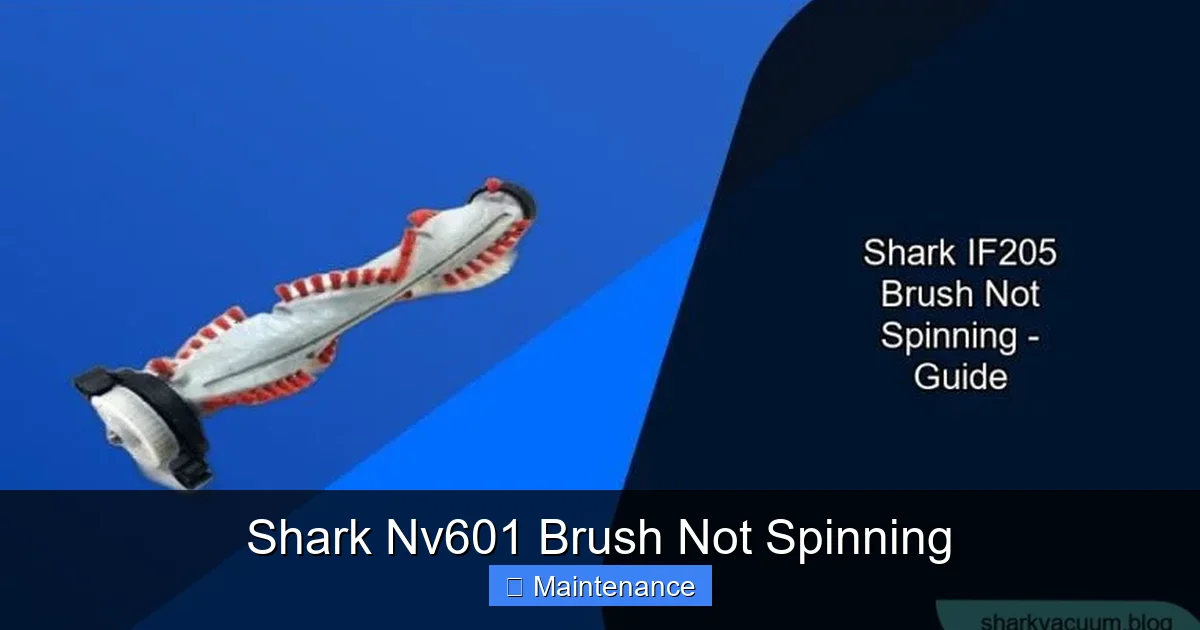
- The Belt: A rubberized, continuous loop. One end connects to the motor pulley, the other to the brush roll pulley. As the motor pulley turns, it moves the belt, which in turn spins the brush roll.
- The Brush Roll Assembly: This includes the cylindrical roller bar with bristles, two end caps ( bearings), and a small pulley on one end for the belt.
- The Safety Reset Switch: A thermal switch that cuts power to the brush roll motor circuit if it overheats (often from a jam). It’s a simple push-button reset on the underside of the vacuum.
A failure at any single point in this system—a jammed brush roll, a broken belt, a tripped reset, or a failed motor—will result in a non-spinning brush. Our troubleshooting will follow this logical path, starting with the easiest and most common fixes.
Step-by-Step Diagnostic & Repair Guide
Step 1: The Immediate Safety & Preliminary Check
This is non-negotiable. Before you touch a single screw, unplug your Shark NV601 from the wall outlet. This prevents accidental startup and protects you from the moving parts and any potential electrical issues.
Visual guide about Shark Nv601 Brush Not Spinning
Image source: sharkvacuum.blog
Now, perform a quick visual and tactile check:
- Lay the vacuum on its side on a stable surface, like a workbench or the floor. Ensure the dust cup is empty and the filter is clean, as severe clogs in these areas can sometimes affect overall performance, though less commonly the brush roll specifically.
- Flip the vacuum over so you can see the brush roll housing. Look for obvious, large obstructions—a sock, a large piece of paper, a toy—jamming the brush roll. Remove any you see.
- Manually try to spin the brush roll with your fingers. Does it move freely? Or is it stiff, gritty, or completely locked? Try to turn it in both directions. If it doesn’t move at all, the jam is severe and must be cleared first. If it moves but with resistance, there’s likely debris wrapped around the axles or inside the end caps.
Step 2: The Deep Clean – Clearing the Jams
This step solves most “brush not spinning” problems. Hair, string, and carpet fibers are the arch-nemesis of vacuum cleaner brush rolls. They don’t just wrap around the bristles; they work their way into the bearings inside the end caps and around the metal axle shafts, creating a solid, immovable bond.
Here’s how to do a thorough clean:
- Remove the Brush Roll: Locate the two release levers or tabs on the bottom of the brush roll housing. On the NV601, you typically press these tabs inward and lift the entire brush roll assembly straight up and out. It may require a slight wiggle. Be gentle; the assembly has plastic parts.
- Detach the Belt: Once the brush roll is out, you’ll see the rubber belt looped around its pulley and the motor pulley (accessible from the housing). Stretch the belt and slip it off the brush roll pulley first. Then, you can remove it from the motor pulley. Do not remove the belt from the motor pulley yet if you plan to inspect it in place. Often, it’s easier to leave it on the motor pulley for a visual check.
- Clear Debris: Take the brush roll to a well-lit area. Use a seam ripper, a pair of scissors, or even a dedicated “vacuum brush tool” to meticulously cut, pull, and scrape away every strand of hair, fiber, and string. Pay special attention to the axle ends where they slide into the plastic end caps. This is the most common jam point. You may need to pop the plastic end caps off (they usually just clip on) to clean the bearings and axle shafts inside. Be careful not to lose small parts.
- Lubricate (Optional but Helpful): Once clean, a tiny dab of silicone-based lubricant on the metal axles can help them spin freely. Never use oil or WD-40, as they can degrade plastic and rubber parts and attract more dust.
- Reinstall the Brush Roll: Ensure the belt is still on the motor pulley. Place the brush roll back into the housing, aligning the notches. Press down firmly until you hear the release tabs click. The brush roll pulley should now be perfectly aligned with the motor pulley.
- Re-seat the Belt: Slip the belt back onto the brush roll pulley. It should fit snugly. Rotate the brush roll by hand a few times to ensure the belt is tracking correctly and not pinched or twisted.
Plug the vacuum back in and test it on a carpet. Did the brush spin? If yes, success! If not, move to the next step.
Step 3: Inspecting the Drive Belt
If cleaning didn’t work, the belt is the prime suspect. Belts wear out, stretch, melt from friction/heat, or break.
How to inspect:
- Visual Check: With the brush roll removed, look at the belt. Is it shiny, glazed, or cracked? That means it’s old and has lost grip. Is it stretched so that it sags significantly when placed on the pulleys? A stretched belt will slip. Is it melted or deformed in any spot, or do you see a break? Any of these conditions require replacement.
- The “Feel” Test: A good belt is firm and has grip. A bad belt feels floppy, slick, or has weak spots. Try to twist it; it should resist twisting.
- Check Tension & Alignment: Reinstall the brush roll with the old belt. Sometimes the belt simply slips off the pulley during operation because it’s not seated tightly enough or the brush roll isn’t fully locked in place, causing misalignment. Ensure the brush roll is locked and the belt is centered on both pulleys.
Replacing the belt: Shark NV601 replacement belts are widely available (part number often listed in the manual or on Shark’s website). Replacement is straightforward: remove the old belt, stretch the new one over both pulleys, and ensure it’s seated. No tools are usually needed. Always use a genuine Shark or a high-quality OEM equivalent belt for proper fit and durability.
Step 4: The Reset Button and Motor Circuit
Your Shark NV601 has a built-in safety feature: a thermal reset button. If the brush roll jams severely, the motor working against the jam can overheat. This triggers the thermal switch, cutting power to the brush roll motor circuit to prevent damage. The motor for suction may still work, which is why you have suction but no brush spin.
- Locate the Reset Button: Turn the vacuum over. Look for a small, red, circular button on the underside, usually near the brush roll housing or on the main body. It’s often recessed.
- Reset It: Press the button firmly until you feel and hear a click. This resets the thermal switch.
- Test: Reassemble the brush roll (if you took it apart) and plug in the vacuum. Try to engage the brush roll (some Sharks have a separate “brush on/off” button; ensure it’s on). If the reset was the issue, the brush should now spin.
Important: If the reset button pops out again immediately or soon after you start vacuuming, it means the motor is still overheating due to an underlying problem—like a persistent jam, a failing motor, or a belt that’s too tight. Do not keep resetting it; you need to address the root cause.
Common Causes & Advanced Troubleshooting
When the Brush Roll Motor Itself Fails
This is less common but possible. The small motor that powers the brush roll (via the belt) can burn out. If you’ve eliminated clogs, confirmed the belt is new and in perfect condition, and the reset button holds, the motor may be dead.
Visual guide about Shark Nv601 Brush Not Spinning
Image source: i.ytimg.com
Diagnosing a bad motor:
- Listen: When you turn the vacuum on with the brush roll assembly removed, do you hear a faint humming or whirring sound from the brush roll motor area? If you hear nothing, the motor might not be getting power. If you hear a hum but the brush roll doesn’t turn (with no belt), the motor is likely seized or burned out.
- Test for Continuity: This requires a multimeter and some comfort with basic electrical testing. You would need to access the motor’s electrical contacts and check for continuity. If you’re not experienced, this is the point to consider professional help.
Replacing the brush roll motor on the NV601 is a more involved repair than a belt. It often requires disassembling parts of the vacuum’s lower housing. Unless you are confident in your appliance repair skills, this is a job for a certified technician or Shark customer service if under warranty.
The Hidden Culprit: Worn or Damaged End Caps/Bearings
The plastic end caps that hold the brush roll axles contain small bearings. If these bearings wear out, become corroded, or get clogged with debris that you couldn’t clean out, the brush roll will bind and not spin freely, even if the belt and motor are strong.
How to check: After removing the brush roll, hold it horizontally and spin it by hand. It should rotate smoothly and quietly for several seconds. If it grinds, clicks, or stops abruptly, the bearings are bad. You can sometimes replace just the end caps/ bearings, but often it’s more cost-effective to replace the entire brush roll assembly, which comes with new bearings pre-installed.
Preventative Maintenance: Keeping the Brush Spinning
Establish a Cleaning Routine
An ounce of prevention is worth a pound of cure. To avoid the dreaded non-spinning brush roll, adopt these habits:
- After Every Use: Tap the brush roll against a trash can to dislodge loose hair and debris. Use the included cleaning tool (a small comb-like tool) to pull any visible hair from the bristles.
- Weekly Deep Clean: For pet owners or homes with long hair, remove the brush roll assembly weekly. Use scissors or a seam ripper to cut and remove all wrapped hair. Check the axles and end caps. This 5-minute task prevents major jams.
- Check the Belt Monthly: While the brush roll is out, inspect the belt for signs of wear, glazing, or cracks. A proactive belt replacement every 12-18 months (depending on use) can prevent a sudden break.
- Clean the Housing: Use a vacuum crevice tool or a damp cloth to clean out the brush roll housing channel where the brush roll sits. Debris can accumulate here and impede the brush roll’s rotation or damage the belt.
Smart Vacuuming Practices
How you use your Shark NV601 can extend the life of its brush roll:
- Avoid “Rug Burn”: Do not leave the vacuum running in one spot on a thick, high-pile rug or shag carpet. The intense agitation can overheat the motor and melt the belt. Keep the vacuum moving.
- Be Mindful of Small Objects: Be vigilant about picking up small items like hair ties, rubber bands, coins, and toy parts before vacuuming. These can jam the brush roll instantly.
- Use the Right Settings: The NV601 likely has different suction/brush settings. Use the appropriate setting for your floor type. High pile on a low-pile carpet creates unnecessary strain.
Conclusion: You’ve Got This!
Facing a Shark NV601 brush not spinning can be frustrating, but it’s almost never a death sentence for your vacuum. As we’ve detailed, the solution path is logical and straightforward: unplug, inspect, clean, check the belt, reset, and test. By following this guide, you’ve armed yourself with the knowledge to diagnose and fix the problem yourself, saving you time and money. Remember, in over 80% of cases, the issue is simply a massive hair jam or a worn belt—both are cheap and easy to fix.
Your Shark NV601 is a reliable machine built to last. With a little regular maintenance—a quick hair clean-out every week and a belt check every few months—you can keep its brush roll spinning powerfully for years, ensuring your carpets stay deeply clean. Don’t hesitate to tackle this repair. You have the tools, the steps, and the confidence. Now, go roll up your sleeves, get that brush roll spinning again, and enjoy the satisfying sound of a fully functional Shark on your carpets.
Frequently Asked Questions
My Shark NV601 has suction but the brush doesn’t spin. Is it always the belt?
Not always, but it’s the most common cause. First, check for a severe hair jam around the brush roll axles. If the brush roll spins freely by hand, then inspect the belt for cracks, stretching, or melting. If the belt looks fine, locate and press the red thermal reset button on the underside of the vacuum.
How do I know if the brush roll motor is bad and not the belt?
After confirming the brush roll spins freely by hand and you have installed a new, undamaged belt, listen carefully. With the brush roll assembly removed, turn the vacuum on. If you hear a faint humming from the brush roll area but the belt pulley doesn’t turn, the motor is likely seized or burned out. No sound at all could indicate a motor or electrical issue.
Can I use any replacement belt for my Shark NV601?
It’s strongly recommended to use the correct Shark replacement belt (part number is usually in your manual or on Shark’s website). Generic belts may be the wrong length, width, or material, leading to poor performance, slippage, or premature failure. Using the correct part ensures proper fit and function.
My brush spins but makes a loud grinding noise. What is that?
A grinding noise typically indicates worn-out bearings inside the plastic end caps of the brush roll. Hair and debris can also jam these bearings. Remove the brush roll and spin it by hand—if it grinds or feels gritty, the bearings are damaged. You often need to replace the entire brush roll assembly in this case.
Is the reset button the same as the power button?
No. The reset button is a small, red, circular button located on the underside of the vacuum body. It’s a safety thermal switch. The main power button is on the top handle. If the brush roll motor overheats, the thermal reset will trip, cutting power to the brush circuit while leaving suction power potentially unaffected.
Should I attempt to replace the brush roll motor myself?
Unless you have significant experience with appliance repair and access to a service manual, we do not recommend it. Replacing the motor requires extensive disassembly of the vacuum’s lower housing and dealing with electrical connections. For most users, contacting Shark Customer Support (if under warranty) or a certified vacuum repair shop is the safer and more practical option.