A non-spinning brush roll on your Shark Navigator NV70 is a common but fixable issue, usually caused by hair, string, or debris jamming the roller or a worn drive belt. Most solutions involve simple cleaning, belt inspection, and resetting the brush roll motor. This guide provides detailed, safe troubleshooting steps to diagnose and resolve the problem, restoring your vacuum’s deep-cleaning power without needing a professional.
You’re cruising your Shark Navigator NV70 across the living room carpet, expecting that satisfying deep-clean agitation, but something feels… off. The vacuum is still sucking up fine dust, but the characteristic whirring and pulling of the brush roll are gone. That powerful rotating brush bar, the heart of your vacuum’s ability to lift embedded pet hair and ground-in dirt, has fallen silent. Don’t panic! This is one of the most common issues with Shark upright vacuums, and the good news is that in the vast majority of cases, you can fix it yourself with a few simple tools and about 15 minutes of your time. This guide will walk you through every possible cause, from the simplest jam to a worn-out belt, with clear, safe, step-by-step instructions.
Understanding why the brush roll on your NV70 isn’t turning is the first step to fixing it. The system is beautifully simple: an electric motor in the brush roll housing spins a belt, which in turn rotates the brush roll itself. Any break in that chain—a jam stopping the roller, a broken belt, a tripped motor safety switch, or a disengaged setting—will result in a stationary brush. We’ll systematically check each link. Before we begin, the most important rule: always unplug your Shark Navigator NV70 from the wall outlet. This isn’t just a suggestion; it’s a critical safety step to prevent the motor from accidentally starting while your fingers are near moving parts.
Key Takeaways
- Debris jams are the #1 cause: Hair, string, carpet fibers, and small objects wrapping around the brush roll bearings are the most frequent reason it stops spinning.
- The drive belt is a critical component: A broken, stretched, or slipped belt disconnects the motor’s power from the brush roll, requiring inspection and replacement.
- Reset the brush roll motor: The NV70 has a thermal reset button on the motor housing inside the brush roll housing; pressing it often solves overheating or overload issues.
- Check the brush roll itself: The roller can become stiff or break; it must spin freely by hand when removed. Worn end caps or bearings will cause it to seize.
- Suction-only mode is a setting: Ensure the brush roll on/off switch (often near the power button) is set to “on” for the brush to engage on carpets.
- Regular maintenance prevents recurrence: Cleaning the brush roll and checking the belt every 2-3 uses dramatically extends the life of your vacuum’s cleaning system.
- Safety first: Always unplug the vacuum before performing any inspection or repair to avoid injury or damage.
📑 Table of Contents
- 1. The Usual Suspect: Hair, String, and Debris Jams
- 2. The Drive Belt: The Vital Link
- 3. The Brush Roll Motor and Its Safety Reset
- 4. The Simple Switch: Brush Roll On/Off Setting
- 5. Wear and Tear: Bearings, End Caps, and the Roller Itself
- 6. Proactive Maintenance: Keeping Your NV70 in Top Shape
- Conclusion: Get Back to Deep Cleaning
1. The Usual Suspect: Hair, String, and Debris Jams
Let’s start with the culprit responsible for 80% of these problems. Over time, long hairs, carpet fibers, rug tassels, and even small items like Christmas tree needles or plastic wrappers wind themselves around the brush roll’s bristles and, more critically, around the metal axles (bearings) at each end. This creates a tight, constricting knot that physically prevents the brush roll from spinning. The motor might hum or strain, but the roller itself is locked in place.
How to Safely Access and Inspect the Brush Roll
First, you need to lay your Shark Navigator NV70 flat on its side. Locate the brush roll housing on the underside of the vacuum head. The NV70 typically has a series of clips or a few screws securing the bottom plate. Tip: Many Shark models use red release clips. Press them inward and pull the plate off. If it’s screws, you’ll need a Phillips head screwdriver. Keep these screws in a safe spot!
Once the bottom plate is removed, you’ll see the brush roll—a long cylinder with black bristles running its length. Gently pull the brush roll straight out of its housing. It may be held by small rubber gaskets or clips; a slight wiggle is usually all it takes. Now, place it on a clean surface for inspection.
The Cleaning Process: Cutting, Prying, and Clearing
Inspect the entire length of the brush roll. You’ll likely see a dense mat of hair and debris wrapped around it, especially near the ends. The goal is to remove every single strand. Do not just pull; this often tightens the knot. Instead:
- Use scissors or a sharp seam ripper: Carefully cut through the wrapped material lengthwise along the brush roll. Avoid cutting the bristles themselves.
- Work from the ends inward: Once cut, you can usually peel away large chunks. Pay special attention to the metal axles and bearings at each end. This is where the jam is most binding. Use a pointed tool like a pencil, a plastic pry tool, or even a dedicated vacuum brush cleaning tool to dig out debris packed into the bearing housings.
- Check for foreign objects: Look for anything that isn’t hair—a button, a piece of plastic, a rubber band—that might have gotten caught inside the roller cavity or wrapped around the belt pulley.
After you’ve cleared it, spin the brush roll by hand. It should rotate smoothly and freely in both directions with no grinding, clicking, or resistance. If it still feels stiff, there may be debris inside the bearing or the bearing itself is damaged. Continue cleaning until it’s smooth.
2. The Drive Belt: The Vital Link
If your brush roll is clean and spins freely but still doesn’t turn when the vacuum is on, the next most common issue is the drive belt. This is a rubber belt, usually black, about the width of a pencil, that loops from a small pulley on the brush roll motor to a larger pulley on the brush roll itself. If this belt is broken, stretched too far, has slipped off, or is covered in a greasy, melted mess (from overheating on a jammed roller), the motor’s power never reaches the brush.
Visual guide about Shark Navigator Nv70 Brush Not Turning
Image source: sharkvacuum.blog
Inspecting the Belt Without Full Disassembly
With the bottom plate still off and the brush roll removed, you should have a clear view into the belt cavity. Look for the rubber belt. You should see it as a loop hanging loosely or sitting on the motor pulley. Check for these signs:
- Breaks or Cracks: Is there a clean break in the belt? A partial tear?
- Slippage: Is it sitting correctly on both pulleys, or has it jumped off one, usually the motor pulley?
- Glazing or Melting: Does the belt look shiny, hard, or have melted plastic stuck to it? This indicates severe overheating from a prolonged jam.
- Stretching: If the belt is extremely loose and sags significantly, it has lost its tension and needs replacement.
Replacing the Shark Navigator NV70 Belt
Replacing the belt is straightforward. Note the belt’s routing: it goes around the small motor pulley (on the motor shaft) and the larger brush roll pulley. To remove the old one, simply stretch it off the pulleys. To install the new one:
- Place one side of the new belt onto the motor pulley.
- Stretch the belt and hook the other side onto the brush roll pulley. You may need to rotate the brush roll pulley slightly to get the belt fully seated. It should fit snugly without being overly tight.
- Ensure the belt is sitting flat and not twisted.
- Reinstall the brush roll by sliding it back into its housing, making sure the belt is inside the roller’s pulley groove.
- Manually rotate the brush roll a few times to confirm the belt is tracking correctly.
- Finally, snap or screw the bottom plate back into place.
Important: Use only a Shark-approved or exact-equivalent replacement belt. Using the wrong size or type will cause poor performance or immediate failure. The part number for the NV70 is typically Shark Belt NV350, NV350UK, or similar—double-check your model’s manual or the old belt for the exact code.
3. The Brush Roll Motor and Its Safety Reset
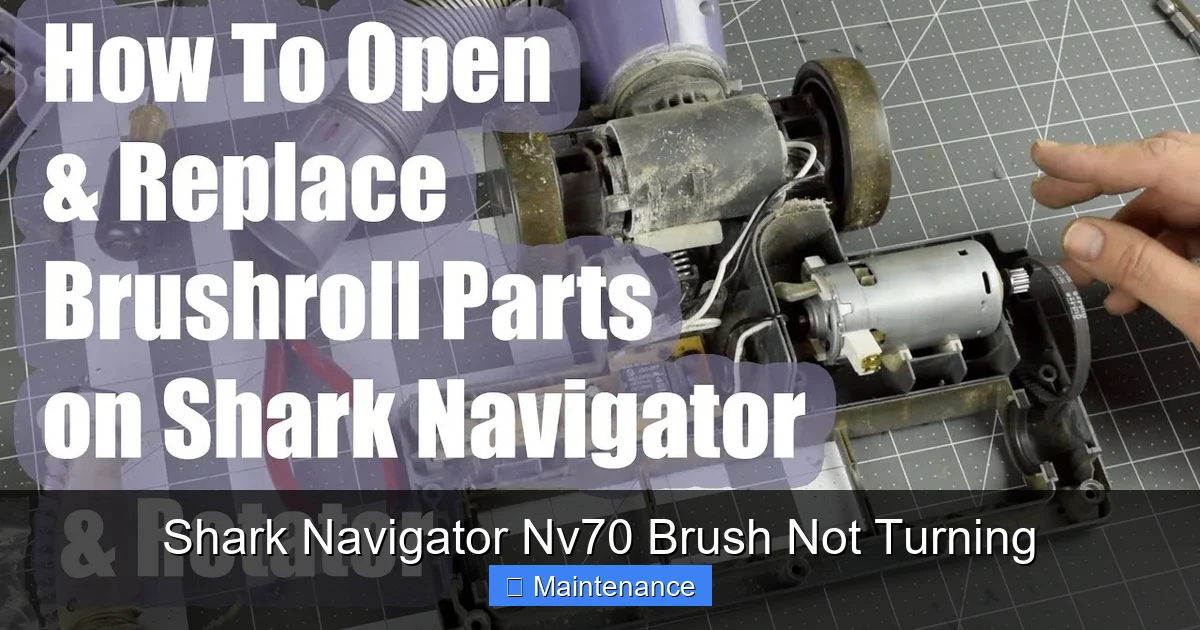
The brush roll is driven by a small, dedicated motor housed within the brush roll assembly. This motor has a built-in thermal overload switch. If the brush roll jams severely and for an extended period, this safety switch will trip, cutting power to the motor to prevent it from burning out. This is a good thing! It means your motor is likely fine and just needs to be reset. The reset button is often a small, red, circular button on the motor housing itself.
Visual guide about Shark Navigator Nv70 Brush Not Turning
Image source: i.ytimg.com
Locating and Using the Reset Button
With the bottom plate and brush roll still removed, look at the motor inside the housing. On most Shark Navigator models, you’ll see a small red button, usually recessed. You’ll need a pen, pencil, or a small flat-head screwdriver to press it. Press firmly until you feel a click. This resets the thermal switch. Once reset, the motor should be ready to run again.
Warning: If the reset button immediately pops out again when you try to run the vacuum, it means the motor is still overheating due to a persistent problem—almost certainly a jammed brush roll or a seized bearing. Do not keep trying to run it; you must fix the underlying mechanical jam first.
Diagnosing a Failed Motor
If the reset button holds and the brush roll is clean and spins freely, but the brush still doesn’t turn, the motor itself may have failed. Listen closely when you turn the vacuum on (with the brush roll removed). Do you hear a faint humming or buzzing sound from the brush roll housing? If yes, power is reaching the motor, but it’s not turning—a strong sign of motor failure. If you hear nothing at all, the issue could be a broken wire or a faulty switch. Motor replacement is more complex and often marks the point where considering a new vacuum might be more cost-effective, depending on the age of your NV70.
4. The Simple Switch: Brush Roll On/Off Setting
Before you disassemble anything, check the most obvious setting. Your Shark Navigator NV70 has a dedicated switch to turn the brush roll on and off. This is useful for cleaning hard floors where you don’t want debris scattering from a spinning brush. The switch is typically located on the top of the vacuum’s handle or near the power button. It might be a red slider or a push-button with a brush icon.
Visual guide about Shark Navigator Nv70 Brush Not Turning
Image source: sharkvacuum.blog
Ensure this switch is set to the “On” or brush icon position. It’s incredibly easy to accidentally bump it to the “Off” (suction-only) position, which would leave your brush roll stubbornly still. This is the fastest “fix” possible—just a flip of a switch. Verify this first!
5. Wear and Tear: Bearings, End Caps, and the Roller Itself
Even with a clean brush roll and a good belt, the components can wear out. The plastic end caps that hold the brush roll axle can crack or warp. The bearings inside them can seize up from lack of lubrication or debris intrusion. The metal axle itself can bend. Finally, the brush roll cylinder can become warped or the bristles can melt and fuse together (from contact with a hot motor or a heated carpet).
Identifying Worn Components
After removing the brush roll, hold it horizontally and try to wiggle the ends side-to-side. There should be no perceptible play. Any significant wobble means the bearings or end caps are shot. Spin it again by hand—listen for grinding or feel for rough spots. That indicates internal bearing failure. Visually inspect the plastic end caps for cracks. If the brush roll is warped (you can see it wobble as you spin it) or the bristles are melted into a solid clump, the entire brush roll assembly needs replacing.
Replacing the Brush Roll or End Caps
Replacing the entire brush roll is usually the simplest and most cost-effective repair. The NV70 brush roll simply slides out. Purchase a Shark Navigator NV70 brush roll replacement (part number often starts with XRBR30F or similar). To replace, just slide the new one in, ensuring the belt is on its pulley, and reassemble. If only one end cap is damaged, you can sometimes buy just the end caps, but replacing the whole unit is standard practice.
6. Proactive Maintenance: Keeping Your NV70 in Top Shape
An ounce of prevention is worth a pound of cure. Integrating quick maintenance into your cleaning routine will prevent the majority of brush roll issues.
- Clean the Brush Roll After Every 2-3 Uses: Don’t wait for a jam. Take 30 seconds to flip the vacuum over, remove the bottom plate, and use scissors or a dedicated tool to cut and pull any hair wrapped around the bristles and bearings. This is the single most important habit you can form.
- Check the Belt Monthly: During your cleaning, quickly glance at the belt. Look for cracks, glazing, or debris stuck to it. A belt in good condition should look clean and supple.
- Inspect the Air Path: A clogged hose, wand, or dust cup can reduce suction and airflow, causing the motor to work harder and potentially overheat the brush roll system. Ensure all parts are clear.
- Empty the Dust Cup Regularly: A full dust cup restricts airflow, reducing overall performance and putting extra strain on the motors.
- Store Properly: Don’t store the vacuum with the brush roll housing pressed against a wall or object, which can deform the belt or roller.
Conclusion: Get Back to Deep Cleaning
Your Shark Navigator NV70 is a workhorse, and a stationary brush roll is a frustrating but usually simple roadblock. By methodically working through this guide—starting with the jam check and reset button, then moving to the belt, and finally to wear items—you have a 95% chance of restoring that powerful rotating agitation. Remember the golden rules: always unplug first, clean the brush roll religiously, and never ignore a jammed roller (the thermal reset is your friend, not a permanent fix). With a little patience and these steps, you’ll have your NV70 pulling pet hair and dirt from your carpets like new again, saving you the cost and hassle of a service call or a premature replacement. Now, go grab those scissors and get spinning!
Frequently Asked Questions
Why is my Shark Navigator NV70 making a burning smell?
A burning smell usually indicates a severe jam that caused the motor to overheat or a melted/damaged drive belt. Unplug the vacuum immediately, remove the bottom plate, and thoroughly clean the brush roll and housing. Check the belt for melting. If the smell persists after cleaning and resetting, the motor may be damaged and need professional repair.
Can I use my Shark NV70 on hard floors with the brush roll on?
You can, but it’s not recommended. The spinning brush will scatter hard debris like kitty litter or crumbs across the floor. Shark designed the brush roll primarily for carpet agitation. For hard floors, use the suction-only mode by flipping the brush roll off switch on the handle. This protects your floors and makes cleanup easier.
How often should I replace the drive belt on my NV70?
There’s no fixed timeline, as it depends on usage. However, as a proactive maintenance rule, inspect the belt every 1-2 months. Replace it at the first sign of cracks, glazing (a shiny, hard surface), stretching, or if it slips off the pulleys. With good maintenance, a belt can last 1-2 years, but a major jam can destroy it instantly.
My brush roll spins freely when I take it out, but not when installed. Why?
This points to one of two issues: 1) The drive belt is not properly seated on the brush roll’s pulley, or it’s broken/slipped. Recheck the belt installation. 2) The brush roll motor’s thermal reset has tripped or the motor is failed. Listen for a humming sound from the housing when the vacuum is on (with the roller removed). No sound suggests a motor or wiring issue; a hum suggests a tripped reset or seized motor.
Is it worth repairing an old Shark Navigator NV70?
Often, yes. The NV70 is a durable, repairable model. The most common fixes—cleaning jams and replacing the ~$10 belt or ~$20 brush roll—are very inexpensive. If the motor fails, the cost of a new motor plus labor might approach the price of a new mid-range vacuum. Consider the age and overall condition of your NV70. If it’s been reliable for years, a $30 part fix is almost always worth it.
Where is the reset button on the Shark Navigator NV70?
The thermal reset button is located on the brush roll motor housing, which is inside the brush roll housing at the bottom of the vacuum. You must remove the bottom plate (the plastic cover on the underside of the vacuum head) to access it. Once the plate is off, look at the motor inside—you’ll see a small, red, circular button. Press it firmly with a pen or screwdriver until it clicks.