Is your Shark Navigator NV26 roller brush refusing to spin? This is a common issue usually caused by a clogged suction path, a broken or slipped drive belt, or a jammed brush roll itself. The fix is often simple and can be done at home with basic tools. Start by unplugging the vacuum, checking for blockages in the hose and nozzle, and inspecting the brush roll and belt for wear or debris. Regular maintenance, like cleaning the brush roll and checking the belt, prevents this problem.
Key Takeaways
- Unplug First: Always disconnect the vacuum from power before inspecting or attempting any repairs to ensure safety.
- Clogs Are Prime Suspects: The most frequent cause is a blockage in the suction path, often from hair, carpet fibers, or large debris jamming the roller or hose.
- The Drive Belt Is Critical: A broken, stretched, or slipped belt connecting the motor shaft to the brush roll will stop it from spinning entirely.
- Brush Roll Maintenance Is Key: Hair and string wrapping around the brush roll bearings can jam it. Regular cleaning prevents this and extends component life.
- Check the Switch: A faulty brush roll on/off switch or a tripped reset button (if equipped) can cut power to the roller motor/head.
- Simple Fixes First: Always begin troubleshooting with the easiest solutions: clear visible clogs, clean the brush roll, and re-seat the belt before considering part replacement.
- Know When to Seek Help: If the motor itself is faulty or internal wiring is damaged, professional repair or replacement may be more cost-effective.
📑 Table of Contents
- Introduction: The Frustration of a Silent Roller
- Understanding How Your Shark Navigator NV26’s Roller Works
- Step-by-Step Troubleshooting: From Easiest to Hardest
- Preventive Maintenance: Keeping Your Roller Spinning
- When to Seek Professional Repair or Consider Replacement
- Conclusion: Don’t Give Up on Your Shark
Introduction: The Frustration of a Silent Roller
You’re in the middle of cleaning your living room, trusty Shark Navigator NV26 in hand, when you notice something’s off. The vacuum is still sucking air, but that distinctive whirring sound from the brush roll is gone. You look down, and there it is: the roller brush is stationary. It’s not spinning. That powerful, deep-cleaning agitation you bought this vacuum for has vanished, leaving you with a machine that merely pushes debris around instead of lifting it. This common problem, where the Shark Navigator NV26 roller will not spin, can be incredibly frustrating, but it’s rarely a death sentence for your vacuum. In fact, in the vast majority of cases, the cause is a simple mechanical issue you can diagnose and fix yourself with a little patience and a screwdriver. This guide will walk you through every possible reason, from the quickest clog clear to a full belt replacement, getting your Shark back to its spinning, cleaning best.
Understanding How Your Shark Navigator NV26’s Roller Works
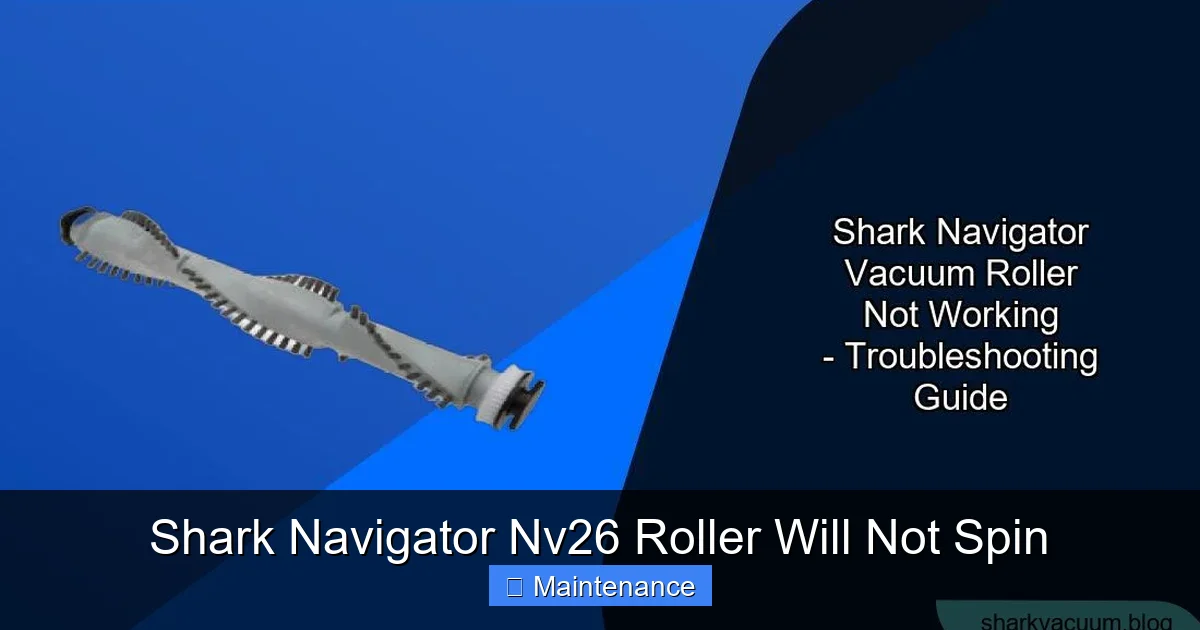
Before we dive into fixes, it helps to understand the basic anatomy. The brush roll (or roller) is a cylindrical brush with bristles, typically powered by a small, separate motor or by a drive belt connected to the main vacuum motor. When engaged, it rapidly rotates, agitating carpet fibers to loosen embedded dirt and hair. The power path is simple: from the wall outlet, through the vacuum’s main motor, and either via a dedicated circuit or a belt system to the brush roll. A switch on the handle or body allows you to turn the brush roll on or off for hard floors. Anything interrupting this path—a physical jam, a broken connection, or a severed power link—will cause the roller to stop. Knowing this flow helps you systematically eliminate possibilities.
Visual guide about Shark Navigator Nv26 Roller Will Not Spin
Image source: sharkvacuum.blog
The Two Main Power Systems
The NV26 model primarily uses a belt-driven system. A rubber drive belt loops around a pulley on the main motor shaft and a pulley on the brush roll. When the motor runs, it spins the belt, which in turn spins the brush roll. Some newer Shark models use a motorized brush roll head with its own small motor, but the NV26 is almost universally belt-driven. This is crucial because a Shark Navigator NV26 roller will not spin problem in a belt-driven model points us directly to the belt, the brush roll’s rotation, or the motor’s ability to turn the belt.
Step-by-Step Troubleshooting: From Easiest to Hardest
Grab your user manual if you have it, but don’t worry if you don’t. We’ll start with the no-tool, visual checks and move to more involved steps. Always, always unplug the vacuum before touching any internal parts.
Visual guide about Shark Navigator Nv26 Roller Will Not Spin
Image source: sharkvacuum.blog
Step 1: The Quick Visual & Suction Check
First, confirm the symptom. Turn the vacuum on in a carpeted area. Do you feel strong suction at the hose end? Place your hand over the vacuum’s exhaust port. Is air blowing out powerfully? If suction is weak or absent, the problem is likely with the main vacuum motor, a severe clog in the hose, or a full dust cup/bag—not specifically the roller. If suction is strong and normal, but the roller is dead, we can focus on the brush roll circuit. Also, ensure the brush roll “on/off” switch (usually on the handle or near the power head) is engaged. It’s an easy oversight.
Step 2: Inspect and Clean the Brush Roll (The #1 Culprit)
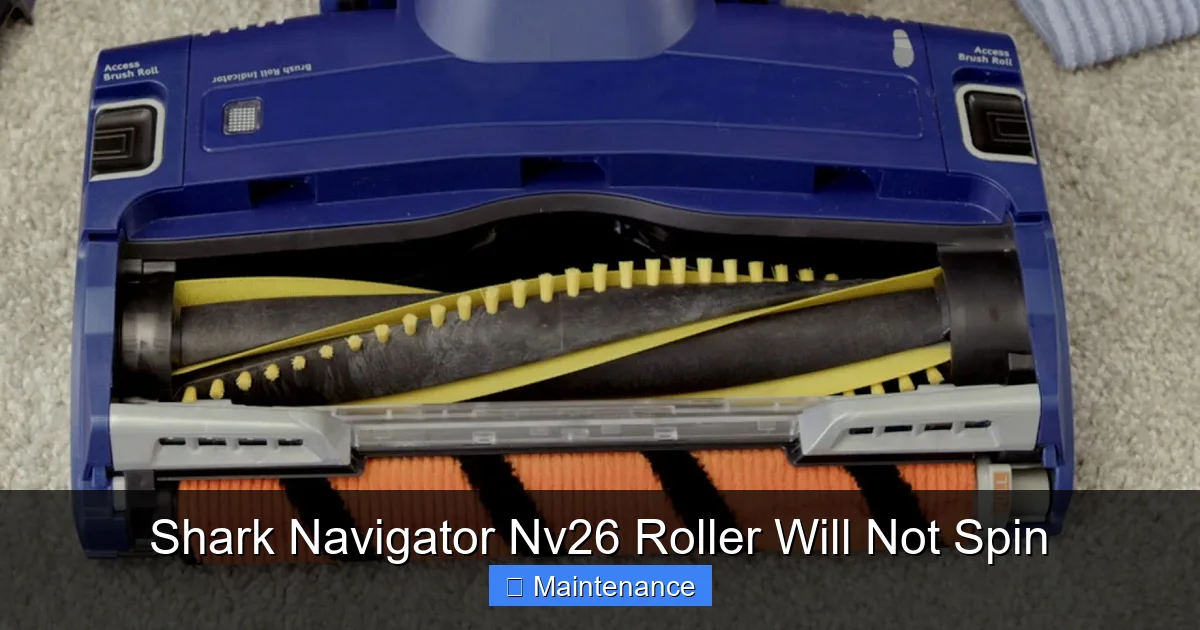
This is the most common fix. Lay the vacuum flat. Flip it over to access the brush roll housing. Using a Phillips screwdriver, remove the screws holding the bottom plate (the brush roll cover). Carefully lift it off. Now, you’ll see the brush roll. Pull it straight out. You’ll likely find a tangled mess of hair, string, carpet fibers, and maybe even small bits of clothing or toys wrapped around the bristles and, more importantly, around the bearing caps on each end. These caps allow the brush roll to spin freely. If they’re jammed with debris, the brush roll cannot rotate.
How to Clean: Use scissors or a seam ripper to carefully cut and remove all wrapped material. Pay special attention to clearing the plastic end caps. Spin the brush roll by hand. It should rotate smoothly and freely, with no gritty feeling or binding. If it’s stiff or makes noise, the bearings may be damaged, and the brush roll needs replacement. While you’re here, check the rubber seals around the bearing areas for tears, which can let debris in. Once clean and smooth, reinsert the brush roll, ensuring it’s seated properly in the slots, and reattach the bottom plate.
Step 3: Examine the Drive Belt
With the bottom plate off, you’ll see the drive belt. It’s a long, thin rubber band. Follow it from the motor pulley to the brush roll pulley. Here’s what to look for:
- Is it there? It may have snapped or come off completely.
- Is it broken? Look for a clean snap, a stretched, thin section, or a deep groove.
- Is it slipped? It may have jumped off one of the pulleys but still be intact.
- Is it glazed or shiny? A worn belt can lose traction and slip on the pulleys.
To test tension, press on the belt midway. It should have some give but not dangle loosely. A belt that is loose, cracked, or worn must be replaced. Shark Navigator NV26 belts are inexpensive and easy to find online or at appliance stores. Replacing it involves removing the old belt, stretching the new one over the motor pulley first, then rotating the brush roll to slip it onto the brush roll pulley. Ensure it’s sitting in the groove on both pulleys.
Step 4: Check for Clogs in the Airflow Path (Beyond the Brush Roll)
Sometimes, a severe clog downstream can create so much back-pressure that it physically prevents the brush roll from turning against the resistance. While less common than a jammed brush roll, it’s worth checking. Detach the hose from the vacuum body. Look into the opening. Use a flashlight. Can you see through to the other side? Use a long, flexible brush or a straightened wire coat hanger (wrapped in tape to avoid scratches) to gently probe for obstructions. Also, check the wand, the upholstery tool hose, and the exhaust filter. A clogged HEPA filter or a full dust cup can also restrict airflow. Clean or replace filters and empty the cup thoroughly.
Step 5: Test the Brush Roll Switch and Reset Button
Locate the brush roll on/off switch. It’s often a red button on the handle or a sliding switch on the vacuum body. With the vacuum unplugged, press the switch multiple times. You should feel a distinct click. If it feels mushy or doesn’t click, it may be faulty. Some Shark models have a small, recessed reset button on the brush roll housing itself (consult your manual). Press it with a paperclip. While less common, a failed switch or a tripped thermal fuse can cut power to the brush roll head.
Step 6: Investigate the Motor and Internal Wiring (Advanced)
If you’ve cleared the brush roll, replaced the belt, verified no clogs, and the switch seems fine, the issue may be internal. The brush roll on belt-driven models is powered by the main vacuum motor. If that motor’s brush assembly is worn out, it may spin slowly or not at all under load (the belt). Listen closely when you turn the vacuum on. Do you hear a faint, high-pitched whine from the motor but no rotation? That can indicate a failing motor. Also, inspect the wiring connections where the brush roll circuit plugs into the main PCB (printed circuit board). A loose or burnt connector can disrupt power. This level of diagnosis often requires comfort with electronics and screwdrivers. If you smell burning or see charred components, stop and seek professional help.
Preventive Maintenance: Keeping Your Roller Spinning
An ounce of prevention is worth a pound of cure. A few minutes of regular maintenance will drastically reduce the chance of your Shark Navigator NV26 roller will not spin syndrome.
Visual guide about Shark Navigator Nv26 Roller Will Not Spin
Image source: i.ytimg.com
Make Brush Roll Cleaning a Habit
Every 3-4 uses, especially if you have pets or long hair, flip the vacuum over and remove the bottom plate. Use scissors to cut away any hair beginning to wrap. Don’t wait for a full jam. This 30-second habit prevents the major cause of brush roll failure.
Inspect and Replace the Drive Belt Proactively
Belts wear out. A good practice is to inspect the belt every 6 months. Look for cracks, glazing, or stretching. Even if it’s working, a belt on its last legs can snap unexpectedly. Replacing it preemptively is cheaper and easier than dealing with a sudden break mid-clean. Keep a spare belt on hand.
Mind What You Vacuum
Your Shark is powerful, but it’s not indestructible. Avoid vacuuming large, hard objects (coins, Legos, pins), wet messes, or very long, stringy items like tinsel or extension cords. These are prime culprits for jamming the brush roll or damaging the belt. For large debris, pick it up first.
Regular Filter and Dust Cup Care
A clogged filter or overfilled dust cup restricts airflow, which can put extra strain on the motor and, indirectly, on the brush roll system. Follow the manufacturer’s schedule for washing foam filters and replacing felt filters. Empty the dust cup after every use for optimal performance.
When to Seek Professional Repair or Consider Replacement
You’ve followed all the steps: the brush roll spins freely by hand, the new belt is perfectly seated, there are no clogs, the switch clicks, but the roller still doesn’t move when the vacuum is on. Now what?
Diagnosing Motor Failure
The most likely remaining culprit is the brush roll motor itself (in belt-driven models, it’s the main motor that drives the belt). If the motor brushes are worn out, it won’t have the torque to spin the belt and roller under load. Diagnosing this requires a multimeter to test for continuity and voltage at the motor terminals, which is beyond most DIYers. A qualified small appliance repair technician can confirm this.
Weighing the Costs
Consider the age and value of your Shark Navigator NV26. These are mid-range, reliable vacuums. A professional motor repair, including labor, can cost $70-$120. A new NV26 currently retails for around $150-$200. If your vacuum is several years old and has other wear, investing in a new machine might be more economical. However, if it’s still under warranty (typically 1-5 years for Sharks, check your proof of purchase), contact Shark customer service first. They may troubleshoot further or offer a replacement part at no cost.
Finding a Reputable Repair Shop
Search for “vacuum cleaner repair” in your area. Look for shops with good reviews that specifically mention Shark or Hoover (Shark’s parent company). A good technician can often give you a free estimate over the phone after you describe the symptoms and model number.
Conclusion: Don’t Give Up on Your Shark
The moment your Shark Navigator NV26 roller will not spin can feel like a major setback, but it’s almost always a solvable problem. The journey from frustration to functionality is a straight line of systematic troubleshooting. Start with the most common and easiest fix: a jammed brush roll choked with hair. Move to the drive belt, the simple rubber link that is the engine of your agitation system. Clear any hidden clogs, test the switch. In over 80% of cases, one of these steps will restore that vital spinning action. By incorporating the quick, preventive habits we discussed—regular brush roll scissor-cuts and belt inspections—you’ll not only fix this issue but also extend the life of your vacuum significantly. Your Shark Navigator is a workhorse built to last. With a little knowledge and care, you can keep it picking up dirt and debris effectively for years to come. So flip it over, grab your screwdriver, and get spinning again.
Frequently Asked Questions
Why is my Shark Navigator NV26 roller brush not spinning but the vacuum has suction?
This is the classic symptom of a brush roll-specific problem. The main vacuum motor is working (hence suction), but the brush roll circuit is interrupted. The most common causes are a jammed brush roll (hair wrapped around bearings), a broken/slipped drive belt, or a faulty brush roll on/off switch.
How do I know if my Shark Navigator NV26 drive belt is broken?
Remove the bottom plate and locate the rubber belt. A broken belt will be visibly snapped in two, missing a section, or have a severe, thin crack. A slipped belt will be off one of the pulleys (motor or brush roll) but still in one piece. A worn belt may look glazed, shiny, or stretched. If the belt is not firmly seated in the grooves on both pulleys, it needs to be re-seated or replaced.
How often should I clean the brush roll on my Shark Navigator?
For optimal performance and to prevent jams, you should inspect and clean the brush roll every 3-4 uses, especially if you have pets, long hair, or vacuum primarily carpet. Removing wrapped hair and fibers before they build up is the single most effective maintenance task you can perform.
Can a clog cause the roller brush to stop spinning?
Yes, but it’s less direct. A severe clog in the hose, wand, or exhaust can create significant back-pressure. This resistance can make it physically harder for the belt and motor to turn the brush roll, potentially causing the belt to slip or the motor to stall under the load. Always check for clogs if other fixes don’t work.
Is it worth repairing a Shark Navigator NV26 with a dead roller motor?
Consider the vacuum’s age and cost. A motor repair with parts and labor can cost $70-$120. Since a new NV26 costs about $150-$200, repair is only worthwhile if the unit is newer or under warranty. If it’s older, replacing it is often more economical. Always get a repair estimate first.
My brush roll spins freely by hand but not when the vacuum is on. What is it?
If the brush roll spins freely by hand (meaning no jam) and the belt is intact and properly seated, the problem is likely with the power delivery. Check the brush roll on/off switch for proper function. If the switch is good, the issue is probably with the main vacuum motor not providing enough power to the belt (worn motor brushes) or a fault in the internal wiring/PCB that controls the brush roll circuit. This may require professional diagnosis.