A dead or weak battery is the most common reason your Shark Vac Mop stops working effectively. Replacing the battery is a simple, cost-effective fix that can bring your cleaning tool back to life for years. Choosing the correct, high-quality replacement battery is crucial for safety, performance, and the longevity of your device. This guide walks you through everything you need to know to identify, purchase, and maintain the right Shark Vac Mop replacement battery.
That moment of dread is familiar to any Shark Vac Mop owner. You’re midway through cleaning your kitchen floor, the satisfying hum of the motor is going strong, and then… it happens. The power fades, the suction weakens, and your mop grinds to a halt long before the job is done. Your first thought might be that your trusty cleaning companion has given up the ghost. But hold on! Before you despair and start shopping for a whole new vacuum mop, take a deep breath. In over 90% of these cases, the culprit is a single, replaceable component: the battery. Your Shark Vac Mop replacement battery is the heart of its cordless freedom, and like all hearts, it has a finite lifespan. Understanding this simple fact can save you hundreds of dollars and a lot of unnecessary waste. This isn’t just about buying a new part; it’s about empowering yourself with the knowledge to restore your machine to its former glory efficiently, safely, and affordably. Let’s dive deep into the world of Shark Vac Mop batteries.
Key Takeaways
- Compatibility is King: Using the exact battery model specified for your specific Shark Vac Mop model (e.g., IZ400, WV350) is non-negotiable for safety and function.
- OEM vs. Third-Party: Shark’s official batteries guarantee compatibility but cost more. Reputable third-party brands offer significant savings but require diligent research for quality and safety certifications.
- Lifespan is Finite: All lithium-ion batteries degrade. Expect 2-4 years of useful life with proper care, after which runtime will noticeably diminish.
- Proper Care Extends Life: Avoid extreme temperatures, don’t store fully depleted or constantly at 100%, and use the correct charger to maximize battery cycles.
- Installation is User-Friendly: Replacing the battery typically requires only a screwdriver and follows a straightforward, model-specific process outlined in your user manual.
- A Dead Battery Doesn’t Mean a Dead Mop: For a fraction of the cost of a new unit, a replacement battery is almost always the most economical solution.
- Check Before You Buy: Always verify your Shark Vac Mop’s exact model number (found on the label or manual) before ordering any replacement battery.
📑 Table of Contents
Understanding Your Shark Vac Mop’s Power Source
Your Shark Vac Mop is a marvel of modern cleaning engineering, combining vacuum suction and mopping action in one lightweight, cordless package. This cordless convenience is powered entirely by its rechargeable lithium-ion (Li-ion) battery pack. Unlike the simple AA batteries in your remote, this is a sophisticated, high-drain power cell designed to deliver bursts of strong suction and motor power.
The Science of the Fade: Why Batteries Die
Lithium-ion batteries are fantastic, but they are not immortal. Their capacity to hold a charge diminishes over time due to chemical aging. This degradation is accelerated by several factors:
- Charge Cycles: A full charge from 0% to 100% counts as one cycle. Most Shark batteries are rated for 300-500 full cycles before capacity drops to 80% of its original level.
- Heat: Storing or using your mop in hot environments (like a hot garage or car trunk) is a battery’s worst enemy. Heat stresses the internal chemistry.
- Deep Discharges: Regularly letting the battery drain completely to 0% before recharging causes more stress than partial discharges.
- Time Itself: Even if you never used it, a Li-ion battery would slowly lose capacity over a few years just sitting on a shelf.
The classic symptom is a dramatically shortened runtime. What used to clean your entire 1,500 sq ft home now peters out after the kitchen. The mop might also feel weaker, struggling on higher pile rugs. Sometimes, it won’t hold a charge at all, dying within minutes of starting. These are all clear signs your Shark vacuum mop battery has reached the end of its useful life.
Locating Your Battery: Model Number is Everything
Before you can even think about a replacement, you must know exactly what you need. The model number is your golden ticket. You can find it in three primary places:
- The Under-Body Label: Flip your Shark Vac Mop over. There is almost always a silver or white sticker on the main body or near the battery compartment. Look for text like “Model No.:” or “Mod.:” followed by a code (e.g., IZ400, WV350, SV780).
- The Original User Manual: The cover page or the specifications section will clearly state the model number.
- The Original Packaging: If you still have it, the box is a surefire place to find the model identifier.
This model number dictates everything: the physical shape of the battery, its voltage (V), and its capacity (mAh or Ah). A battery for an IZ400 will not fit a WV350. Period. Your first and most critical step is to identify this number with absolute certainty.
Compatibility: Finding the Right Replacement Battery
Now that you have your model number (let’s say it’s a popular Shark IZ400), the search begins. The market is split into two main channels: Original Equipment Manufacturer (OEM) parts from Shark itself, and third-party compatible batteries from various brands. Navigating this landscape requires a clear understanding of compatibility.
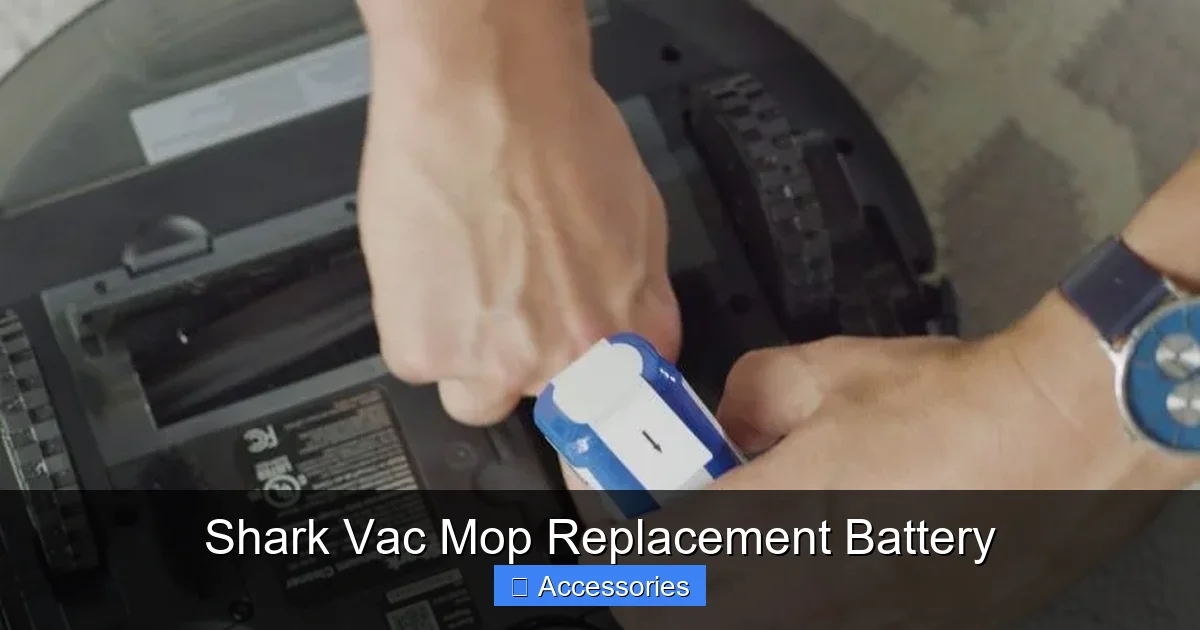
Visual guide about Shark Vac Mop Replacement Battery
Image source: bestcleanertools.com
Decoding Shark’s Official Battery Naming
Shark sells its replacement batteries directly through its website and authorized retailers. They are typically named with a part number. For example, the official replacement for many models is the “Shark Battery Pack for IZ Series” with a part number like XBAT400. This battery is engineered explicitly for the IZ400, IZ420, etc. The key here is that Shark often uses a single battery design across a “series” of models. So, if your manual or the battery itself says “For IZ Series,” it likely fits the entire family. Always cross-check the official Shark website’s accessory finder tool by entering your exact model number. It will list the precise, guaranteed-compatible battery part number. This is the safest, no-guesswork route.
Third-Party Batteries: A World of Options (and Caution)
You’ll quickly find dozens of listings on Amazon, eBay, and other marketplaces for “Shark Vac Mop Battery.” These are from companies like Housmile, Powerextra, or generic brands. They are almost always cheaper. But here’s the critical checklist for evaluating them:
- Explicit Model List: The listing must state, in writing, “Compatible with Shark IZ400, IZ420, IZ450” (or your specific model). Vague claims like “for Shark cordless vacuums” are a red flag.
- Matches OEM Specs: Compare the voltage (V) and capacity (e.g., 4000mAh). A higher capacity (mAh) *can* mean longer runtime, but only if the voltage matches exactly. A mismatched voltage can damage your mop’s motor and electronics.
- Look for Certifications: Seek batteries certified to UL (Underwriters Laboratories) or CE standards. This indicates basic safety testing for fire and electrical hazards. Avoid batteries with no safety certifications.
- Read Recent Reviews: Go past the star rating. Read 1-star and 3-star reviews specifically looking for mentions of “not fitting,” “overheating,” “swelling,” or “short runtime.” These are deal-breakers.
- Warranty: Reputable third-party brands offer a 12-month or longer warranty. This is a sign of confidence in their product.
- Charge When Convenient: You don’t need to wait for a full drain. Charge it after each use, even if it’s only at 50%. Frequent partial charges are better than occasional full cycles.
- Avoid Extreme Heat While Charging: Don’t charge your mop on a sunny countertop or next to a heater. Heat during charging is a major degrader.
- Don’t Leave on Charger Indefinitely: Most modern chargers have trickle charge protection, but it’s still best practice to unplug the charger once the battery is full. If you use your mop weekly, charge it after each use and then unplug.
- Use Only the Correct Charger: This cannot be stressed enough. Using a generic or incorrect voltage/amperage charger is a direct path to battery damage, failure, or even fire. Always use the charger that came with your Shark or an exact replacement certified by Shark or the third-party battery manufacturer.
- Store at ~50% Charge: This is the sweet spot for long-term Li-ion storage. A full charge stresses the battery over time, as does a completely empty one. Run the mop until the battery is about halfway used, then store it.
- Cool and Dry Location: A basement or climate-controlled closet is ideal. Avoid attics, garages, or cars where temperatures can swing wildly.
- Check Every 3 Months: Every quarter, pull the mop out and check the battery level. If it has dropped significantly (below 20%), give it a charge back up to the 50% mark. This prevents it from sinking into a deep, damaging discharge state.
- Guaranteed Compatibility: Perfect fit, perfect voltage, perfect communication with your mop’s electronics. Zero risk of damage.
- Warranty Coverage: Often covered under Shark’s limited warranty for the first year (check your specific terms).
- Performance Consistency: You get exactly the runtime and power Shark designed for your model.
- Resale Value: Having OEM parts can be a plus if you ever sell the mop.
- Price: This is the biggest drawback. OEM batteries can cost 40-100% more than quality third-party options.
- Availability: Sometimes they can be out of stock directly from Shark, leading to longer wait times.
- Cost: The primary advantage. You can often find a well-reviewed third-party battery for 50-70% of the OEM price.
- Availability: Usually in stock on major platforms like Amazon.
- Capacity Claims: Some brands offer batteries with a higher mAh rating (e.g., 4500mAh vs. OEM’s 4000mAh), which *can* translate to longer cleaning sessions, assuming the voltage is correct and the cells are quality.
- Quality Variance: This is the gamble. Battery cell quality (from Samsung, LG, or generic factories) varies wildly. Poor cells degrade faster and can be unsafe.
- Fit & Finish: May be slightly harder to insert/remove, or have a different plastic housing feel.
- No Shark Warranty: Any damage caused by the battery (however unlikely with a good one) is not covered by Shark.
- Potential for “Fake” Specs: Some sellers exaggerate mAh ratings. A 4500mAh claim might be based on theoretical cell capacity, not real-world pack performance.
- Airflow: Is the pre-motor filter clean? Is the exhaust filter clogged? Is the dustbin seal intact? Any blockage severely reduces suction power, making it *seem* like a battery problem.
- Brush Roll: Is the motorized brush roll (on the mop head) jammed with hair or carpet fibers? A jammed brush roll creates immense drag on the motor, drawing more power and causing a “weak” feel.
- Charger: A failing charger might not be delivering a full charge. Try charging with a known-good charger if possible.
Choosing a third-party battery is a trade-off: significant cost savings versus the peace of mind of an OEM part. If you go third-party, diligent research is your responsibility.
Maximizing Battery Lifespan: Care and Maintenance Tips
Whether you just installed a fresh OEM Shark battery or a quality third-party unit, how you treat it will determine how long it lasts and how well it performs. You wouldn’t fill a sports car with cheap gasoline and then store it outside; treat your Shark Vac Mop replacement battery with similar respect.
Visual guide about Shark Vac Mop Replacement Battery
Image source: i5.walmartimages.com
Charging Best Practices
The old myth about needing to fully discharge a Li-ion battery first is not only wrong but harmful. Follow these modern rules:
Storage and Seasonal Care
If you won’t be using your Shark Vac Mop for an extended period (e.g., summer vacation, or you have a separate pet hair vacuum for winter), proper storage is key:
Following these simple habits can easily add a year or more to the functional life of your replacement battery, protecting your investment.
The Buying Guide: Original vs. Third-Party Batteries
This is the big decision point. Let’s lay out a side-by-side comparison to help you choose the path that fits your budget and risk tolerance.
Visual guide about Shark Vac Mop Replacement Battery
Image source: i5.walmartimages.com
Shark OEM (Original Equipment Manufacturer) Battery
Pros:
Cons:
Third-Party Compatible Battery
Pros:
Cons:
Our Recommendation: If budget is no object and you want zero worry, buy the Shark OEM battery. If you are comfortable researching brands, reading reviews critically, and accepting a small risk for significant savings, opt for a third-party battery from a brand with thousands of positive reviews specifically for your Shark model, clear safety certs (UL/CE), and a solid warranty. Brands like Housmile and Powerextra have built reputations in this niche, but always verify for your specific model year.
Troubleshooting Common Battery Issues
So you’ve installed your new replacement battery, but something’s still not right. Before concluding the battery is defective, run through this quick diagnostic.
“My new battery doesn’t hold a charge / dies instantly.”
First, calibrate the battery. Fully charge it (until the indicator light shows full), then use the mop on a hard surface until it completely shuts off. Immediately charge it again to 100% without interruption. This helps the mop’s power management circuit accurately gauge the new battery’s capacity. If it still dies instantly, the battery may be defective or incompatible. Double-check the model number on the battery itself against your mop’s requirements.
“The mop feels weaker than before, even with a new battery.”
This points away from the battery and toward other components. Check:
“My battery gets very hot during charging or use.”
Some warmth is normal, but excessive heat is a major red flag for a low-quality or damaged battery. Stop using it immediately. Disconnect the charger and let the battery cool in a safe, fire-resistant area. A swollen, puffy, or deformed battery case means STOP. Do not charge or use. Dispose of properly (see FAQs). This is a critical safety failure. This is more common with uncertified third-party batteries, highlighting the importance of buying from reputable sources with safety certifications.
Conclusion: Powering Your Cleaning Routine
Your Shark Vac Mop is a powerful, convenient tool that makes quick work of hard floor messes. Its cordless freedom is a modern luxury we often take for granted—until the battery fades. But as we’ve explored, a loss of power is rarely a death sentence for your mop. It’s most often a straightforward, economical fix. By arming yourself with your exact model number, understanding the OEM vs. third-party landscape, and practicing good battery hygiene, you can confidently source and install a Shark Vac Mop replacement battery.
The choice between an official Shark part and a vetted third-party alternative comes down to your personal balance of budget and risk tolerance. But the most important takeaway is this: do not throw away a perfectly good Shark Vac Mop because of an old battery. The environmental cost of discarding electronics is high, and the financial cost of a new unit is unnecessary. For the price of a nice dinner out, you can breathe new life into your cleaning arsenal. So, flip that mop over, find that model number, and start your search. Your spotless floors—and your wallet—will thank you.
Frequently Asked Questions
How do I know exactly which Shark Vac Mop replacement battery I need?
Locate your mop’s model number, usually on a sticker on the underside or in the manual (e.g., IZ400, WV350). Use this number to search the official Shark website’s accessory page or a reputable retailer’s site. The product listing will explicitly state which models the battery is compatible with. Never guess based on appearance alone.
How long does a Shark Vac Mop battery take to charge fully?
Most Shark Vac Mop batteries take approximately 3-4 hours to charge from a completely depleted state to 100% when using the correct Shark charger. Third-party chargers or batteries may have different specs. Always refer to the instructions that come with your specific battery.
What are the signs that my Shark Vac Mop battery needs replacing, not just charging?
Key signs include: (1) Runtime has dropped drastically (e.g., from 30 minutes to 5), (2) the mop powers off unexpectedly during use, (3) the battery won’t hold a charge at all, or (4) the battery case is visibly swollen, puffy, or deformed. A swollen battery requires immediate, safe disposal.
Are third-party Shark Vac Mop batteries safe to use?
They can be, but safety depends entirely on the manufacturer. Only buy third-party batteries that are certified by recognized safety laboratories like UL or CE. Read reviews specifically for mentions of overheating or swelling. Avoid ultra-cheap, no-name brands with no safety certifications, as they pose fire and explosion risks from poor-quality lithium cells.
How should I store my Shark Vac Mop and its battery long-term?
For storage over 1-2 months, charge the battery to approximately 50%. Remove the battery from the mop if possible, and store both in a cool, dry place away from direct sunlight and temperature extremes. Every 3 months, check the battery level and recharge it back to 50% if it has dropped significantly.
How do I dispose of an old Shark Vac Mop lithium-ion battery?
Never throw lithium-ion batteries in the regular trash or recycling bin. They are considered hazardous waste. Take the old battery to a designated electronic waste (e-waste) recycling facility, a hazardous household waste collection event, or a retailer that offers battery recycling (like Best Buy or Home Depot). Call your local waste management authority for specific drop-off locations in your area.